Workflow Management
The Workflow Management feature is used to create a workflow, or an automated process consisting of an initial triggering action, or a series of actions, and an Output. This feature is found under Admin > Workflow Management.
This feature is activated by HHAeXchange System Administration. Contact HHAeXchange Support Team for details, setup, and guidance.
When a workflow is created, the process runs automatically each time the initial action in the workflow is met.
For example, an Agency may create the following workflow:
-
Action: Status of a Referral Profile has been edited.
-
Output: The system automatically generates and sends an email to the Intake Manager, informing them of the change.
Create a new Workflow consists of three phases: Naming the Workflow, Applying the Action, and Defining the Output.

For the first step create a Workflow Name and select the Module for which the Workflow is activated.
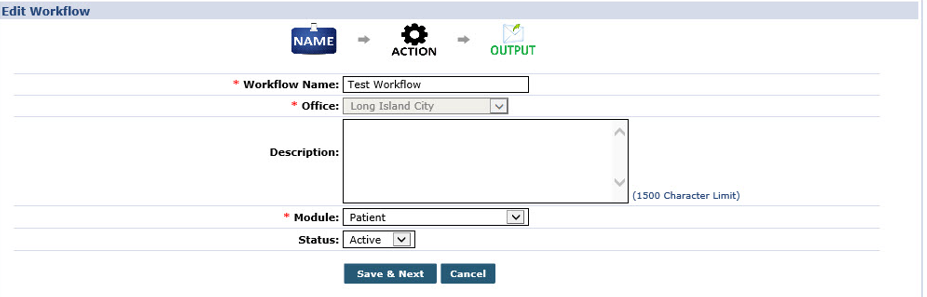
To Name a Workflow, complete the following fields:
-
Workflow Name*: Name of the Workflow.
-
Office*: The Office the Workflow is applied to.
-
Description: A free text field to describe the Workflow.
-
Module*: The module the new Workflow is applied to.
The triggering actions available in the next section is dependent on the module selected.
The second step involves defining the trigger action of the Workflow. Users may setup additional conditions to better define the triggering action.
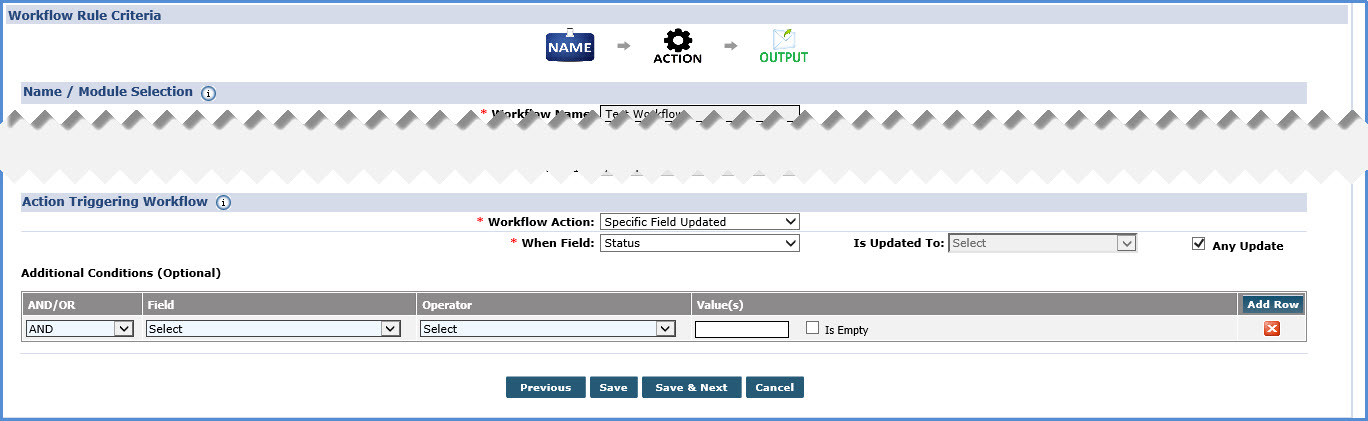
To setup the triggering action, complete the following fields:
-
Workflow Action*: The action triggering the Workflow. The values in this field depend on the Module selected in the previous step. Some actions requires additional information or further specification. In these cases, the following fields appear:
-
When Field*: If a triggering action occurs when a field is updated, users must define the field.
-
Is Updated To*: Users must also define whether a specific value within that field is the triggering action, or if any update to the field is the trigger.
The additional fields generated by the value selected in the Workflow Action dropdown vary based on the selected action.
If the action triggering the Workflow requires more detail, use the following fields:
-
AND/OR: And/Or: Selecting And requires both the workflow action that was specified and the selected field to occur. Selecting Or requires either variable be selected.
-
Field: Select the field that triggers the additional condition.
-
Operator: Select the operator that defines the relationship between the condition established and the value that is entered in the next field.
-
Value(s): The variable that is entered to explicitly define the condition
The final step in creating a Workflow involves defining the Output. The output can be a Message, a To-Do, or an Email
Multiple Outputs can be added to one Workflow.
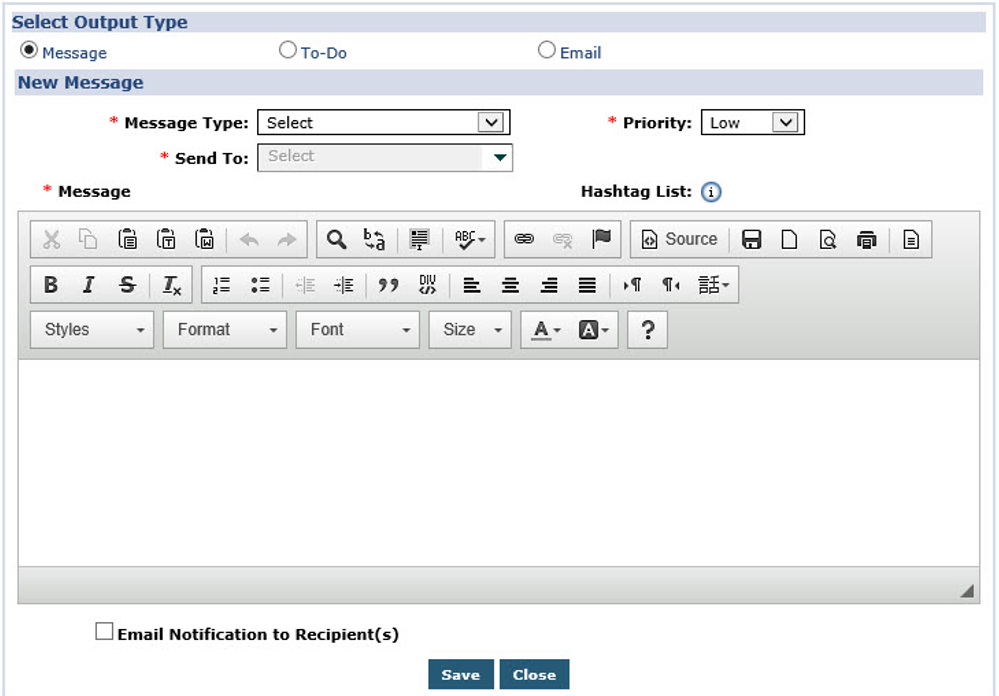
The Workflow Output may be one of the following:
Messages are sent to internal Agency users. To send a message, define values for the following fields:
-
Message Type*: Select who receives the message. If users select…
-
All: All Agency users receives the message.
-
Private: Only select users receives the message.
-
Role: Only selected roles receives the message.
-
-
Send To*: If Private or Role is selected for the Message Type, users must define which users or roles, respectively, receives them message.
-
Priority*: Use this field to define the priority of the message being sent.
-
Message*: The actual message being sent.
To-Do Outputs is sent to the To-Do section of the Home Module. To send a To-Do, users must define values for the following fields:
-
To: Select who receives the message. If users select…
-
User: Only select users receives the message.
-
Role: Only selected roles receives the message.
-
-
Assign To: Users must define which users or roles, respectively, receives them message.
-
Priority*: Use this field to define the priority of the message being sent.
-
Due*: Enter the number of days after the workflow action has taken place that the assigned personnel must complete their tasks.
-
Description*: A description of the To-Do.
If Email is the selected Output, the system sends emails to every address entered in this section. Users must define the following fields:
-
To*: Enter the email addresses of all relevant parties in this field.
-
CC: Enter the email addresses of any parties that is copied on the message.
-
BCC: Enter the email addresses of any parties that is blind copied on the message.
-
Subject*: The subject of the email.
-
Message*: The email message.
Users may add as many Outputs as they desire to a Workflow.