Digital Applicant Onboarding (DAO) Permissions
Providers use DAO to access, create, and manage application forms, workflows, and theme-related settings for the Caregiver Applicant Portal.

This feature is activated by HHAeXchange System Administration. Contact HHAeXchange Support Team for details, setup, and guidance.
The HHAeXchange Digital Applicant Onboarding (DAO) function streamlines the conversion of Applicants into Caregivers through the Agency-configured Caregiver Applicant Portal. Providers are responsible for certain Digital Applicant Onboarding setups, such as establishing application forms, unique workflows, and stylized settings.
This guide provides instructions related to Application Process Management and supervision of Applicants through the Provider application, including:
-
DAO permissions, setups, and access.
-
Instructions to add HR Representatives to office(s) to manage Applicants.
-
Instructions for Application Form creations and Application Workflow customizations.
-
Instructions for Agency-specific Theme settings.
-
Instructions to use the Applicants List feature to perform Agency-related actions for Applicant(s).
Once the DAO feature is enabled by HHAeXchange Administration, role-based permissions must be granted in the application. To grant access to roles, go to the User Management, Edit Roles page under Admin > User Management > Edit Roles. On the Edit Roles page, select Admin from the Section field, select the role(s) from the Roles dropdown, and click Search.
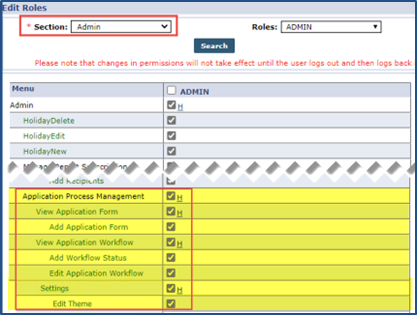
The following table describes the permissions necessary to view, add, and edit Application Forms, Workflows, and Settings in the Application Process Management page under Admin > Application Process Management:
|
Permission |
Description (Allows users to...) |
|---|---|
|
Application ProcessManagement |
Access to the Application Process Management page. |
|
View Application Form |
View Application Forms. |
|
Add Application Form |
Add Application Forms. |
|
Add Workflow Status |
Add workflow statuses. |
|
Edit Application Workflow |
Edit Application workflows. |
|
Settings |
Access Settings on the Application Process Management page. |
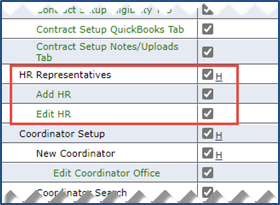
Access to the HR Representatives feature is role-based and is granted via the User Management, Edit Roles page under Admin > User Management > Edit Roles. On the Edit Roles page, select Admin from the Section field, select the role(s) from the Roles dropdown, and click Search.
From the table of permissions, select HR Representatives. There are also related permissions to add and edit HR Representatives.
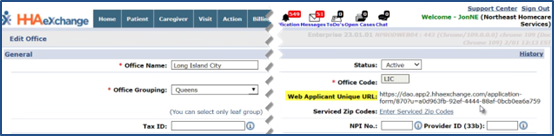
The Caregiver Applicant Portal link is used to distribute access to the Portal to applicants. Go to Admin > Office Setup > Search Office > Edit Office to the Web Applicant Unique URL field at the top right of the page to access the Caregiver Applicant Portal link.
Copy the web URL from this location and paste it onto the appropriate job board or corporate website page for hiring purposes.