General Tab for Admin Contract Setup
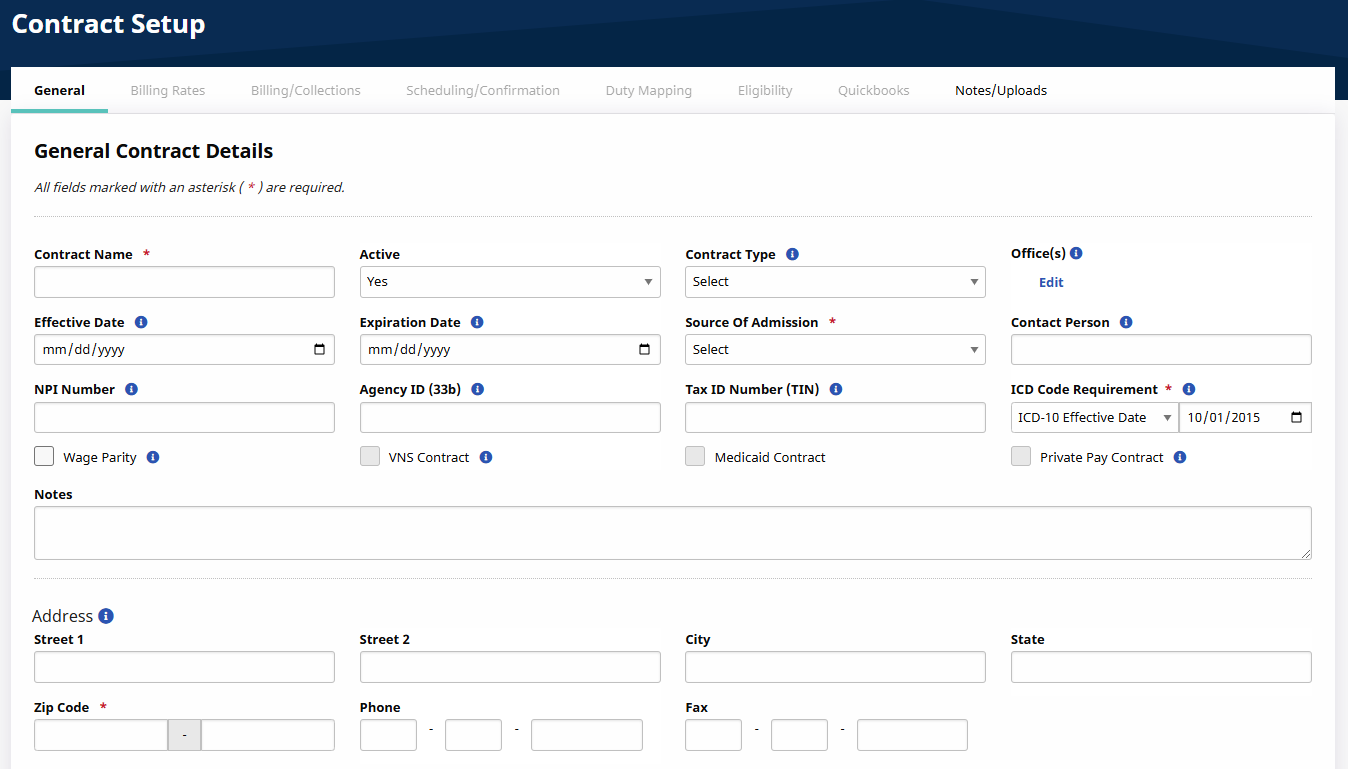
The General tab of the Contract Setup page is used to capture basic Contract Details as well as the Payer’s Address. It can be found under Admin > Contract Setup.
Refer to the table below the image for field name and descriptions. Required fields are denoted with a red asterisk.
|
Field |
Description |
|---|---|
|
*Contract Name |
(Required) The name of the Contract |
|
Active |
Select Active to assign the Contract Patients; or Inactive to retire the Contract (filed in the system for archive purposes). |
|
Contract Type |
Create Contract Types via the Reference Table Management function for organization purposes. |
|
Office(s) |
Select the Offices to associate the Contract with; i.e., which Office(s) can schedule visits under this Contract. |
|
Effective Date |
Select the date the Contract becomes Active and may be used to schedule visits. |
|
Expiration Date |
Select the date the Contract becomes Inactive and can no longer be used. |
|
*Source of Admission |
(Required) Select the Sources of Admission for Patients referred to the Agency via this Contract. This information is used by the Department of Health for statistical reporting. |
|
Contact Person |
Enter the contact information for a Contract Representative. |
|
NPI No. |
Enter the Contract’s National Provider Identifier number. This number is automatically applied to paper invoices and e-claims for Patient services authorized by the Contract. |
|
Provider ID (33b) |
Enter the Provider ID in this field to allow the system to automatically populate that field on the HCFA 1500 form when generating invoices in that format. |
|
Tax ID No. |
Enter the Contract’s Tax ID number; automatically applied to paper invoices and e-claims for Patient services authorized by the Contract. |
|
Wage Parity |
Select if visits for this Contract require a wage parity rate. Run a Wage Parity report during the Payroll process to identify visits where a higher pay rate is required to meet Wage Parity guidelines. |
|
VNS Health Contract |
Select if the Contract is a Visiting Nurse Service (VNS) Health Contract. VNS Health Contracts require additional configuration steps. Contact the HHAeXchange Support Team for details and setup. |
|
Medicaid Contract |
Select if visits scheduled under this Contract must fulfill specific Medicaid validations before billing. |
|
Private Pay Contract |
Select if this Contract is Private Pay. |
|
ICD Code Requirement |
Select the ICD Code set required by the Contract and effective date (required). |
Enter the Address information in the Address section of the page. The Zip field is required to save the page.
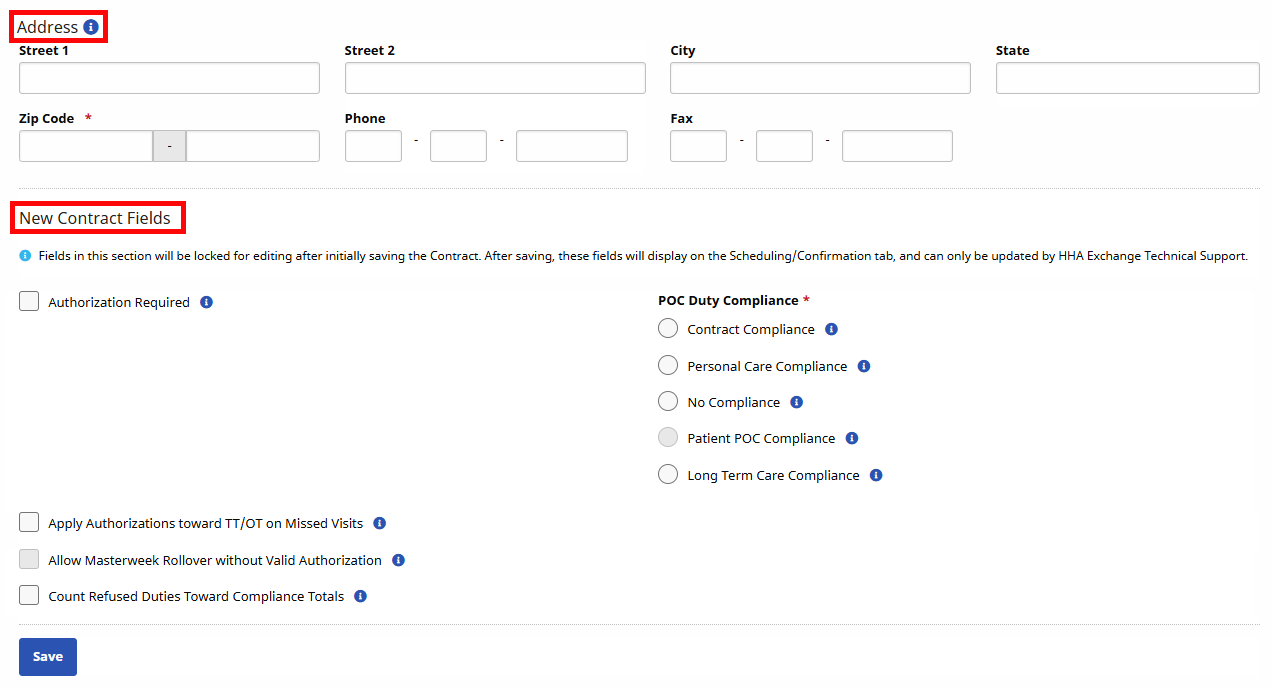
Under the New Contract Fields section, complete the fields as described in the following table.
|
Field |
Description |
|---|---|
|
Authorization Required |
Select for visits to require Authorization. Visits for Patients assigned to this Contract must have a matching authorization on file. |
|
*POC Compliance |
(Required) Define the Plan of Care (POC) compliance for all visits scheduled under the Contract, as follows:
|
|
Apply Authorizations toward TT/OT on Missed Visit |
Select for the system to apply matching Authorization toward TT/OT values (if visit is marked as a Missed Visit with values added in the TT/OT field). If not selected, then the system does not apply Authorization hours for Missed Visits with Travel Time. |
|
Allow Master Week Rollover without Valid Authorization |
Select to permit the system to perform Master Week rollovers even if the visits generated by the process are not Authorized. |
|
Count Refused Duties Toward Compliance Totals |
Select this checkbox for Refused duties to be counted for the selected Required Compliance. |