Family Dashboard Permissions
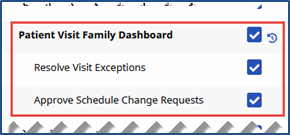
System users must have the Patient Visit Family Dashboard permissions enabled. To enable, go to Admin > User Management > Edit Roles. Under the Section field, select Visit and applicable Roles (to assign).
|
Permission |
To… |
|---|---|
|
Patient Visit Family Dashboard |
Access and view the Patient Visit Family Dashboard. |
|
Approve Schedule Change Requests |
Manage and approve Family Member Schedule Visit Change Requests. |
|
Resolve Visit Exceptions |
Manage and resolve visit exceptions; visits placed On Hold by a Family Member on the Family Portal. |