Scheduling/Confirmation
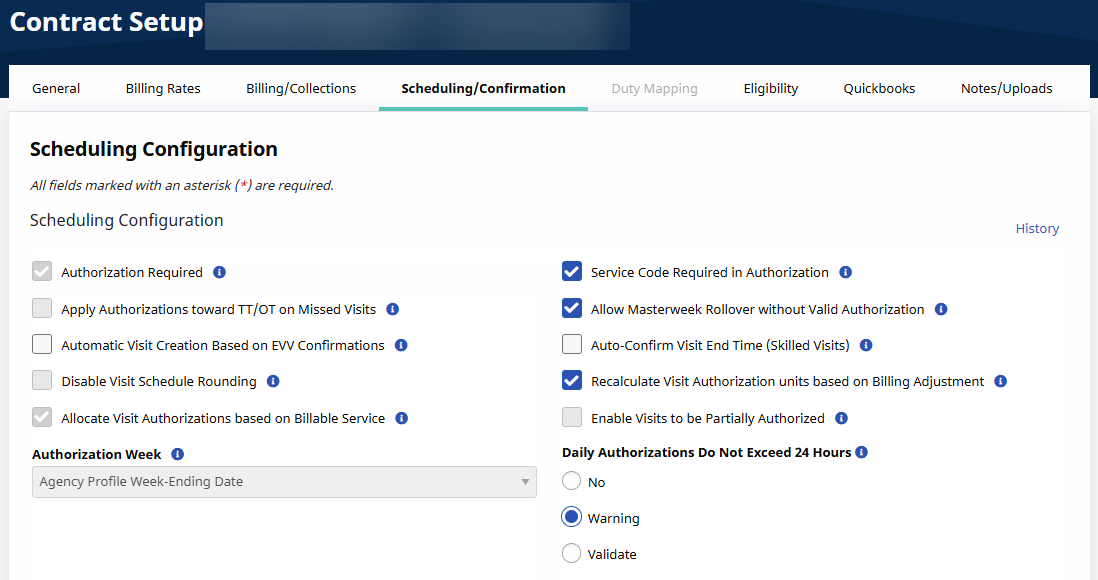
The Scheduling/Confirmation tab on the Contract Setup page contains all fields related to scheduling and confirming visits. It can be found under Admin > Contract Setup.
This tab is comprised of four sections and includes: Scheduling Configurations, Visit Confirmation Options, Timesheet Options, and Payroll settings (related to confirmation).

|
Field |
Description |
|---|---|
|
*Authorization Required |
(Required) Select if Patient Visit Authorizations must be fulfilled to schedule a compliant visit. Once selected, this requirement may only be disabled by HHAeXchange Support Team. |
|
Service Code Required in Authorization |
Select to require a specific Service Code for all Authorizations entered for Patients under the Contract. |
|
Apply Authorizations toward TT/OT on Missed Visits |
Select for the system to apply matching Authorization toward TT/OT values (if visit is marked as a Missed Visit with values added in the TT/OT field). If not selected, then the system does not apply Authorization hours for Missed Visits with Travel Time. |
|
Authorization Week |
Defined week range used for billing and running payroll. This field is controlled by system administration. Contact the HHAeXchange Support Team to change settings. |
|
Allow Masterweek Rollover without Valid Authorization |
Select to permit the system to perform Master Week rollovers even if the visits generated by the process are not Authorized. |
|
Daily Authorizations Do Not Exceed 24 Hrs |
This field allows Agencies to determine how the system responds when a value greater than 24 hours is entered for a daily Authorization, as follows:
|
|
Automatic Visit Creation Based on EVV Confirmation |
Select for the system to automatically create new visits once EVV confirmations for both Clock In and Clock Out are received on the same day. |
|
Auto-Confirm Visit End Time (Skilled Visits) |
Select for the system to automatically apply an EVV confirmation to the Visit End Time if a Caregiver has successfully clocked into a shift. |
|
Disable Visit Schedule Rounding |
Select for the system to allow users to create to-the-minute visit schedules as opposed to rounding it to the closest interval. This field is for review purposes only. Contact the HHAeXchange Support Team to enable/disable this feature. |
|
Recalculate Visit Authorization units based on Billing Adjustment |
Select checkbox to recalculate Authorizations based on Billable Service Time. Refer to the following description. |
|
Allocate Visit Authorizations based on Billable Service |
Read-only checkbox, enabled by HHAeXchange System Administration. With this feature enabled, the system calculates the Authorization units used based on Billable Service Time rather than the Scheduled Time. Refer to the Utilize Billable Service for Authorization Allocation topic in the Billing category. |
|
Field |
Description |
|---|---|
|
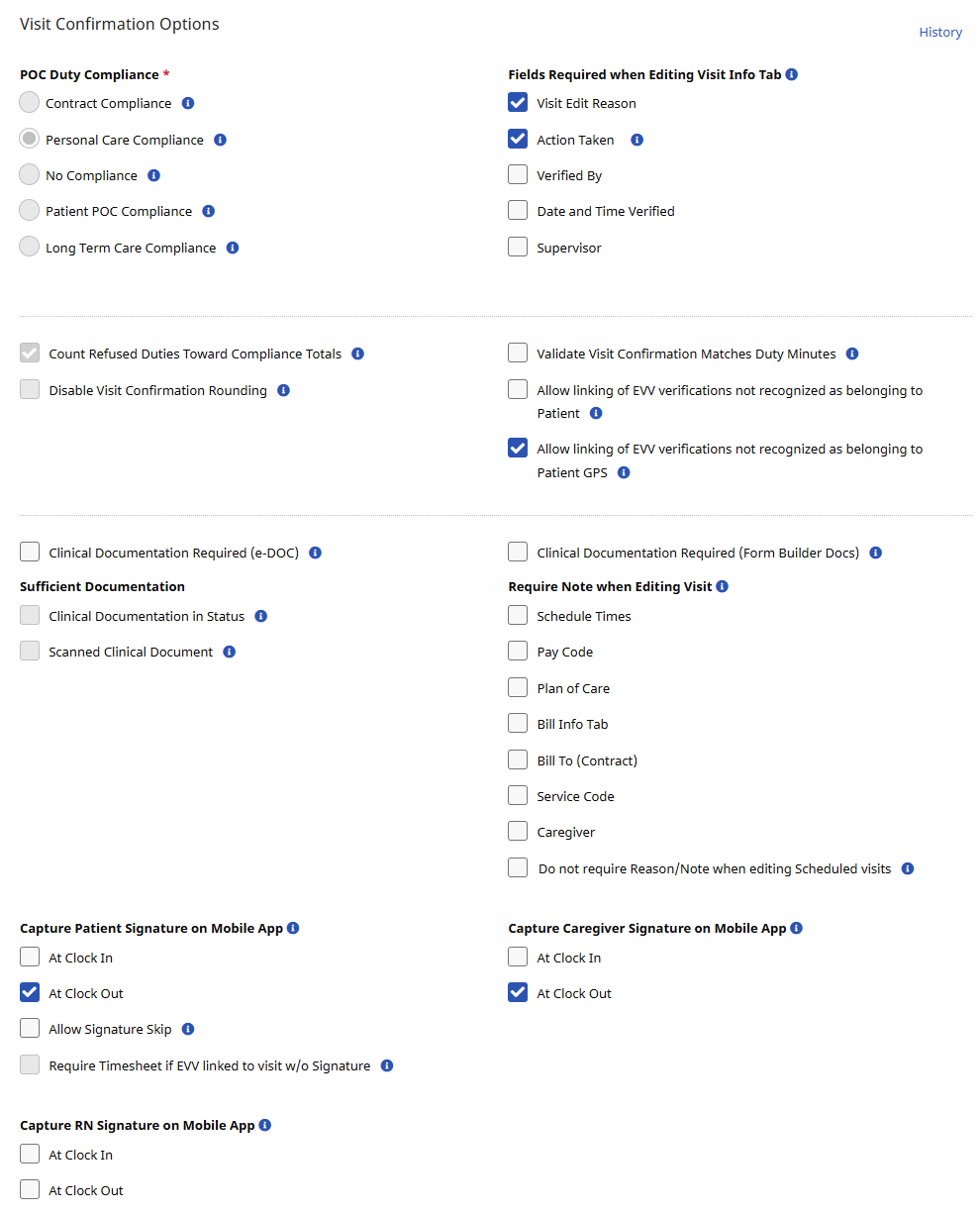
*POC Duty Compliance |
(Required) Define the Plan of Care (POC) compliance for all visits scheduled under the Contract, as follows:
|
|
Clinical Documentation Required (Skilled Visits) |
Select this field to require Clinical Documentation for all Skilled visits before passing the Prebilling Exception page. When selected, the checkboxes in the Sufficient Documentation section unlock. |
|
Sufficient Documentation |
Select the type of Clinical Documentation required for Skilled visits, as follows:
Contact HHAeXchange Support Team to update field settings. |
|
Count Refused Duties Toward Compliance Total |
Select for Duties marked as Refused to be counted towards the chosen Required Compliance. |
|
Allow linking of EVV verifications not recognized as belonging to a Patient |
By default, HHAeXchange does not allow users to caught on the Call Maintenance tab that did not originate from a phone number recognized as belonging to the Patient. Select this checkbox to bypass this restriction. |
|
Fields Required when Editing Visit Info Tab |
Select which fields are required when making changes on the Visit Info tab to include:
|
|
Require Note when Editing Visit |
Select which fields on the Visit Window require a reason when edited, including:
|
|
Validate Visit Confirmation Matches Duty Minutes |
When selected, the POC Duties duration must match the actual visit duration. |
|
Capture Patient Signature on Mobile App |
Select to require a signature when a Caregiver Clocks IN and/or OUT using the Mobil App. Once activated, the Mobile App prompts the Caregiver with a signature screen when Clocking IN and/or OUT.
Refer to the Mobile App Agency category for details and instructions. |
|
Disable Visit Confirmation Rounding: |
Select for the system to record the exact time an EVV is placed, as opposed to rounding it to the closest interval. This field is for review purposes only. Contact the HHAeXchange Support Team to enable/disable this feature. |
|
Field |
Description |
|---|---|
|
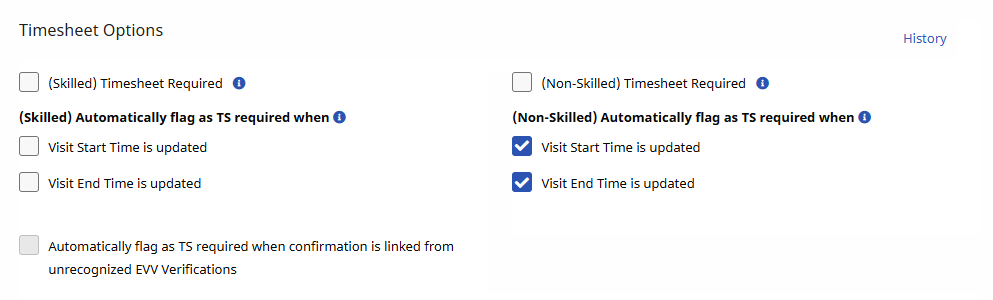
Timesheet Required (Skilled and Non-Skilled) |
Select so that the Timesheet Approved checkbox must be selected on the scheduling window before the visit can pass the Prebilling Exception page. |
|
Automatically Flag as TS Required When (Skilled & Non-Skilled) |
Select for any manual change to the Visit Start Time and/or Visit End Time field for visits under the Contract results in the Visit being marked as Timesheet Required. |
|
Automatically flag as TS required when confirmation is linked from unrecognized EVV Verifications |
Select to mark visits with Timesheet Required if the Contract authorizes linking calls from unrecognized phone numbers. |

|
Field |
Description |
|---|---|
|
Calculate Payroll to the Minute |
Select for Caregivers to be paid for the exact duration of a visit to the minute. This field is for review purposes only. Contact the HHAeXchange Support Team to enable/disable this feature. |
|
Calculate Payroll Using Confirmed Duration |
Select for Caregivers to be paid for the Confirmed Visit duration as opposed to the scheduled visit duration. |