Authorization
An Authorization validation indicates that no valid Authorization is on file for the Patient whose Contract has been configured to require an Authorization for visits. To see this requirement, go to the Admin > Contract Setup page.
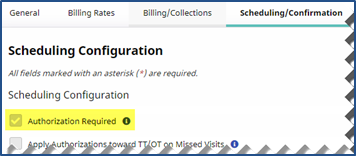
In the General section, the Authorization Required checkbox is selected configuring the Contract to require Authorizations for all Patient visits.
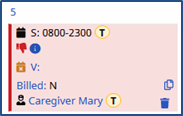
On the Patient’s profile, a valid Authorization must be added to the Authorizations/Orders page. If a scheduled visit does not have a valid Authorization, it displays in pink and is held as a Prebilling exception.
To resolve the Prebilling exception, either adjust the Authorization to match the visit details or adjust the visit to ensure the details match the Authorization.
For example, if the visit is pink because it was scheduled for 8 hours, but the Authorization is for 7 hours, then reduce the hours of the visit to 7. Once complete, the visit displays in green and passes the Prebilling validation.

This feature is activated by HHAeXchange System Administration. Contact HHAeXchange Support Team for details, setup, and guidance.
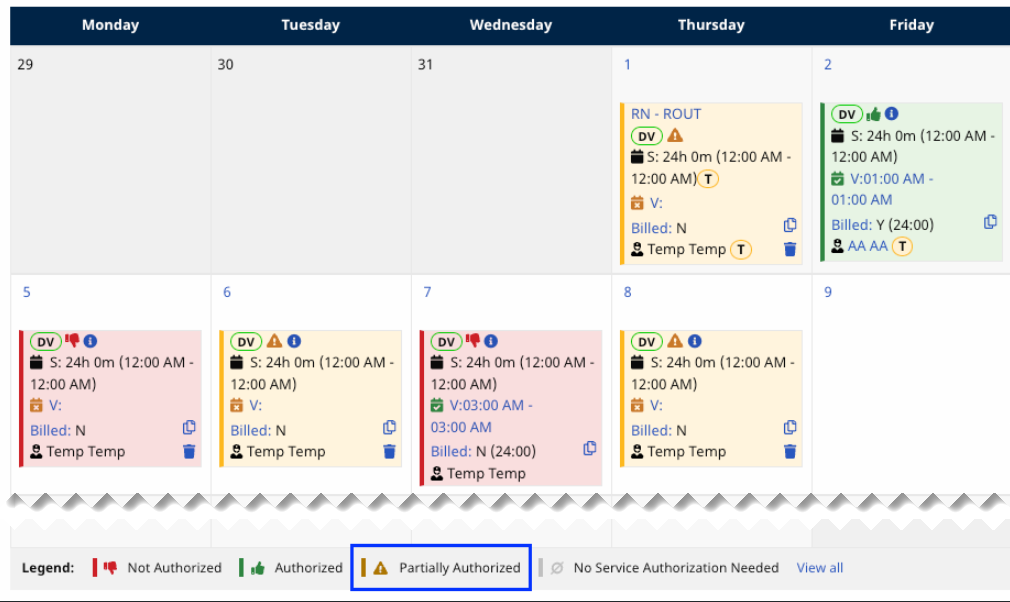
The Partially Authorized feature enables Providers to fully bill for visits that are only partially authorized. When activated, Providers can bill for the entire visit to cover any remaining time, even if the visit was only partially authorized. These visits are highlighted in yellow with a warning icon on the Patient’s Calendar and are also noted in the calendar legend.
This feature is limited. The system permits only one visit per authorization to utilize any remaining time within the selected period, whether it is Weekly, Monthly, or for the Entire Period.