Banked Minutes
This feature is activated by HHAeXchange System Administration. Contact HHAeXchange Support Team for details, setup, and guidance.
The Banked Minutes feature tracks extra time worked during patient visits. Minutes are added or used on a visit-by-visit basis and reset to zero at the start of each month. This gives Providers and Agencies clear visibility into time balances directly from the Patient’s Calendar.
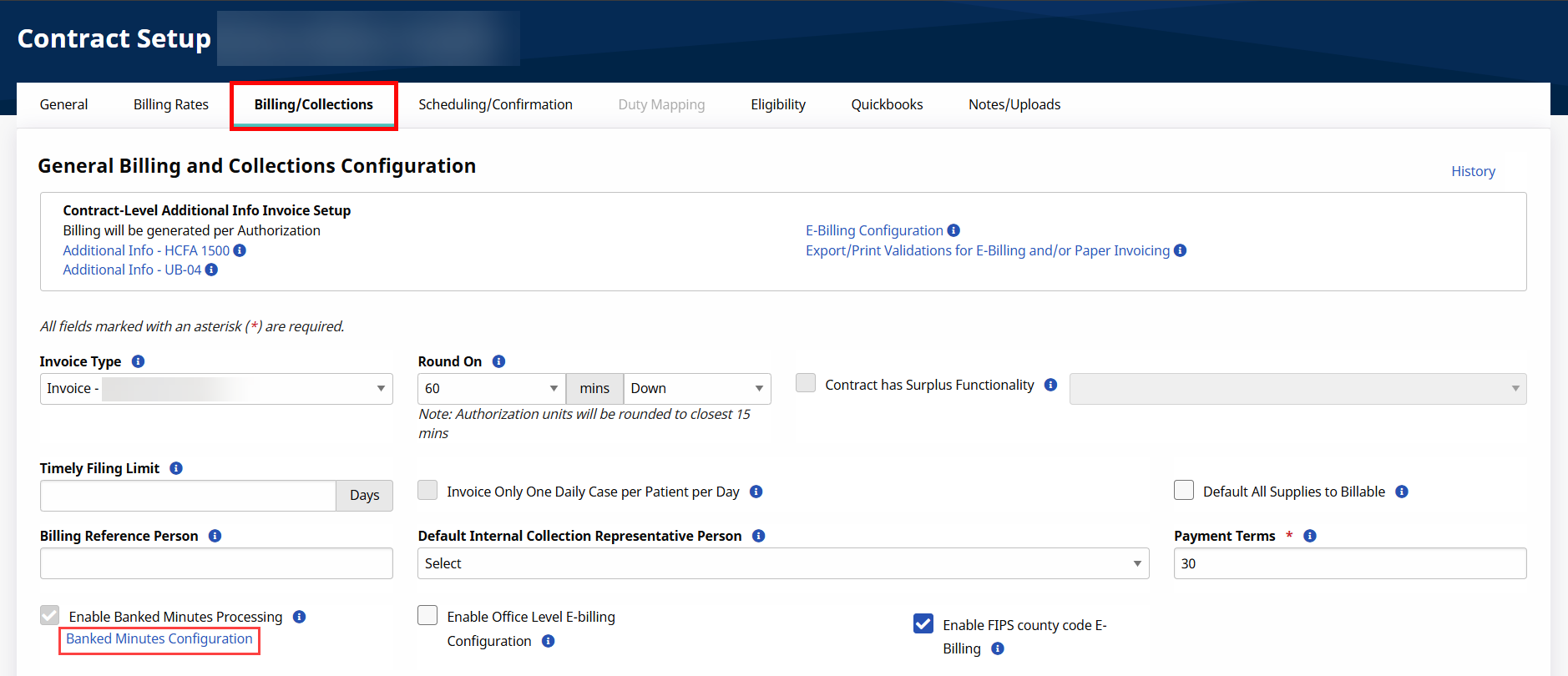
To view specific settings at a Contract level, open the contract via Admin > Contract Setup > Search Contract, click on the Billing/Collections tab, and click the Banked Minutes Configuration link.
On the Banked Minutes Configuration window, fields are read-only. The Bank Period is set to Month, as all banks reset to 0 at the beginning of a calendar month.
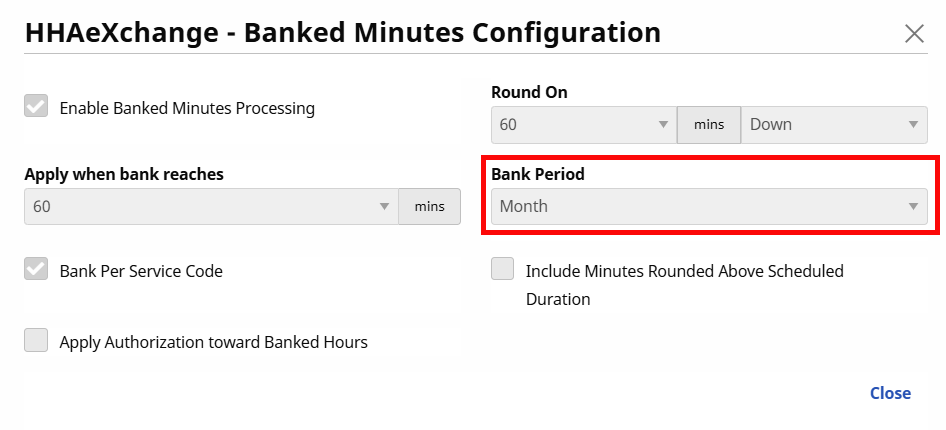

The following table describes the fields in the Banked Minutes Configuration window.
|
Field |
Description |
|---|---|
|
Enabled Banked Minutes Processing |
Indicates if an Agency/Office is configured for Banked Minutes. |
|
Round On |
The time to round to (15-minute intervals). Regardless of selected rounding duration, this setting must be set to Down for this functionality to work. |
|
Apply when bank reaches |
Applied Banked Minutes as a billing adjustment when the total bank reaches the selected time. |
|
Bank Period |
The period is automatically set to Monthly for this functionality. All banks reset to 0 at the beginning of a calendar month (no balance is carried from one month to another). |
|
Bank Per Service Code |
Automatically selected as Banked Minutes are categorized and used according to the Service Code. Each Service Code is calculated in its own bank. |
|
Include Minutes Rounded Above Scheduled Duration |
Rounded minutes are added to the bank, even if the rounding reduces from a value more than the scheduled duration. Rounding is applied to Confirmation Time. |
|
Apply Authorization toward Banked Hours |
The banked period is applied to its own Banked Hours field for each visit. If selected, the Service/Billable Hours for each visit includes Banked Hours. Totals are added to Billed Hours on the Authorization section; otherwise, only visit service hours are indicated. |
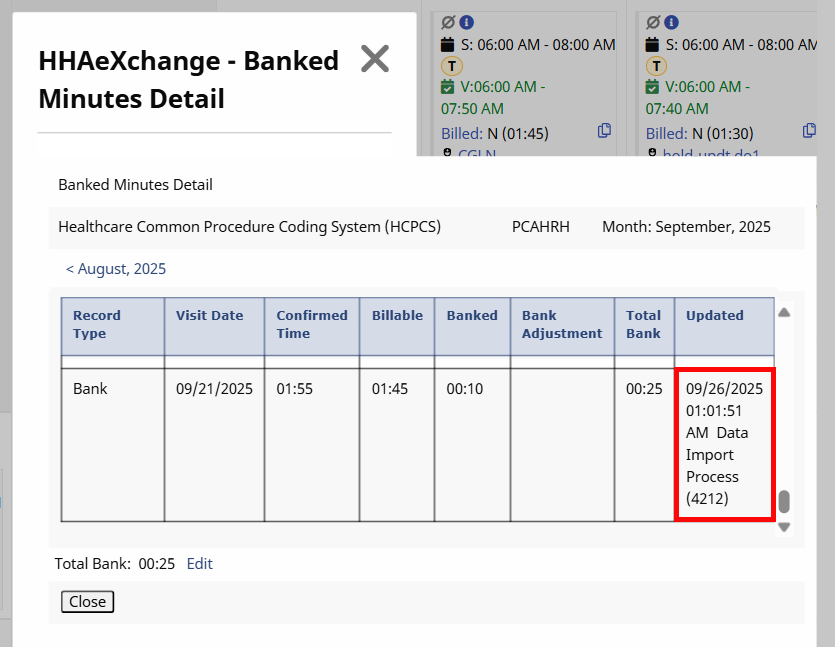
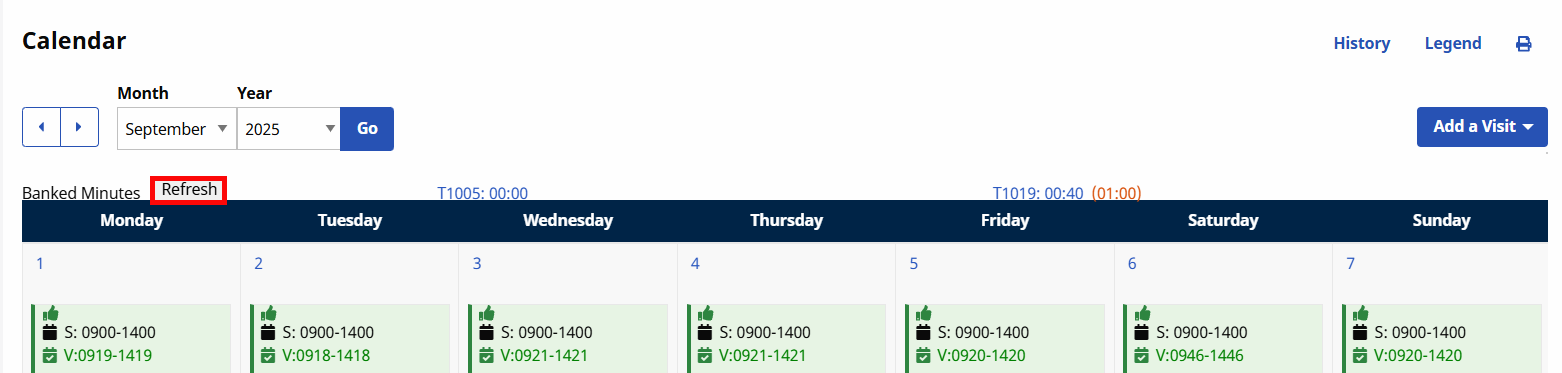
The Banked Minutes section is displayed on the Patient Calendar page, showing applicable Banked Minutes per Service Code. To the right of the link, the time balance is shown in parenthesis. To view Banked Minutes details, click the respective Service Code link.
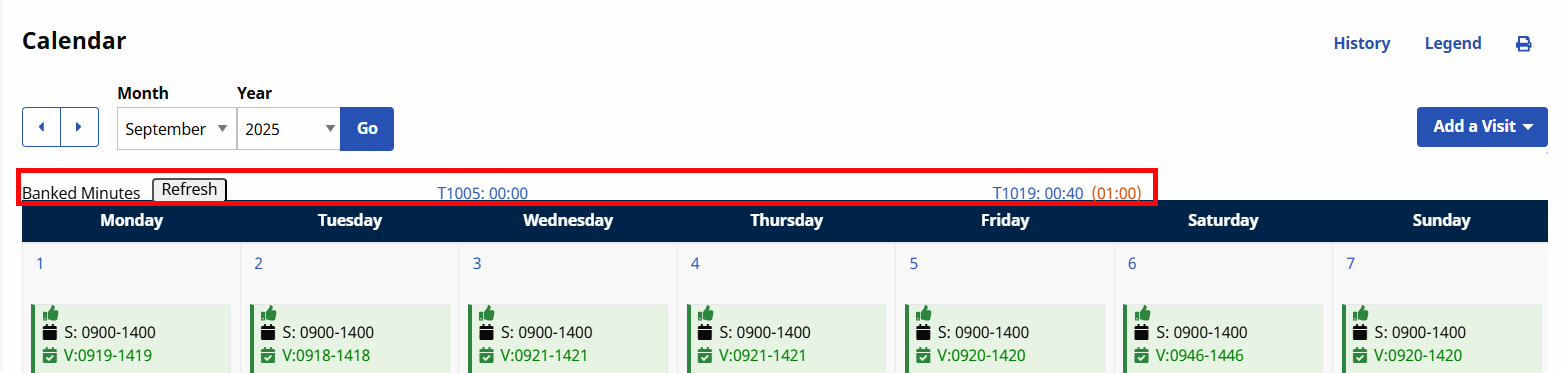
The Banked Minutes Detail window opens providing activity details for the selected Service Code and month.
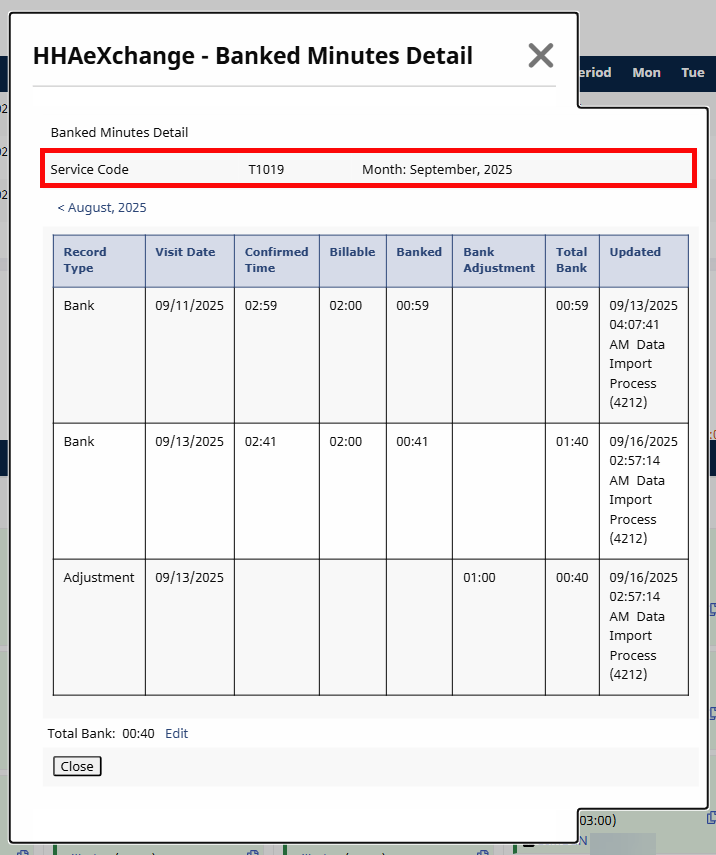
The window opens to the current month selected. To go to past or future months from the current, click the applicable (previous/next month) links available.
|
Column |
Description |
|---|---|
|
Record Type |
Specifies the type of transaction used to calculate the banked minutes based on the action taken for the visit (such as Manual Adjustment, Visit Deleted, Auto Adjustment, etc.). |
|
Visit Date |
The date the visit took place where banked time was allotted. |
|
Confirmed Time |
Specifies the duration based on the confirmation times. |
|
Billable |
The number (time) that is billable. |
|
Banked |
The banked time for the visit. |
|
Bank Adjustment |
Indicates any adjustments applied based on the overall bank balance. This balance can be positive or negative. Negative balances appear in parenthesis. |
|
Total Bank |
Specifies the total bank balance. The Edit link to the right of the field allows manual adjustments to accommodate changes to confirmation times, deleting a visit, or a Service Code change which may impact the Banked Minutes bank. The Override Banked Minutes permission must be enabled by HHAeXchange System Administration for the role performing this task. |
|
Updated |
Displays the update details (date, time, and system user who performed the update). |
To adjust a bank balance, click Edit next to the Total Bank field in the Banked Minutes Detail window. Enter the updated balance, then click Save to apply your changes, or Cancel to discard them.
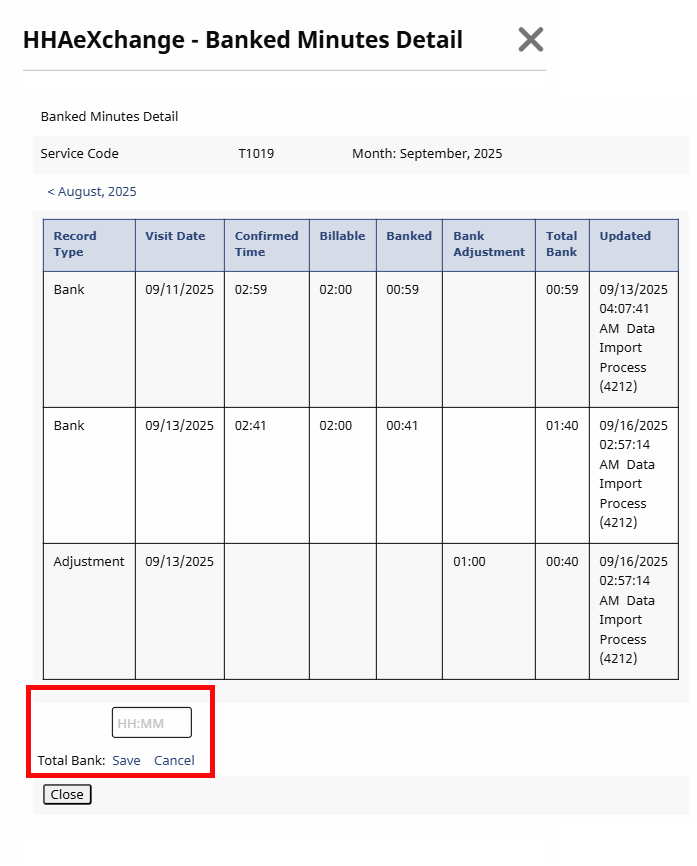
The Override Banked Minutes permission must be enabled by HHAeXchange System Administration for the role performing this task.
On the Patient Calendar, click the Refresh button in the Banked Minutes section to recalculate any updates made to visits such as scheduled time, confirmed time, or Service Code with banked minutes.
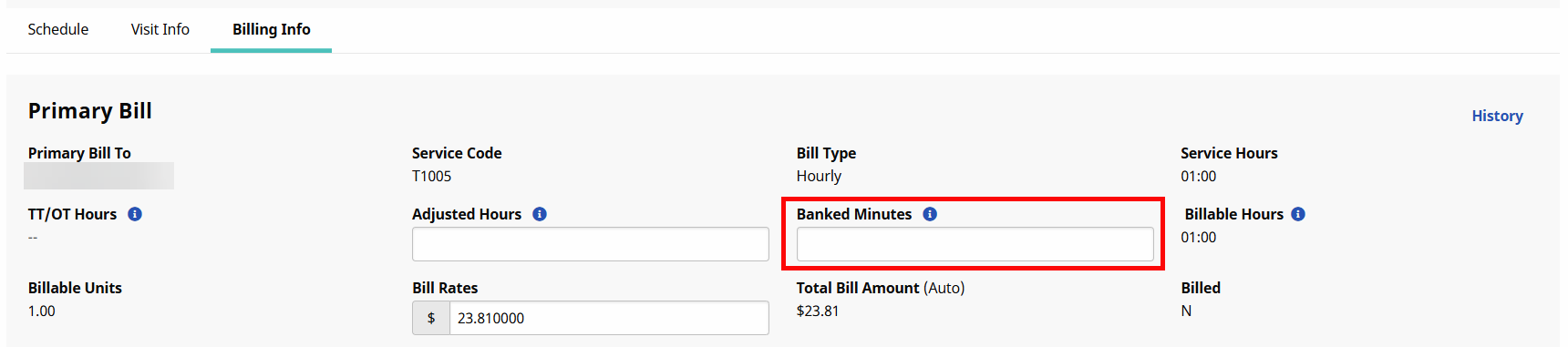
You can manually adjust Banked Minutes from the Billing Info tab of a Visit. Entering minutes in the Banked Minutes field reduces the current balance. In the Banked Minutes Details window, this change appears as a Manual Adjustment in the Record Type column and under the Bank Adjustment column.
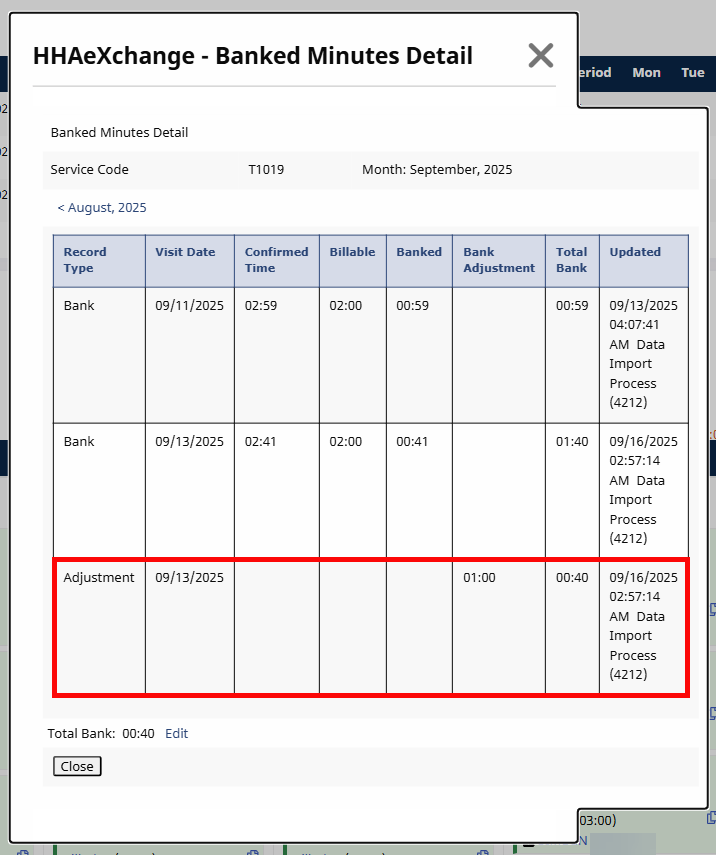
When you delete a visit that included Banked Minutes, those minutes are returned to the bank. In the Banked Minutes Details window, this shows as Visit Deleted in the Record Type column. If the deletion causes the Total Bank to go negative, the system automatically looks for unbilled visits with available adjustments and reverses them.
When a visit with applied banked minutes is deleted from an invoice, there is no difference in the calculations and bank minutes adjustment.
When a Service Code is changed for any visit, the associated banked minutes are calculated accordingly. For bank balances to transfer, the receiving Contract must also have Banked Minutes enabled.
For example, the 9/1 visit is scheduled with T1019 as the Service Code. After the Banked Minutes calculation is applied, 10 minutes are manually adjusted leaving the bank with 1 hour for Service Code T1019.
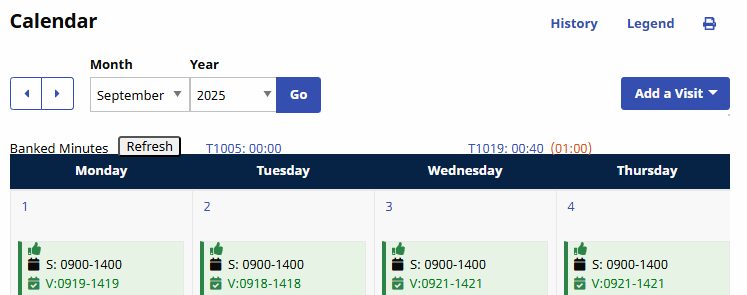
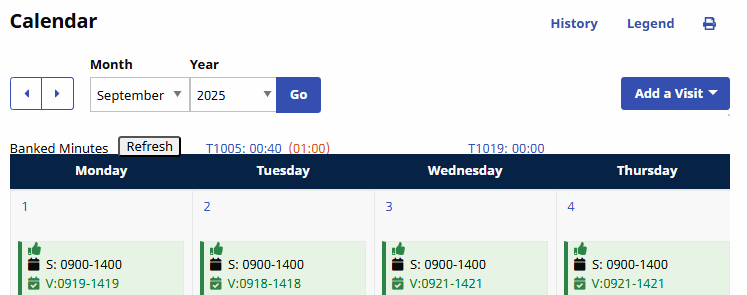
Service Code T1019 is changed to T1005. Once refreshed, the bank balance transfers to the changed Service Code.
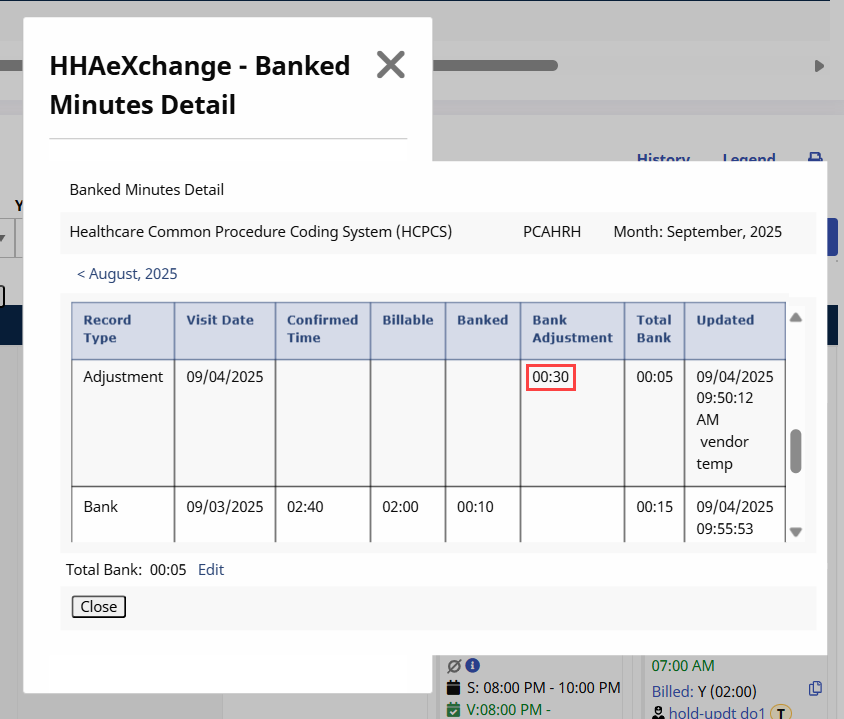
If the bank shows a negative balance, the system looks for unbilled visits with available banking adjustments and applies them to correct the balance.
For example, if Visit 1 is updated and creates a reversal, the system removes that adjustment from the most recent unbilled visit with banking minutes.
The system performs a daily overnight refresh of all Patient records for an Agency. Those records that are auto-processed display in the Banked Minutes Detail window as Data Import Process under the Updated column.