Bypass Prebilling Validations
Even if a visit does not meet one of the validations covered in the previous section, it may avoid being held if the Service Code associated with the visit is setup to bypass Prebilling validations. This section covers how to setup a Service Code to bypass Prebilling validations as well as which validations may be avoided using this feature.

Complete the following steps to setup a Service Code to bypass Prebilling validations.
-
Go to Admin > Reference Table Management.
-
Select Contract Service Code from the Reference Table dropdown. Click the Add Contract Service Code button to create a new Service Code or click the Service Contract link to edit an existing one.
-
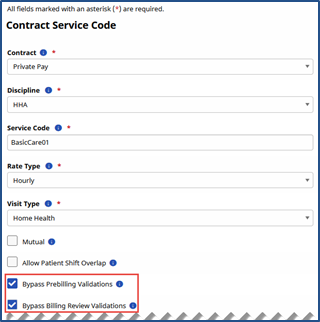
The Contract Service Code window opens. Select the Bypass Prebilling Validations checkbox.
There is also an option to bypass Billing Review validations on this window.
-
Click Save.
The below-listed Prebilling validations are exempt if Prebilling Bypass options are selected for Service Codes assigned to scheduled visits.
-
Authorization
-
Caregiver Compliance
-
Clinical Documentation
-
Insufficient Duty Minutes
-
Medicaid Compliance
-
Overlapping Shifts
-
POC Compliance
-
Timesheet
-
Unbalanced Visit
To bypass the Authorization validation, visits completely ignore a Patient’s Authorizations. This means the visit is exempt from any rules stipulated by the Authorization. Additionally, the visit does not affect the number of hours or units allotted for visits in the Authorization.
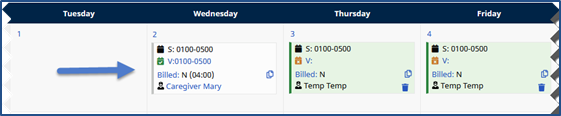
On the Patient Calendar page, any visit scheduled with a Service Code setup to ignore Prebilling validations display in white to indicate it is governed by any Authorizations:
Required to successfully process payroll, the following Prebilling validations remain in effect, even when Bypass Prebilling Validations is selected for a Service Code:
-
Incomplete Confirmation
-
With TEMP Caregiver
-
OT/TT Not Approved
-
Restricted Caregiver