Restricted Caregiver
You can place a restriction (suspension from providing service) on Caregivers who:
-
Do not meet compliance requirements,
-
Have received negative reviews from Members, or
-
Are ineligible for other reasons specified by an authorized user.
The Restricted Caregiver validation holds visits worked by Caregivers who have been marked as Restricted for a date prior to that of the confirmed visit. Complete the following steps to correct this validation.
-
From the Prebilling page, click the Caregiver Name link to go to his/her Profile.
-
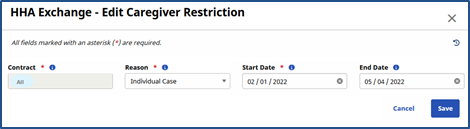
In the Absence/Restriction page, go to the Restrictions section and adjust either the Restriction Start Date or Restriction End Date so that the visit held in Prebilling falls outside of the date range.
-
Click Save.