With TEMP Caregiver
The Provider can assign a temporary (TEMP or Temp) Caregiver value to a visit as a placeholder when an available Caregiver has not yet been determined.
The With Temp Caregiver validation catches visits that have a TEMP Caregiver assigned to it. Generally, if the visit has a TEMP Caregiver assigned, it also breaches the Incomplete Confirmation validation, as there is no way for a Caregiver to place an EVV for the visit. Such calls are stored in the Call Dashboard under Visit > Call Dashboard, but not synced to the visit. The following example provides information on correcting this validation.
Temp Caregiver Example
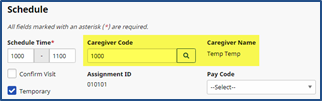
A visit scheduled for 1000-1100 has a TEMP Caregiver assigned to it.
The visit is sent to Prebilling. Click the Edit icon to open the visit.

On the Schedule tab for the visit, click the Search icon  next to the Caregiver Code field at right to perform a Caregiver Search.
If the Caregiver who worked the visits placed EVV calls, he/she may be found and linked to the visit via the Call Dashboard.