Mileage Service Code
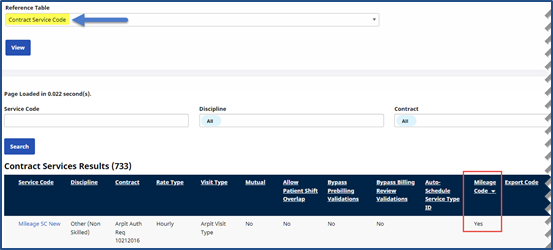
The Mileage Service Codes are created and managed via the Reference Table Management function under Admin > Reference Table Management. To access, select Contract Service Code from the Reference Table field and click Search. A Mileage Code column indicates if a Service Code/Contract is associated to Mileage.
Click the Add button to create a new Service Code or edit an existing one by clicking on the Service Code link.
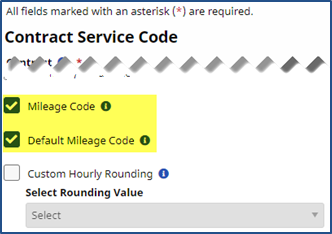
The Contract Service Code window opens. To associate a Contract with Mileage, two fields titled Mileage Code and Default Mileage Code are displayed in the Contract Service Code window. Complete the required fields as described in the table below. The Mileage Code checkbox must be selected to enable the Default Mileage Code checkbox.
Only one Mileage Code can be made default per Discipline per Contract.
|
Field |
Description |
|---|---|
|
*Contract |
(Required) Select the Contract. |
|
*Discipline |
(Required) Select accordingly: Other (Skilled) or Other (Non-Skilled). |
|
*Service Code |
(Required) Enter a Service Code Name. |
|
*Rate Type |
(Required) Select Hourly (rates are based on an hourly basis). |
|
*Visit Type |
(Required) Select the Visit Type from the dropdown. |
Multiple Mileage Service Codes can be created for a Contract; therefore the Default Mileage Code must be selected to create an Automatic Mileage Event.