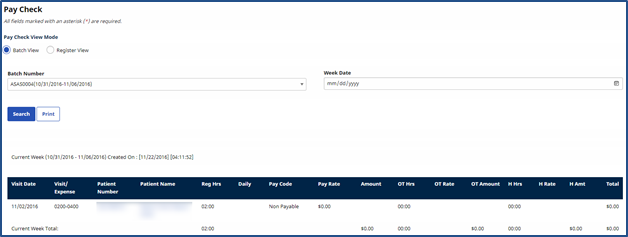
Pay Check Page
This page is used to review a Caregiver’s paychecks. Choose to view this information using the Batch View or Register View.

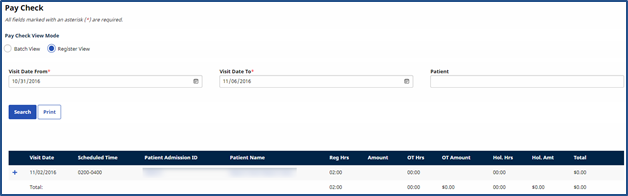
To search for paychecks using the Register View, enter a date range (as required). Enter a Patient Name to review all paychecks associated with that specific Patient. In this view, each individual visit included in the paycheck is listed as a line item.
|
Column |
Description |
|---|---|
|
Visit Date |
The date of the visit. |
|
Scheduled Time |
The time the visit is scheduled for. |
|
Patient Admission ID |
Patient's Admission ID number. |
|
Patient Name |
The name of the Patient. |
|
Reg Hrs. |
The number of hours the Caregiver actually worked. |
|
Amount |
The amount paid to the Caregiver for the visit at their regular rate. |
|
OT Hours |
The number of overtime ours accrued from the visit. |
|
OT Amount |
The amount paid to the Caregiver for the visit at overtime rate. |
|
Hol. Hrs. |
The number of holiday hours paid to the Caregiver. |
|
Total |
Total amount paid to include regular, overtime, and holiday hours. |
|
Payroll Batch |
The payroll batch the visit is included in. |
|
Payroll Batch Date |
The date the payroll batch was generated for the visit. |
To generate a paycheck Batch View search, select the Batch Number from the dropdown and enter the required Week Date field. In the results, like the Register View (discussed in the section above), the Batch View displays the same columns with an added Pay Code associated with the paycheck. Refer to the section above for field descriptions.