How do I add a Home Care Worker ID (HHA/PCA Registry Number)?
Overview
The HHA/PCA Registry Number is the state-issued registry ID assigned to a caregiver (Home Health Aide or Personal Care Aide). Many state Medicaid programs and MCOs require this number to appear on claims as part of the rendering provider identification, since it confirms that the individual delivering care is registered and in good standing with the state.
Because of this requirement, the HHA/PCA Registry Number must be entered on the caregiver profile page in HHAeXchange. A missing or incorrectly formatted registry number in HHAeXchange can result in a rejected claim. Keeping this field accurate on every caregiver profile and knowing how the field is used downstream in billing helps prevent avoidable pre-billing holds and claim rejections.
This article covers:
-
How to locate registry numbers in bulk and identify caregivers missing one in HHAeXchange
-
How the field is used on claims, and the contract setup required for it to parse
Locating Registry Numbers En Masse and Identifying Missing Values
Use the List of Caregivers (Ent) report to review registry numbers across your entire caregiver roster and flag anyone missing one.
-
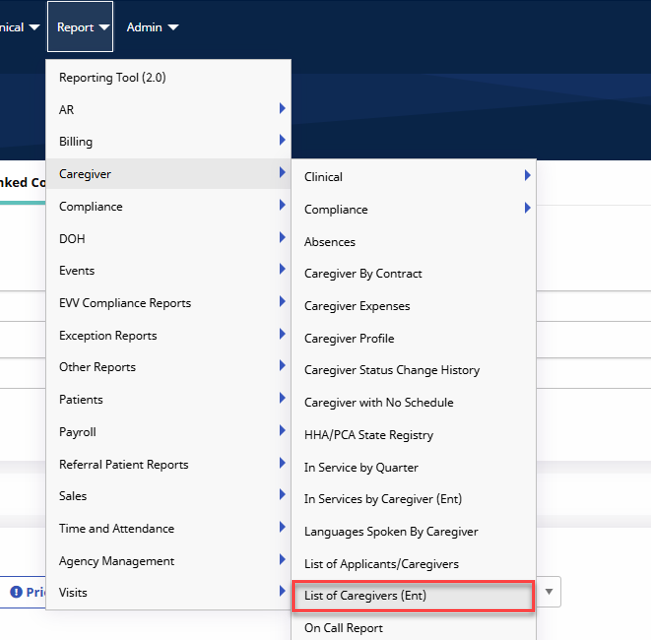
Navigate to Reports > Caregiver > List of Caregivers (Ent).
-
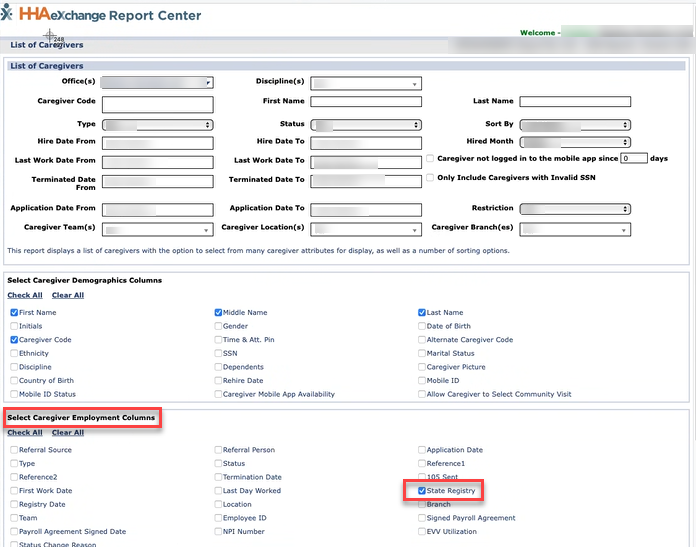
Within the report, select the State Registry checkbox under Select Caregiver Employment Columns.
-
Select the Print Excel button at the bottom of the page.

-
Review the exported spreadsheet. Any caregiver with a blank State Registry column is missing their HHA/PCA Registry Number in HHAeXchange.
-
To add or update a number, navigate to Caregiver > Search Caregiver . Locate the caregiver and click the name to open their profile. Click Edit at the top right and scroll down to the Employment information to enter the value in the HHA/PCA Registry Number field and Added/Checked Registry Date then Save.
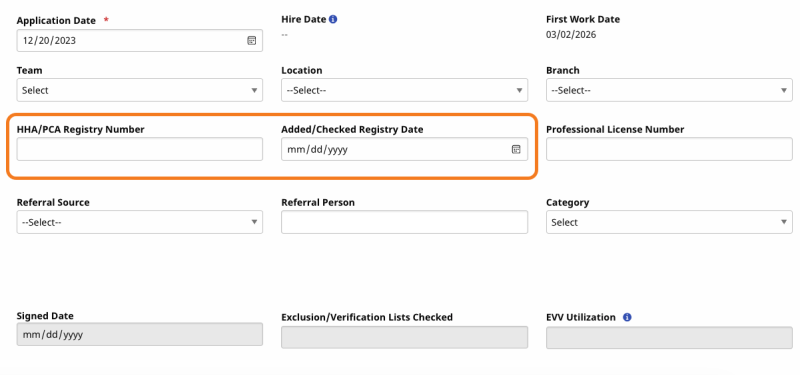
Why this matters: Depending on the payer, a missing registry number in this field will result in a pre-billing hold, preventing the claim from being submitted until the field is corrected.
Understanding How the Registry Number Parses to Claims
Once the HHA/PCA Registry Number is filled out on the caregiver's profile, it can parse onto the claim as the rendering provider ID — but whether it does so automatically depends on the contract type.
-
Linked contracts: This setting is controlled by the payer. It's automatically enabled, and no additional setup is required on the provider side.
-
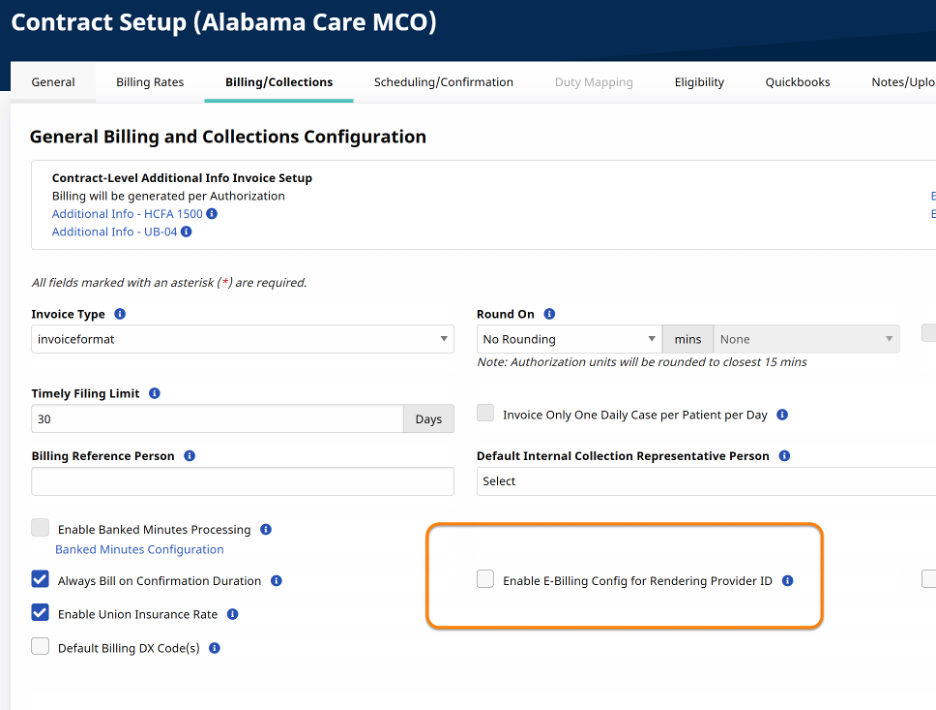
Internal contracts: This setting is controlled by the provider and must be manually enabled per contract. If it isn't enabled, the registry number will not parse to the claim even if it's filled out on the caregiver profile.
To enable this setting for an internal contract:
-
Navigate to Admin > Contract Setup.
-
Select the Billing/Collections tab.
-
Check the box for Enable E-Billing Config for Rendering Provider ID.
-
Save the contract.
Repeat this step for every internal contract where the registry number needs to appear on claims.
NY Home Care Worker ID FAQ for Providers
HHAeXchange is also working with NY Health Plans and NY Providers to address their claims configurations. This FAQ explains what has been fixed, what is still in progress, and what you can do if your claims are rejected.