Authorization Dashboard
The Authorization Homepage dashboard under Data Insights focuses on the various metrics that track the Authorization process at HHAeXchange. The Authorization Homepage dashboard captures data such as Active Authorizations, Patients with No Authorization, Elapsing Authorization, and Utilization Rate.
This topic covers the Authorization Dashboard, describing the features of each widget section.
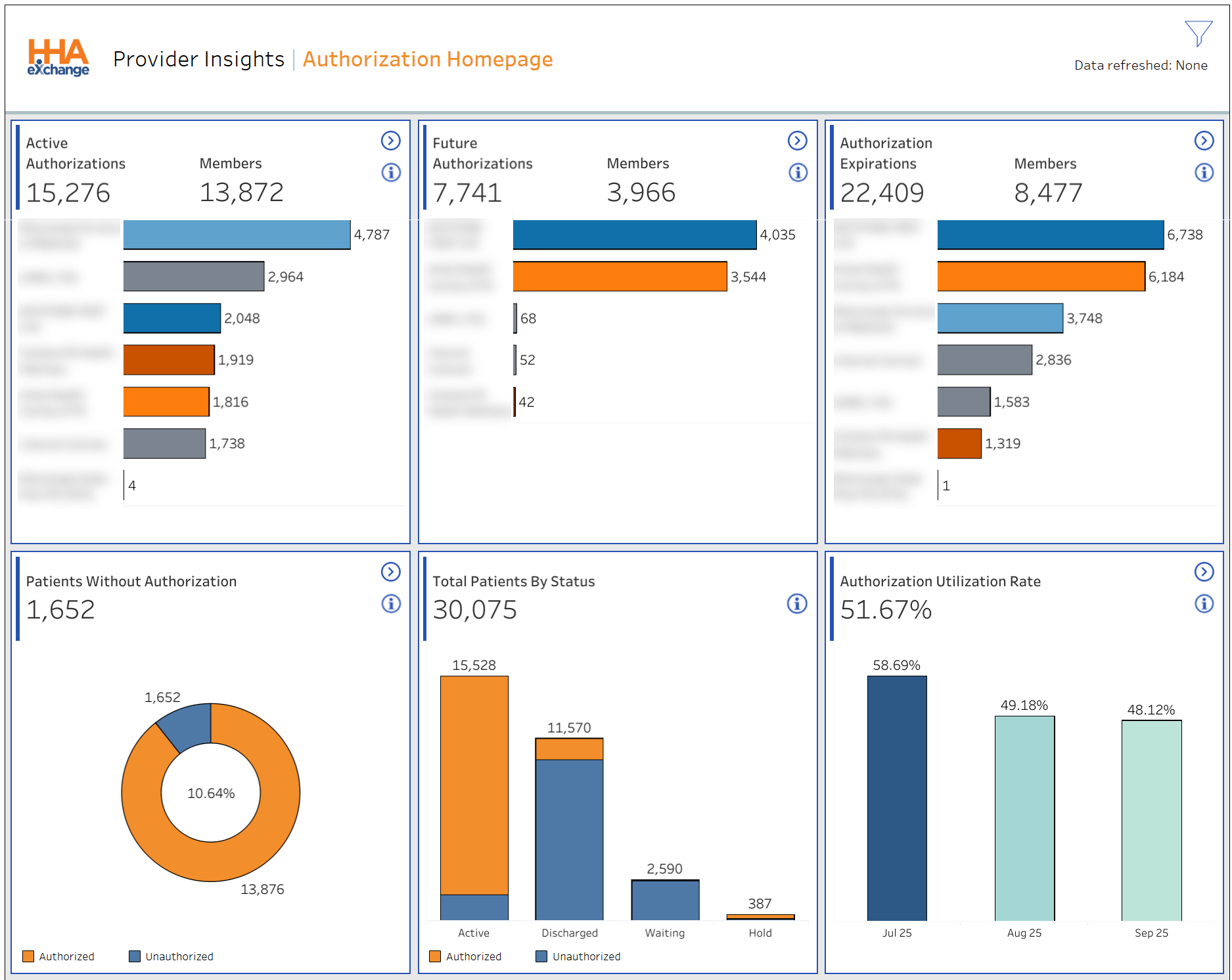

The cards on the Authorization Homepage dashboard under Data Insights are described in the following table. For more detail on a specific area of the Authorization Homepage dashboard, select the Navigate icon  on a card to access the next set of cards and widgets. Refer to each subsection below for descriptions.
|
Card |
Description |
|---|---|
|
Current Active Authorization # |
Total number of current Active Authorizations. |
|
Active Patients Without Authorization # |
Number of Patients who are currently Active with NO active authorization. This figure is independent from Payer, Contract, and Service Code filter. |
|
Unique Member with Elapsing Authorizations(Days) |
Number of Patients who have elapsing authorizations within the selected number of days and have no replacement authorization. Enter a specific number of days in the Days Elapsing text field for more specific results. |
|
Utilization Rate |
Displays the percentage of total Utilization rate. |
The image below under Data Insights illustrates the Active Patients Without Authorization set of cards and widgets.
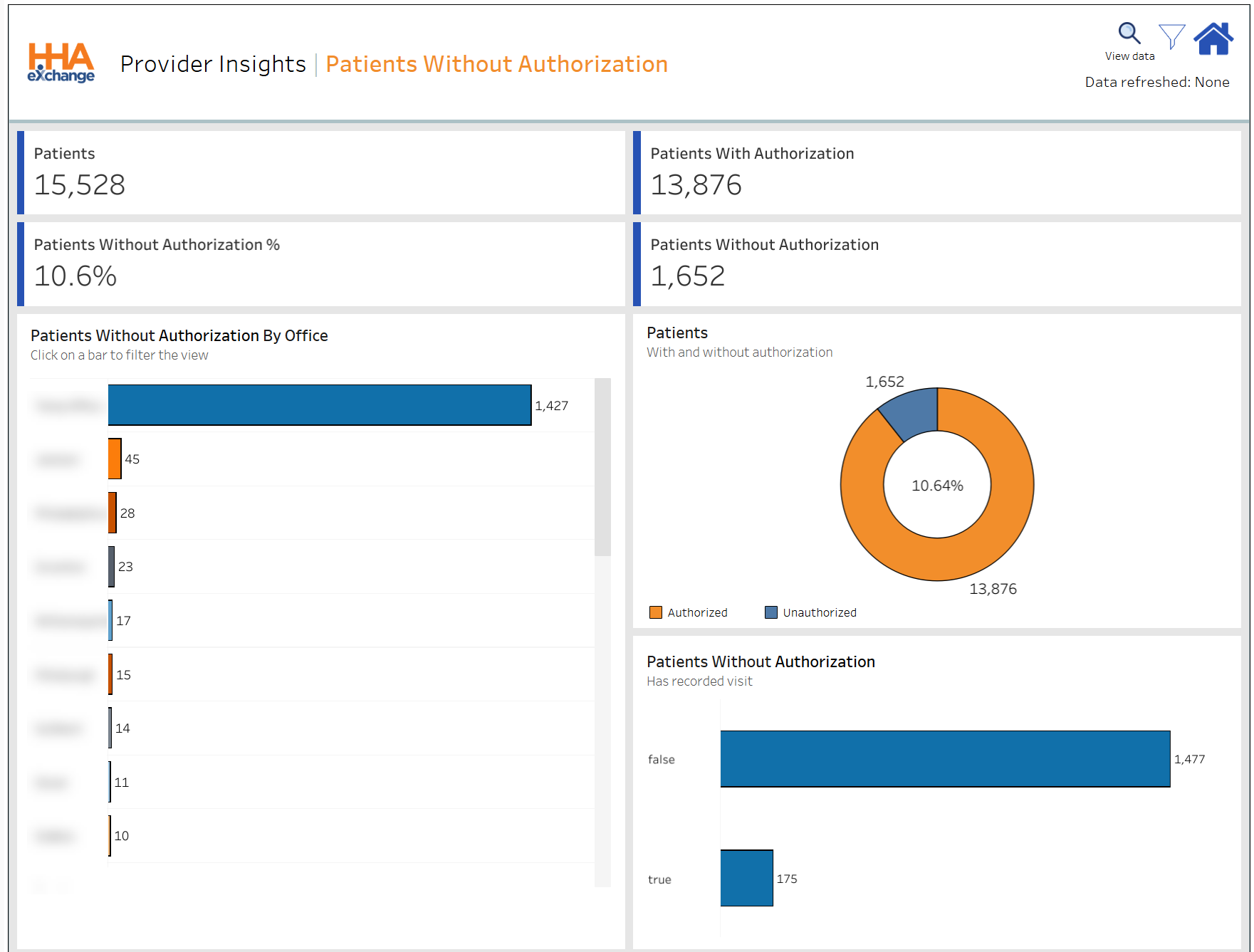
Active Patients without Authorization cards under Data Insights are described in the following table.
|
Card |
Description |
|---|---|
|
Active Patients Without Authorizations # |
Number of currently Active Patients with NO active Authorization. |
|
Active Patients Without Authorizations % |
Percentage of currently Active Patients with NO active Authorization. |
|
Active Patients With Authorizations # |
Number of currently Active Patients with active Authorization. |
|
Total Active Patients |
Total number of currently Active Patients. |
Active Patients without Authorization widgets under Data Insights are described in the following table.
|
Widget |
Description |
|---|---|
|
Active Patients with NO Authorizations by Office |
Number of currently Active Patients with NO Authorization by Payer. Select the View Data magnifying glass icon |
|
Active Patients (with or without Authorizations) |
Number of currently Active Patients with NO active Authorization by Payer. |
|
Active Patients with NO Authorizations (with Recorded Visit) |
Bar graph shows the number of currently Active Patients with NO active Authorization, defined by a recorded visit. |
 at the top header of the page to view the
The image below under Data Insights illustrates the Current Active Authorizations set of cards and widgets.
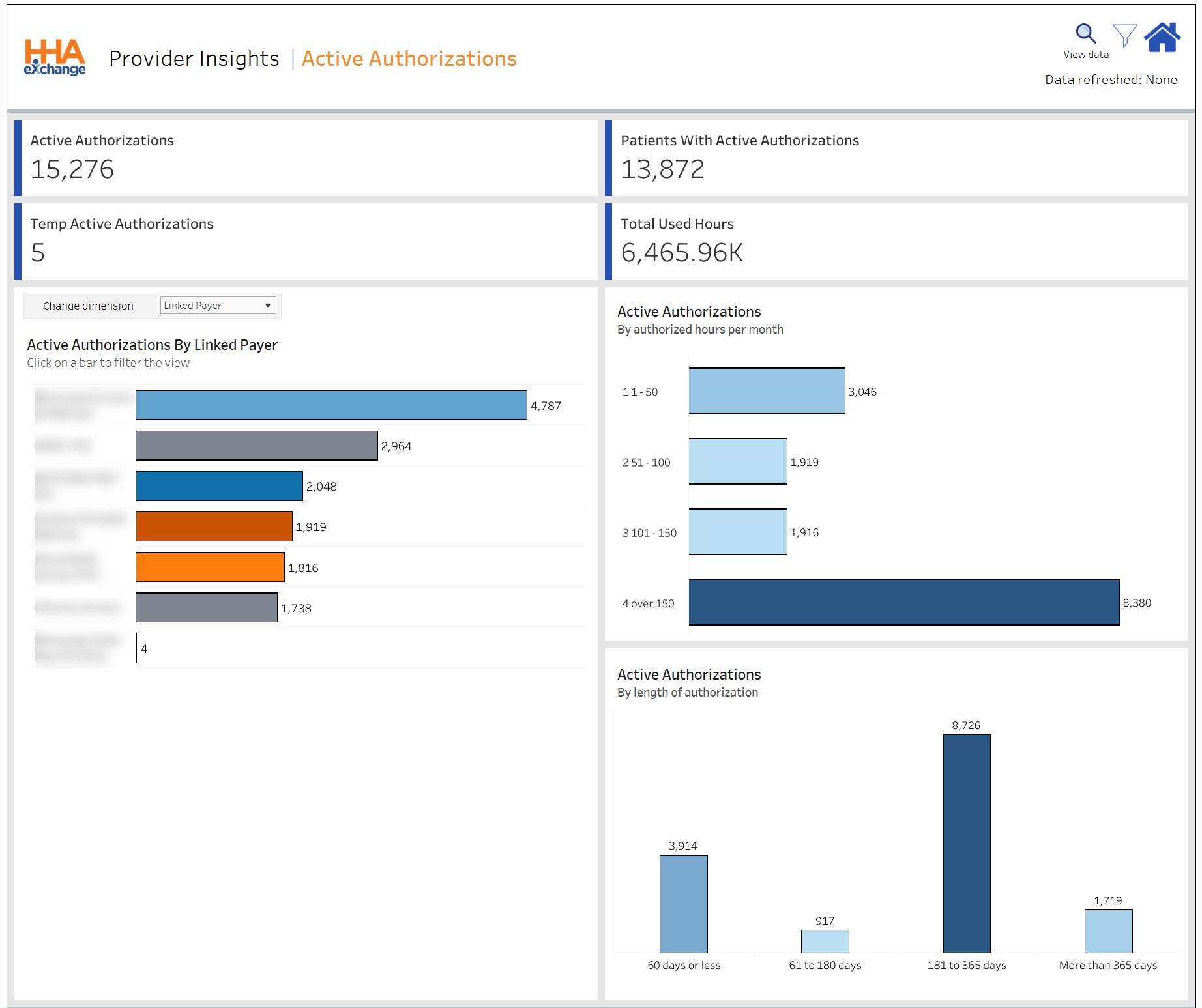
Average Current Active Authorizations cards are described in the following table under Data Insights.
|
Card |
Description |
|---|---|
|
Current Active Authorizations |
Total number of current Active authorizations. |
|
Total Active Patients |
Number of Patients who are currently Active. |
|
Temp Active Authorizations # |
Number of Temporary Authorizations. |
|
Utilized Hours |
The average maximum number of hours approved per authorization. |
Current Active Authorizations widgets under Data Insights are described in the following table.
|
Widget |
Description |
|---|---|
|
# of Active Authorizations by Payer |
Number of currently Active Authorizations by Payer. Select one or more bars to focus on specific Payers. From the Change Dimension field, select by Payer, Caregiver, Contract, Office, Service Code, or Coordinator to view specific details. Select the View Data magnifying glass |
|
# of Active Authorizations by Authorized Hours per Month |
Number of currently Active Authorizations, categorized by hours per month. |
|
# of Active Authorizations by Length of Authorization |
Number of currently Active Authorizations by length of days. |
The image below under Data Insights illustrates the Elapsing Authorizations set of cards and widgets.
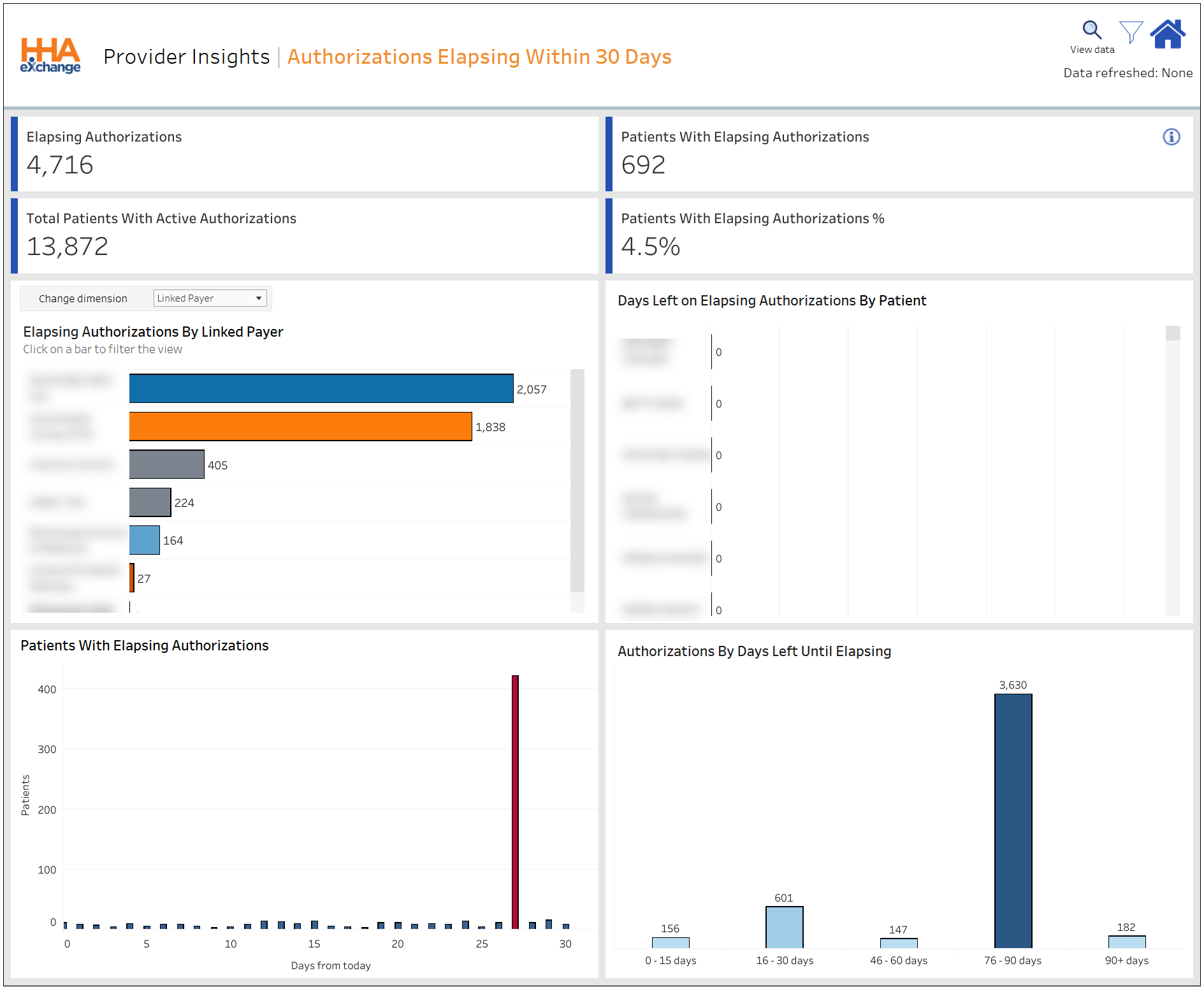
Elapsing Authorizations cards under Data Insights are described in the following table.
|
Card |
Description |
|---|---|
|
Patients with Elapsing Authorization in 30 Days % |
Percentage of Patients who have elapsing authorizations within the selected number of days. |
|
Unique Members with Elapsing Authorization in Days |
Number of Patients who have elapsing authorizations within the selected number of days. |
|
Unique Elapsing Authorizations in Days # |
Number of unique elapsing Authorizations within the selected number of days. |
|
Total Patient with Elapsing Authorizations |
Number of currently Active Patients with active Authorizations. |
Elapsing Authorizations widgets under Data Insights are described in the following table.
|
Widget |
Description |
|---|---|
|
# of Elapsing Authorizations in 30 Days by Payer |
Number of unique elapsing Authorizations within the selected number of days by Payer. From the Change Dimension dropdown field, select by Payer, Caregiver, Office, Service Code, or Coordinator to view specific details. Select the View Data magnifying glass icon |
|
Days Left on Elapsing Authorization Within 30 Days (by Member) |
List of Patients with elapsing Authorizations, in order (from soonest to latest). |
|
# of Authorizations by Days Left Until Elapsing |
Number of unique Authorizations by days left until elapsing. |
The image below under Data Insights illustrates the Utilization Rate set of cards and widgets.
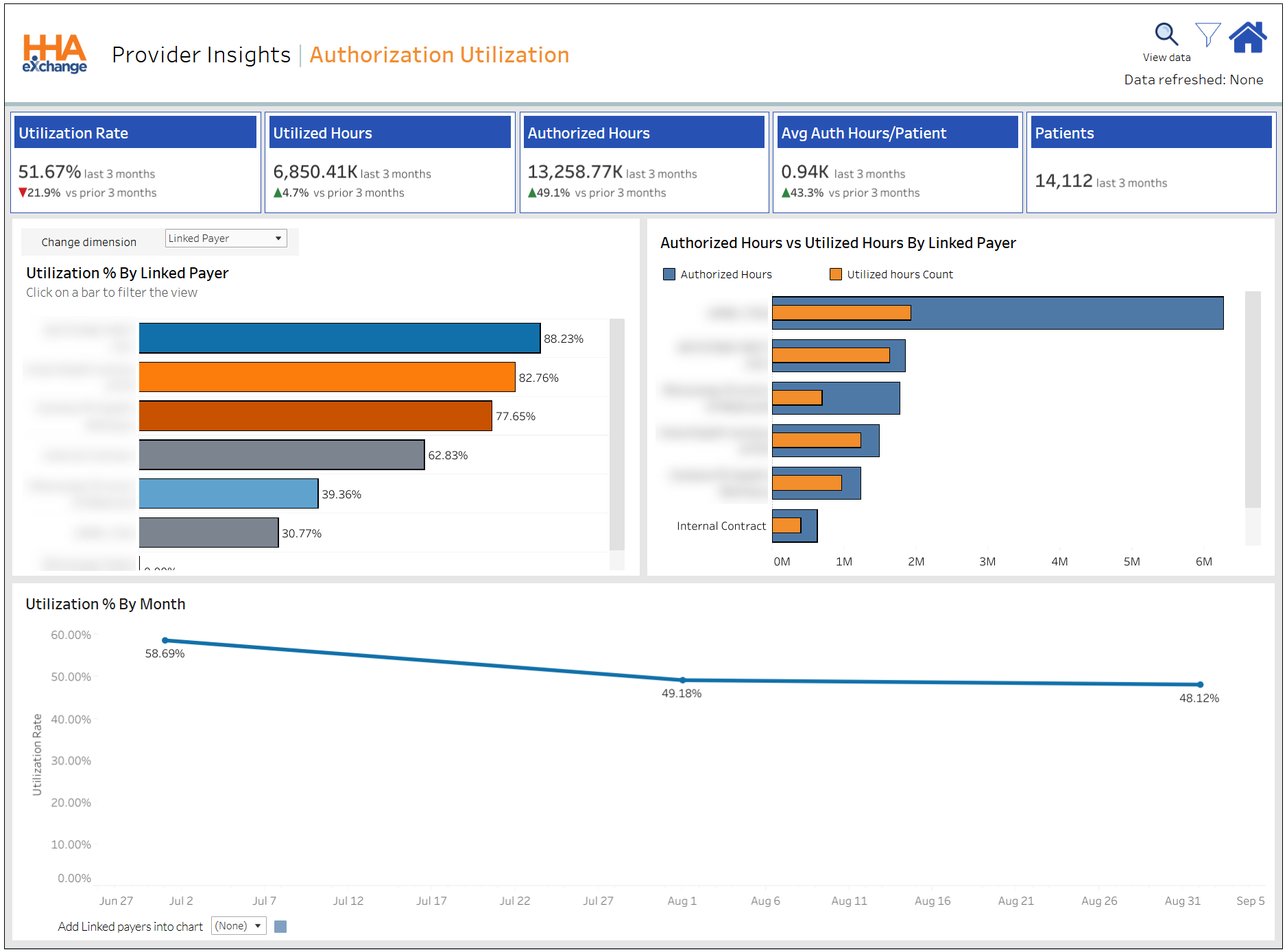
Utilization Rate cards under Data Insights are described in the following table.
|
Card |
Description |
|---|---|
|
Utilization Rate |
Percentage of Utilization Rate for the last 2 months, compared to the previous 2 months. |
|
Utilized Hours |
Number of utilized hours for the last 2 months, compared to the previous 2 months. |
|
Authorized Hours |
Number of authorized hours for the last 2 months, compared to the previous 2 months. |
|
Total Active Patients |
Number of currently Active Patients with active Authorizations. |
Utilization Rate widgets under Data Insights are described in the following table.
|
Widget |
Description |
|---|---|
|
Utilization % by Payer |
Percentage of utilization by Payer. Select one or more bars to focus on specific Payers. From the Change Dimension dropdown field, select by Payer, Caregiver, Contract, Office, Service Code, or Coordinator to view specific details. Select the View Data magnifying glass icon |
|
Authorized Hours vs Utilized Hours (by Payer) |
Bar graph shows the comparison of Authorized hours with Utilized hours by Payer. |
|
Utilization % by Month |
In this dual-graph, the line chart represents the Unconfirmed visits (percentage or number of) and the bar chart displays the total number of visits. The line and the bars work from two separate axes allowing for the total number of visits (bars) to provide context for the shape of the Unconfirmed visits (line). The time scale of the chart is determined by the period selected in the filters. When Week or Month is selected the chart displays the data at a weekly level; whereas, when Quarter or Year is selected the chart is divided at a monthly level. |
Other Resources