FOB Device
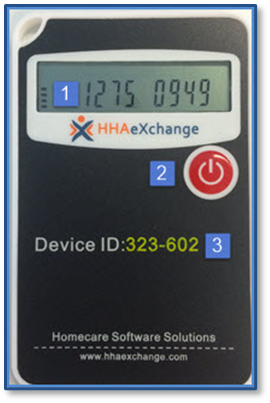
The FOB (Fixed Object) device is used to place secure and accurate EVV. When the power button is pressed, the FOB displays an encrypted 8-digit passcode which reflects the current date and time. Two codes, one generated at the start of the visit and one at the end, are required to place EVV using the FOB.
The image illustrates the FOB Device, highlighting 3 areas:
-
The 8-Digit Passcode
-
The Power Button
-
The 6-Digit Device ID
To Clock In and/or Out using the FOB, call your Agency’s HHAeXchange phone number from ANY phone and follow the steps below:

-
Press 3 to indicate FOB Device confirmation.
-
Press 1 to indicate FOB Clock In.
-
Enter your Assignment ID.
-
Enter the 6-Digit Device ID.
-
Enter the 8-Digit Passcode from the start of the visit.
-
Press 3 to indicate FOB Device confirmation.
-
Press 2 to indicate FOB Clock Out.
-
Enter your Assignment ID.
-
Enter the 6-Digit Device ID.
-
Enter the 8-Digit Passcode from the end of the visit.
-
Enter any duties performed (one at a time).
-
Complete duty entry and call (00 or 000).
-
Press 3 to indicate FOB Device confirmation.
-
Press 3 to indicate FOB Clock In and Clock Out.
-
Enter your Assignment ID.
-
Enter the 6-Digit Device ID.
-
Enter the 8-Digit Clock In Passcode.
-
Enter the 8-Digit Clock Out Passcode.
-
Enter any duties performed (one at a time).
-
Complete duty entry and call (00 or 000).