Other Insurance (Secondary) Billing
This feature is activated by HHAeXchange System Administration. Contact HHAeXchange Support Team for details, setup, and guidance.
Providers can enter a Secondary Billing option to supplement the Primary insurance. This feature can be managed at the Patient Contract level. Once the information is saved on the Contract level, then Secondary insurance can be applied to a Patient visit.
Providers may refer to Other Insurance Secondary Billing as Coordination of Benefits (COB) billing. Coordination of Benefits (COB) refers to the process used when a patient has more than one payer. In this context, Other Insurance Secondary Billing is often called COB billing, because it involves submitting the claim to the secondary payer after the primary payer has processed it.

-
Go to Patient > Search Patients.
-
Enter the search parameters, and then select Search. Select the patient.
-
Select Contracts/Insurance from the side menu, and then select the Other Insurance tab.
-
Click the Add Other Insurance button to add a secondary insurance.

-
In the Add Other Insurance window, enter information in the required fields, and then select Save.
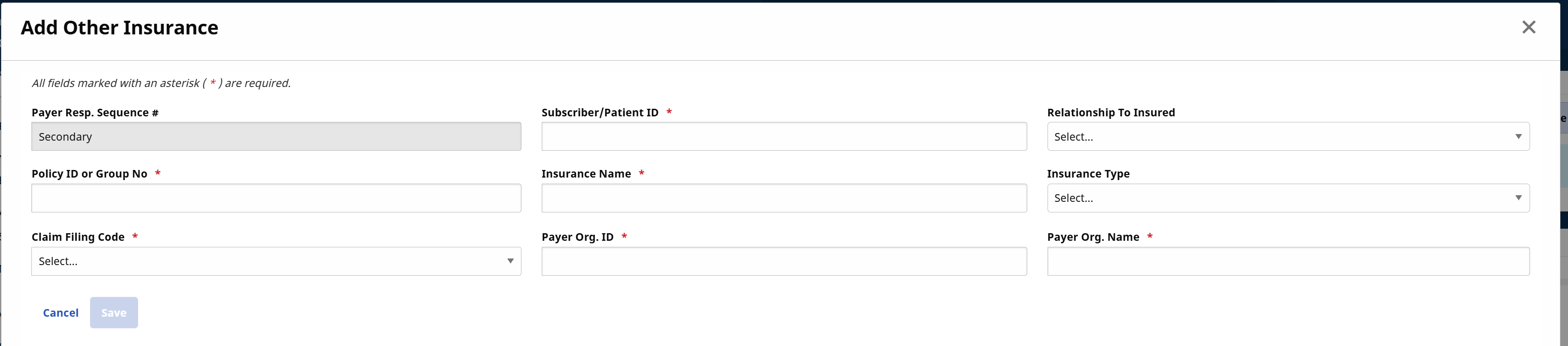
The secondary insurance appears in the list of contracts. The system allows up to two insurances to be entered at a time, a Primary and a Secondary. Insurance entries can be edited or deleted, as needed.
Complete the Other (Secondary) Insurance at the contract level instructions before completing the following steps. Completing this section saves the information to the claim that goes on the 837 when billed.
-
Go to Patient > Search Patients. Enter the search parameters, and then select Search. Select the patient.
-
Open the Calendar page from the menu.
-
Select the Visit link from the visit on the calendar.
-
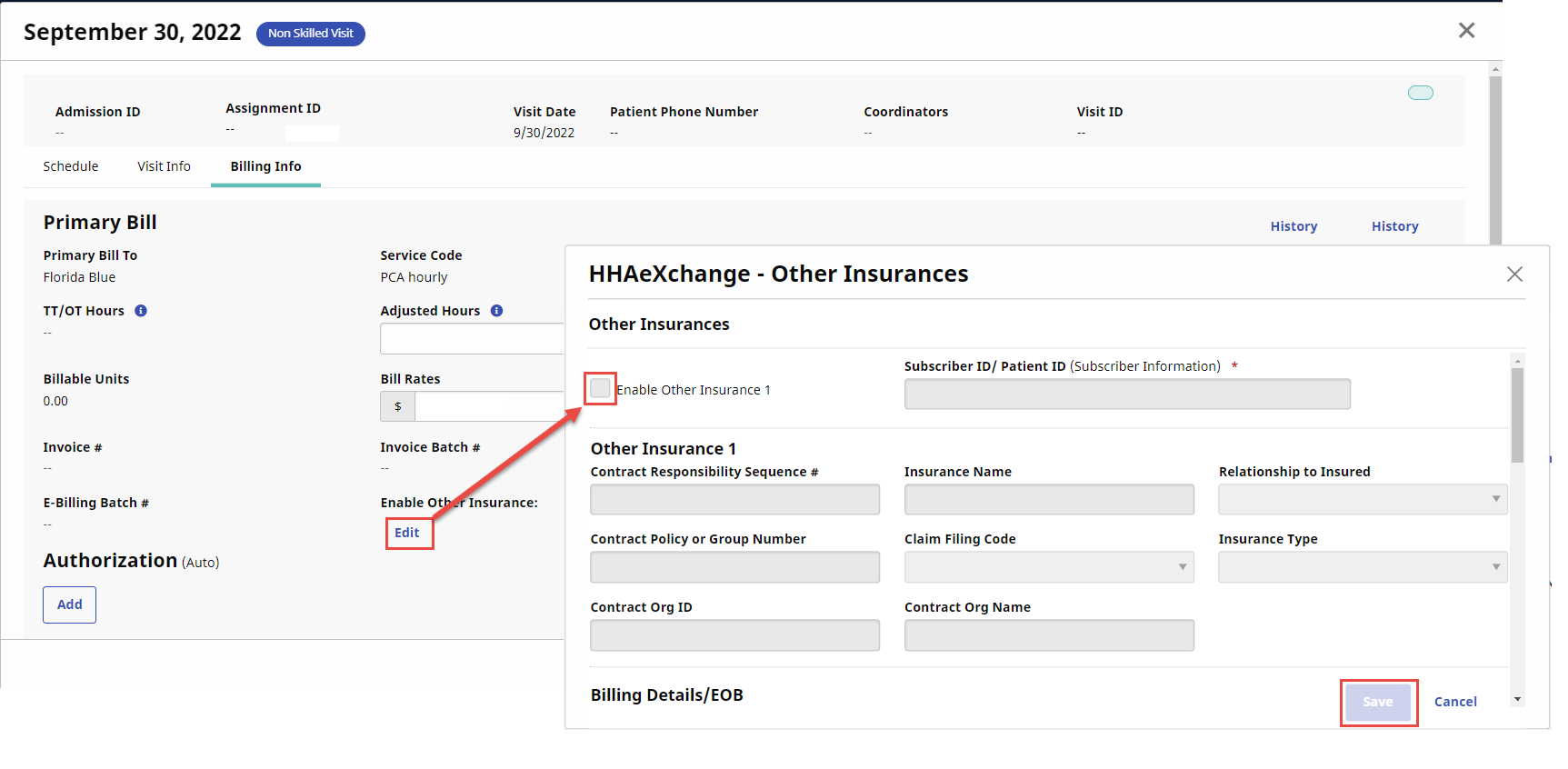
On the Bill Info tab, select Edit on the Enable Other Insurance field.
-
Select the Enable Other Insurance 1 on the Other Insurances window. Enter primary insurance details.
-
To add secondary insurance, select the Enable Other Insurance 2 checkbox. Enter secondary insurance details.
-
Enter the Billing Details/EOB fields on the Other Insurances window.
When the Total Paid Amount field is $0, the Non-Covered Charges field becomes required.
Example:
The charge on the service line is $100. The Payer applied $50 to the Deductible field, $25 to the Adjusted field, and the Patient paid $25.
Deductible + Adjusted amount + Paid = Billed Amount
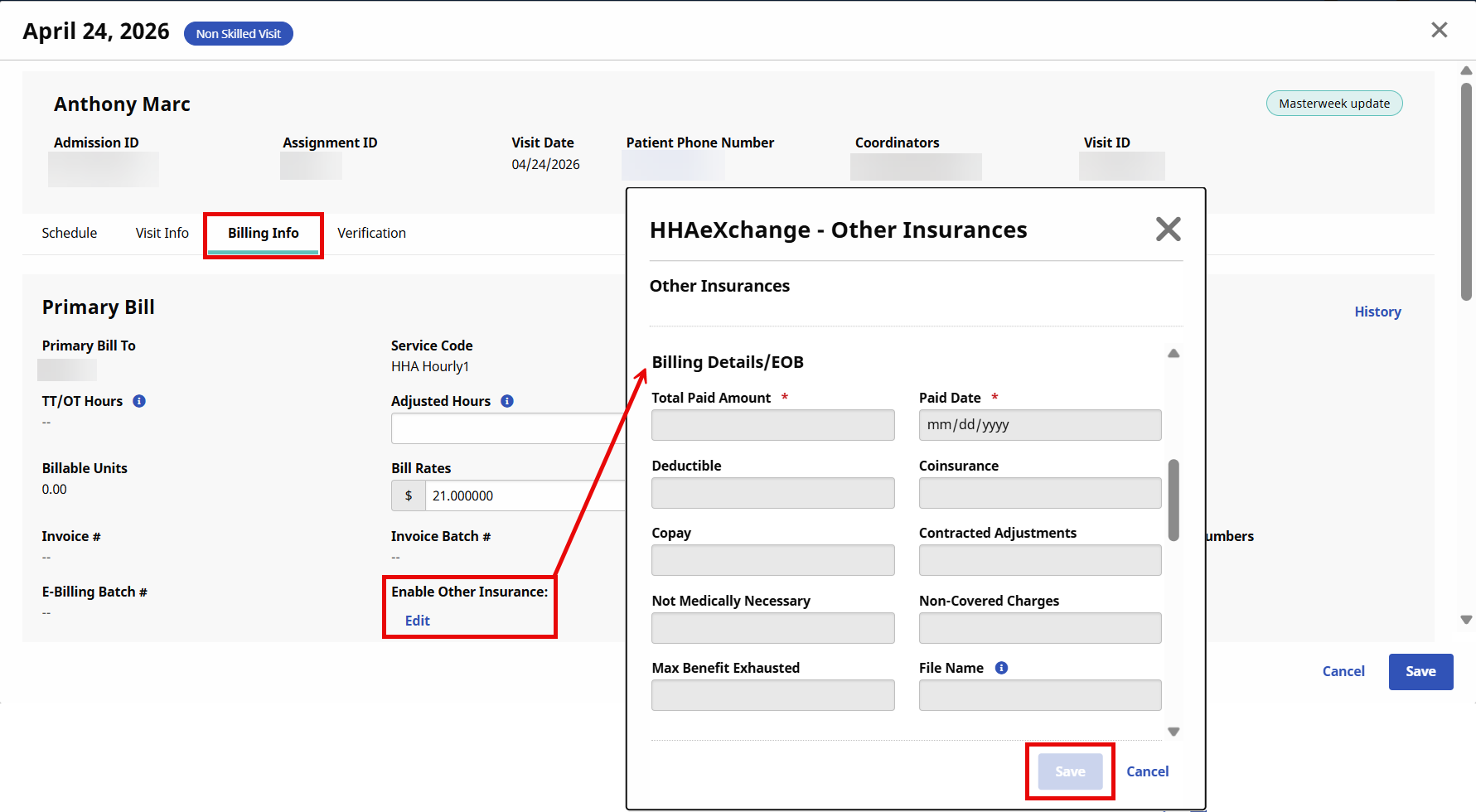
See the Sample Explanation of Benefits (EOB) for help to complete the Other Insurance fields.
-
Coinsurance - The amount paid after the deductible is met.
-
Copay - Fixed fee paid at the time of the visit.
-
Deductible - Out of pocket amount paid by the insured.
-
Contracted Adjustments - The pre-negotiated reduction in medical bills, representing the difference between a provider's charged amount and the lower, contracted rate agreed upon with an insurance payer.
If a provider bills $500 for a service and the insurer's allowed amount is $350, the $150 difference is the contractual adjustment.
-
Not Medically Necessary - The amount that does not meet the criteria for essential care.
-
Non-Covered Charges - Medical services, procedures, or supplies not paid for by a health insurance plan because they are excluded from the policy, not deemed medically necessary, or provided out-of-network.
-
Max Benefit Exhausted - The total dollar amount or maximum number of weeks/visits allowed under the insurance plan, unemployment claim, or policy for a specific, set period.
-
File Name (Only required for Humana Florida) - Enter up to 80 alphanumeric characters in the File Name for the Other Insurance Denial form received from the Primary Insurance. This helps the Payer locate the file that coincides with the claim.
Do not use the following special characters:
-
#
-
*
-
~
-
/
-
:
-
|
-
)
-
(
-
,
-
<
-
>
-
-
-
Select Save.