Payments Page
The Payments page lets you track payments and export payment information in the Non-Homecare Portal.
To open the Payments page, select Payments from the navigation menu.
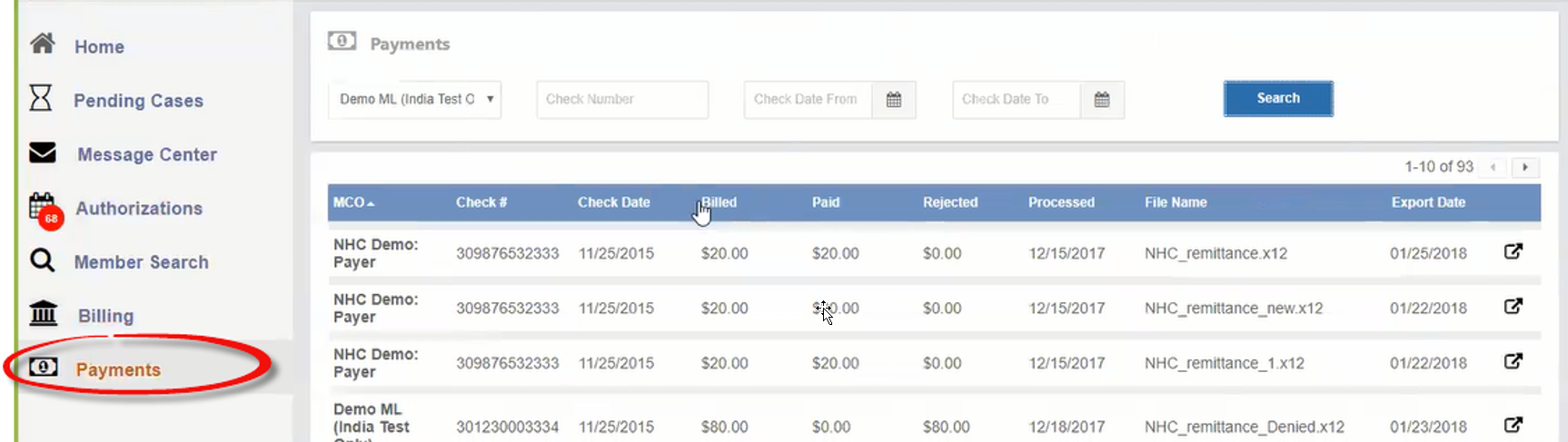
The Payments page includes two sections:
-
Search filters:
Use the filters to narrow results by:
-
MCO / Payer
- Check Number
-
Check Date From/To
-
-
Payment list:
The main panel shows individual payment records, including:
-
MCO / Payer: The Payer that issued the payment
-
Check Number: The payment check number
-
Check Date: The date the payment was issued
-
Billed: The amount billed
-
Paid: The amount paid
-
Rejected: Any portion of the invoice that was rejected
-
Processed: The date the invoice was processed in the system
-
File Name: The name of the export file
-
Export Date: The date the payment file was exported
-
Export Icon: Use this icon to export payment information.
-
