Maine EVV Aggregation Report
This report contains all transactions sent to the aggregator. The transactions provide record status for each Caregiver, Patient, and Visit record.
HHAeXchange sends Electronic Visit Verification (EVV) data when a visit is confirmed. The visit must have a confirmed Clock In and confirmed Clock Out time in order to be sent to the aggregator. Information sent consists of newly confirmed visits and all updates made to confirmed visits. Data is sent daily during the overnight process.
It is recommended to bill in correspondence with the state’s system after a Success response is received for the visit on the State Aggregation Report.
Complete the following steps to run a State Aggregation Report.
-
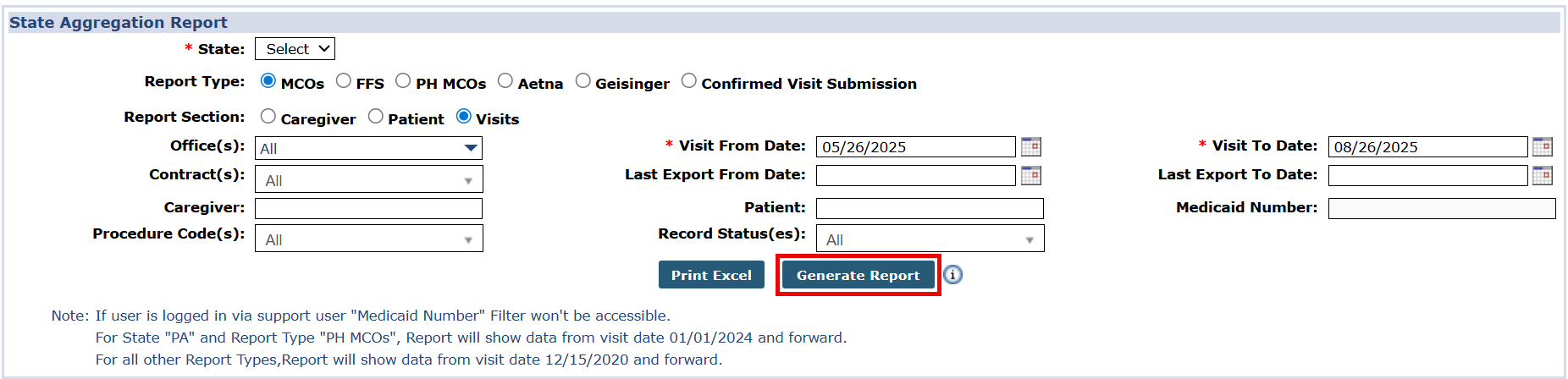
Go to Report > Exception Reports > State Aggregation Report, the State Aggregation Report window opens.
-
Complete the required fields as follows, then select the Generate Report button:
-
State: select ME
-
Report Type: select FFS
-
Report Section: Select Caregiver, Patient, or Visits
-
Visit From Date
-
Visit To Date
-
Record Status(es): Select All to view all statuses. This field defaults to Failed for each report.
-
-
Run the report for the Caregiver, Patient, and Visits sections. Providers must run all three reports to review and address all rejections associated with the EVV aggregation.
Refer to the Maine Common Failed Responses topic for a list of common failed responses found in the State Aggregation Report.