Compliance Validations
Compliance Validations ensure that a Caregiver with missing, incomplete, or expired documentation or certifications are not scheduled for any visits. Complete the following steps to set up Compliance Validations.
-
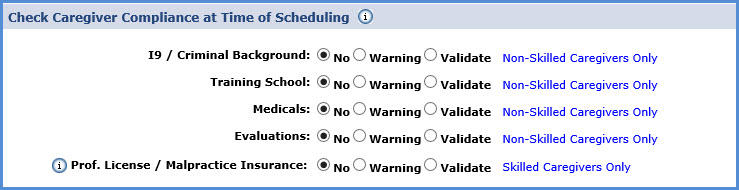
Go to Admin > Agency Profile and scroll down to the Check Caregiver Compliance at Time of Scheduling section.
-
The fields in this section are the items reviewed in the Compliance Validation process. The I9 / Criminal Background, Training School, Medicals, and Evaluations fields are specific to Non-Skilled Caregivers, while the Prof. License / Malpractice Insurance field is only for Skilled Caregivers.
-
In each field select which items to include or ignore in the validation process, described as follows:
Validation
If selected, the system…
No
does not include the item in the validation process.
Validate
does not allow the Caregiver to be scheduled if missing that information.
Warning
includes the item in the validation process. If the Caregiver does not meet the proper documentation on file, the system warns the user of the issue; however, this does not prevent one from scheduling the Caregiver for the shift.
-
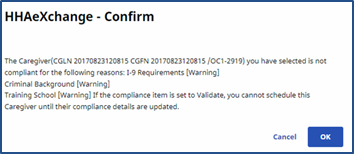
If a requirement is set to No or Warning, a warning message appears when attempting to save a Caregiver who does not meet the validation requirements.
-
If the requirement is set to Warning, click OK on the pop-up and proceed to schedule the Caregiver.
-