Patient Menu
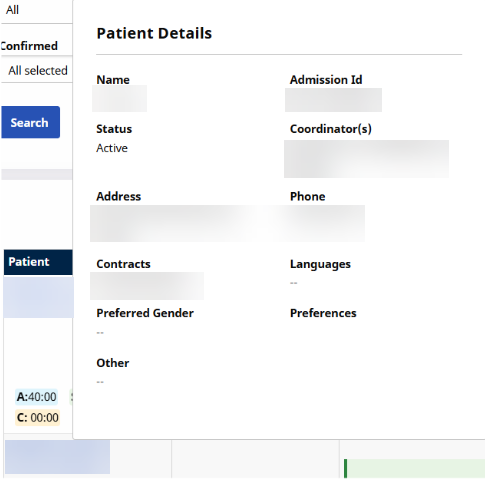
When searching for visits by Patient, hover the cursor over the Patient name in the left-most column to view a Patient’s information to include Name, Admission ID, Status, Coordinator(s), Address, etc..
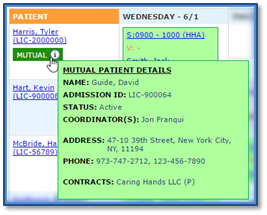
The system also specifies whether a Patient is part of a Linked or Mutual case. Hovering the cursor over the Mutual or Linked generates a pop-up providing supplementary information of the Patient’s case.
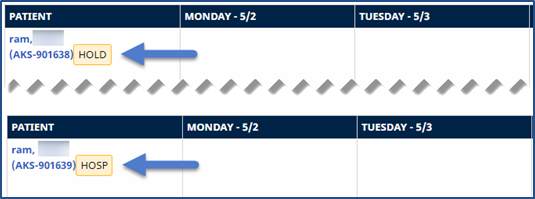
The Appointments page displays the Patient’s Status as Hold or Hospitalized when applicable. It also marks the Start Date of the Status change in the corresponding visit cell.
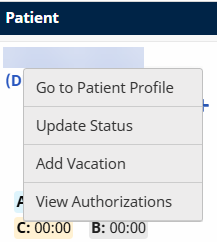
Click the Patient Name link to open a menu of options.
The menu items described below are available for Internal Patients. The menu items available for Linked Patients include Go to Patient Profile, Edit Masterweek, and View Authorizations.
|
Select… |
Description |
|---|---|
|
Add Vacation |
Add vacation dates to the Patient’s Calendar. |
|
Edit Masterweek |
Edit the Patient’s Master Week schedule. |
|
Go to Patient Profile |
Opens the Patient’s Profile in a new window. |
|
Update Status |
Update the Patient’s Status. |
|
View Authorizations |
View the last three Authorizations for the Patient. |