Service Delivery Locations

Based on state requirements, EVV Visits must have valid and accurate Service Delivery Locations. In some cases, Service Delivery Locations may require manual input from Providers for various reasons, such as inaccurately logged GPS coordinates or an invalid location.
For EVV Visits, Providers can manually add Service Delivery Location(s) for Visit Start/End Times for the applicable visit on the Patient Calendar.
On a Visit under Patient > Search Patient > Calendar, click Add Service Location for the Visit Start/End Time(s) respectively to indicate the service delivery location(s).
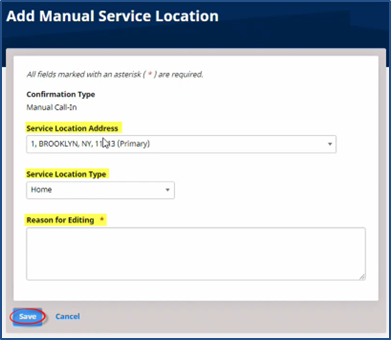
In the Add Manual Service Location window, select Primary, Patient, or Other from the Select Location Address field. Select the Service Location Type. Enter the Reason for Editing the manual service location. Click Save.
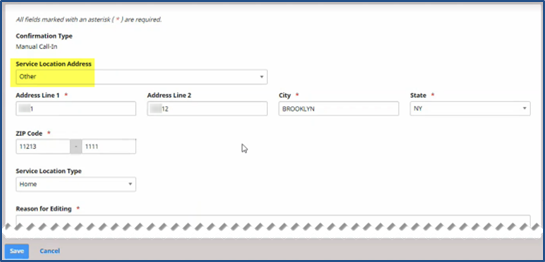
If the Service Location Address is selected as Other, then complete the required fields to fully define the Other address, such as the Address Line(s), City, State, and Zip Code.
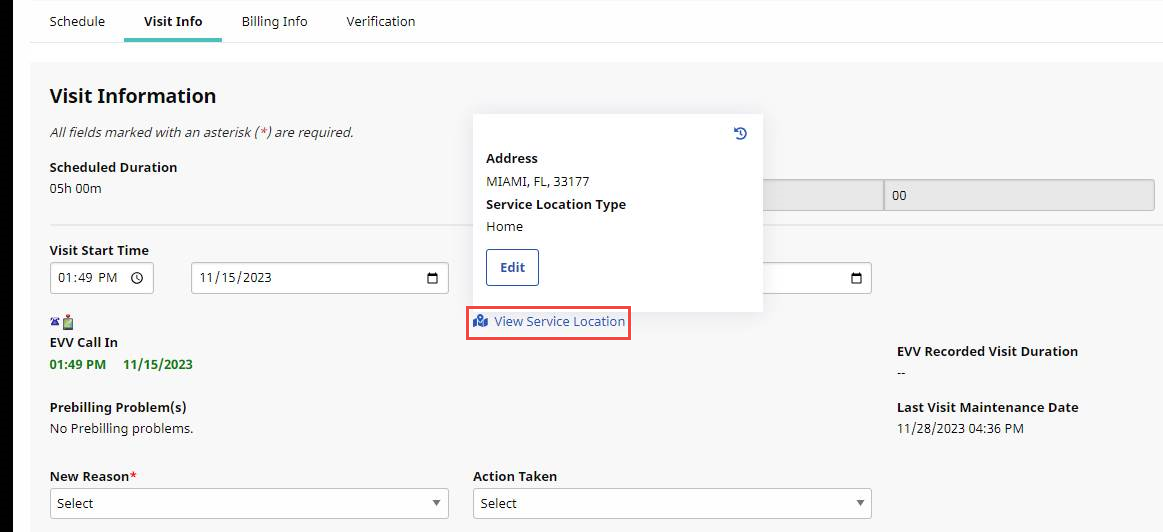
For EVV Visits with existing Service Delivery Locations, Providers can view and edit location information. In some cases, location information requires editing to correct an invalid or inaccurate location. When a visit is outside the 95-day lock period, users can no longer edit or update the information.
On the Visit Info tab, click View Service Location below the Visit Start Time and Visit End Time to display the Visit Address and Service Location Type.
If needed, click Edit to edit the Address or Service Location Type.