Service Location Edits - Cures Act Requirements
The Cures Act requires that the service location for a visit be accurately captured and recorded in the system to be compliant. Because editing the service location address for a particular visit may not be permissible for Providers managing certain Linked Contracts, there may be delays in satisfying this compliance requirement.
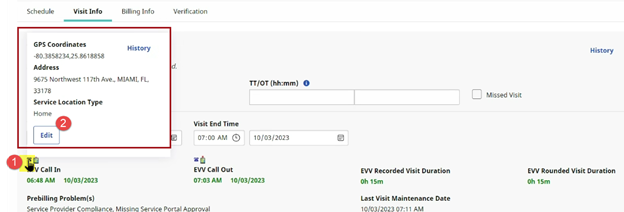
The system has been updated to allow Providers to edit the service location directly on the Visit Info tab for the affected visit. This correction can be completed for Clock In or Clock Out, as pictured in the following image.
To edit, click the Phone icon  to the left of the confirmed EVV in green font in the Visit Info tab. A pop-up screen appears displaying the details captured in the initial EVV. Click Edit on the pop-up screen.
The Edit EVV Information window opens. In the image below, the Service Location Address is selected as Other opening fields to complete. Edit the necessary information, including the required fields denoted with a red asterisk. Click Save.
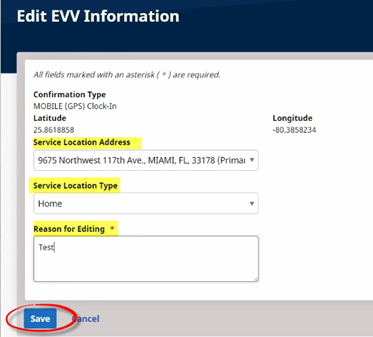
When saved, the change appears as a Note in the Visit Info tab.
