What's New: July 2026
Enterprise Version 26.07.01
We’re excited to introduce the latest enhancements to your home healthcare experience! This release brings new features designed to simplify care coordination, reduce administrative work, and help your team focus on what matters most—delivering quality care. Explore what’s new and see how these improvements make your work more seamless than ever.
HHAeXchange is permission-based, so access to certain features may vary depending on your role and organization settings.
Feature Enhancements

|
What's New |
Why It Matters |
What You Need to Know |
|---|---|---|
|
Employers can create, assign, edit, and end court-ordered garnishments (child support, federal tax levies, creditor judgments, and other order types) directly in The HHAeXchange platform, without filing a support ticket. Once set up, payroll automatically calculates and withholds the correct amount every pay run, applies legal wage-protection limits, and tracks the running balance. For child support orders, The HHAeXchange platform also remits the withheld funds to the agency on the employer's behalf, in all 50 states. |
|
Customer Action Required:
Known Limitations:
|
|
What's New |
Why It Matters |
What You Need to Know |
|---|---|---|
|
Payroll now automatically files new-hire and rehire reports with state agencies on the employer's behalf, across all 50 states, for both employees and contractors. The HHAeXchange platform detects when a filing is due after a worker's first payroll run and submits it to the correct state(s). |
|
Customer Action Required:
Known Limitations:
|
|
What's New |
Why It Matters |
What You Need to Know |
|---|---|---|
|
Employers can assign workers' compensation (NCCI) class codes to workers, individually or in bulk, and download audit-ready reports that break down wages and hours by state and class code — the format insurance carriers request at audit time. |
|
Customer Action Required:
Known Limitations:
|
|
What's New |
Why It Matters |
What You Need to Know |
|---|---|---|
|
Key payroll reports — the Payroll Journal, Deduction Journal, Benefits Journal, Time off Journal, Worker Details, and Garnishments Journal — are now available directly inside The HHAeXchange platform, with no support request needed. Reports can be pulled for a single pay run or any custom date range and downloaded as CSV. |
|
Customer Action Required:
Known Limitations:
|
We’ve rebuilt key parts of the Private Payment experience so your team spends less time managing payments and more time with patients. Here’s a look at what’s changed — and why it matters.
What's New
A Faster Way to Save a Payment Method
Saving a card or bank account used to mean bouncing between multiple screens. Not anymore. The whole flow now lives right inside the invoice — guided, quick, and still backed by Stripe’s secure vault, so sensitive payment details never touch our servers.
Pay Now, Right Where You Need It
The Pay Now option has moved front and center in the invoice workflow — no more scrolling to the bottom of the screen. One less click between your team and a completed payment.
Mileage & Expense Invoices, Finally Included
Invoices with mileage or additional charges used to be off-limits for Private Payment. Now they’re fully supported — so more of your billing can run through one streamlined process, with fewer workarounds.
Duty Sheets, Attached Automatically
When a duty sheet is part of the visit, it can now be attached directly to the invoice email — giving patients and responsible parties a clear record of the care and tasks performed.
More Flexibility with Adjustments
Need to apply a write-off, travel time credit, or other adjustment? You can now do it directly during invoice creation — and during refunds, too. It’s the same familiar adjustment experience your team already knows from Enterprise, now available here.
Payment Status, Made Clearer
Incomplete is now Unpaid — a small wording change that removes a lot of confusion about what’s actually happening with an invoice. And when something needs attention, you’ll know at a glance:
-
A red icon flags a declined payment
-
An orange triangle flags a dispute
-
Hovering shows the details straight from Stripe
Your team also gets an email the moment either one happens, so nothing slips through.
Smarter Invoice Resend
If an invoice needs to go out again — wrong recipient, never received, whatever the reason — resending it now automatically retires the old payment link and issues a fresh one. No stale links, no double payments
We’re rolling out a series of security improvements to better protect your account and your users. Here’s what to expect:
Critical Account Change Alerts
Users will now receive an automatic email notification when certain profile changes are made to their account, including updates to their name, email address, or multi-factor authentication (MFA) settings. If a user receives an alert for a change they did not make, they should contact their administrator immediately. No action is needed to receive these notifications — they will be enabled automatically for your organization.
Risk-Based Authentication
The platform will now apply an additional layer of security during login. If unusual activity is detected — such as a login from a new device, an unfamiliar IP address, or multiple failed login attempts — users will be prompted to complete MFA verification before accessing the system. Users who already have MFA set up will use the same method they currently use. Normal logins from recognized devices and locations are unaffected.
Updated Password Policy
To align with federal security standards (CMS and NIST), password requirements are being strengthened:
-
Minimum password length is now 12 characters (maximum 256)
-
Passphrases are now accepted
-
Passwords expire every 60–90 days (set by your organization)
-
Users cannot reuse any of their last 10 passwords
-
Accounts will lock after 5 failed login attempts (previously 10); users can unlock via an admin or by resetting their password
-
Certain commonly used or high-risk passwords will no longer be accepted
These updates apply across all HHAeXchange Enterprise applications and will be enabled in phases. Your organization will be notified before changes are applied to your account.
MD Order: Your Signature Workflow, Your Choice
Sometimes moving forward means bringing back an option you actually needed. This one's for every agency that missed a little flexibility.
Flexibility Restored
Back in June, we introduced digital signatures for MD Orders — a modern upgrade for agencies ready to go fully electronic. But we heard from you: not every agency operates the same way, and some rely on the legacy nurse’s dropdown workflow for good reason. So, we brought it back, right alongside the new digital option.
Now, it's a simple choice, configured exactly the way your agency needs it.
How It Works
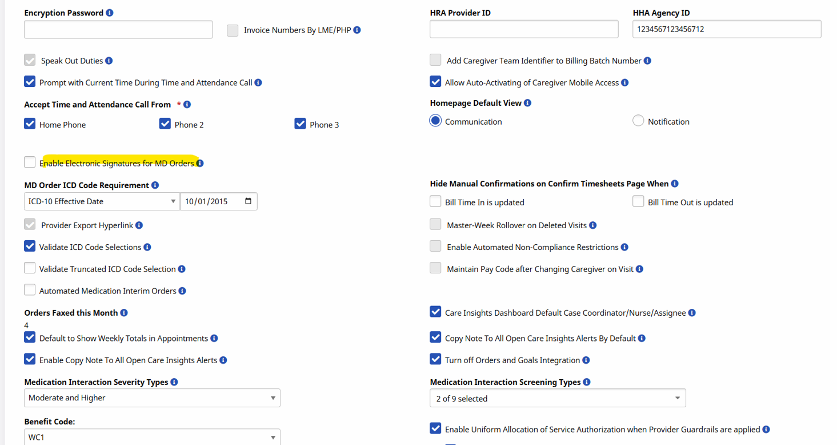
A new toggle — Enable Digital Signatures for MD Orders — lives right in your Agency Profile settings. Flip it however fits your workflow:
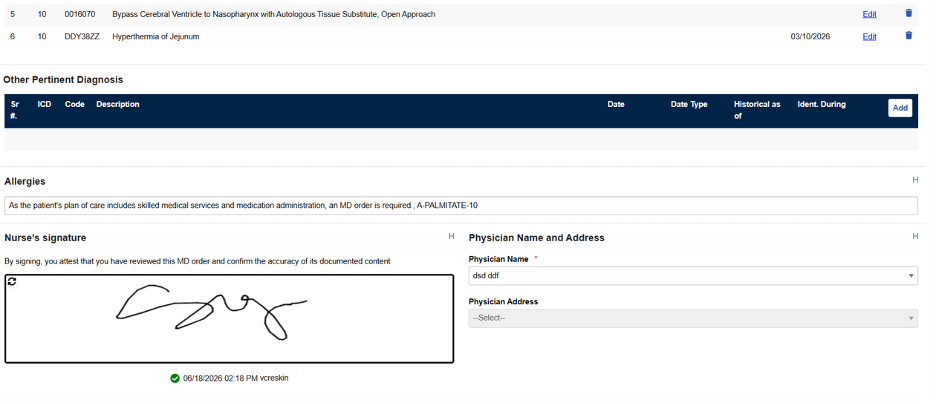
Digital Signatures Enabled: Users provide a digital signature directly on the MD Order. The nurse dropdown disappears — clean, modern, and fully electronic.
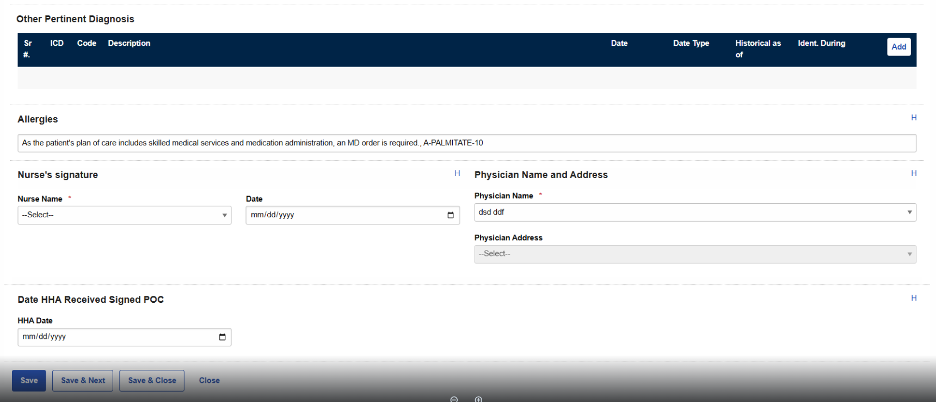
Digital Signatures Disabled (Legacy): Users simply select the signing nurse from a dropdown, just like before. No digital signature components in sight — nothing extra to worry about.
Why It Matters
Compliance requirements and day-to-day operations look different from agency to agency. This update means you're never locked into one workflow — you choose the signature process that matches how your team actually works, without any manual workarounds.
Documentation should support your workflow — not send you hunting across five different screens to piece together the full picture.
Your Plan of Care, Right Where You're Working
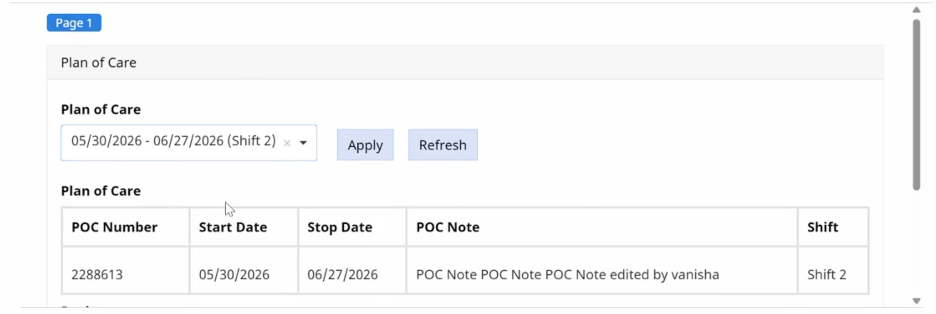
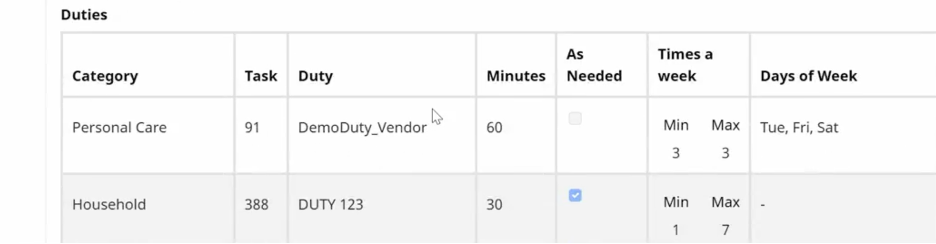
Filling out a form used to mean bouncing back and forth to the patient profile just to double-check Plan of Care details. Not anymore. Agency Admins can now select and view a patient's Plan of Care (POC) directly within the form itself — no navigating away, no losing your place, no re-checking your work across multiple tabs.
How It Works
When building a form, a new POC selection field is available. The dropdown pulls in only the POCs already tied to that patient's profile, so you're always choosing from accurate, relevant options — never guessing.
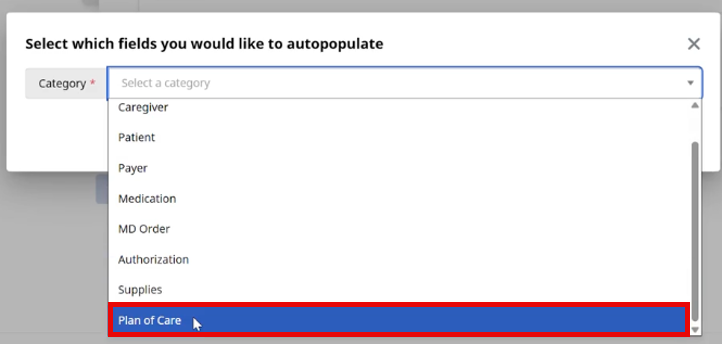
Once you select a POC, the form displays two dedicated grids with the relevant care plan details, giving you full visibility right alongside the rest of your documentation.
-
Refresh on demand. Need the latest duty list for that POC? Pull it in real time, without ever leaving the form.
-
Persistent selection. Once you save, the POC stays linked to the form — so the connection between your documentation and the patient's active care plan is never lost.
Why It Matters
Consistency matters when it comes to care documentation. By pulling Plan of Care details directly into the form, this update ensures what you're documenting always lines up with the patient's actual, active care plan — with far less manual cross-checking and far more confidence that everything matches.
State Specific Release Notes
Conflict Management Enhancements
Great products get better when they're shaped by the people actually using them — and this release is a direct result of feedback from our NY payer early adopters.
For Payers: Deeper Visibility, Built for Compliance
-
See the conversation, not just the conflict. A new read-only Provider Communications tab on the Payer conflict detail page lets you view inter-provider messages tied to a conflict — giving you a clear, auditable record of whether providers actually attempted to resolve cross-agency issues themselves. (Fully read-only — payers can view, not compose or reply.)
-
Richer exports for compliance review. The Payer List View export now includes Claim Line Number, EVV Times, EVV Type, and Distance (miles) — so you get the data you need for conflict analysis without leaving your export file.