Add or Edit Care Insights Questions

Complete the following steps to add a question to Care Insights - Provider & Caregiver, Care Insights, Questions.
-
On the right area of the Questions tab, Click Add Care Insights Question.
-
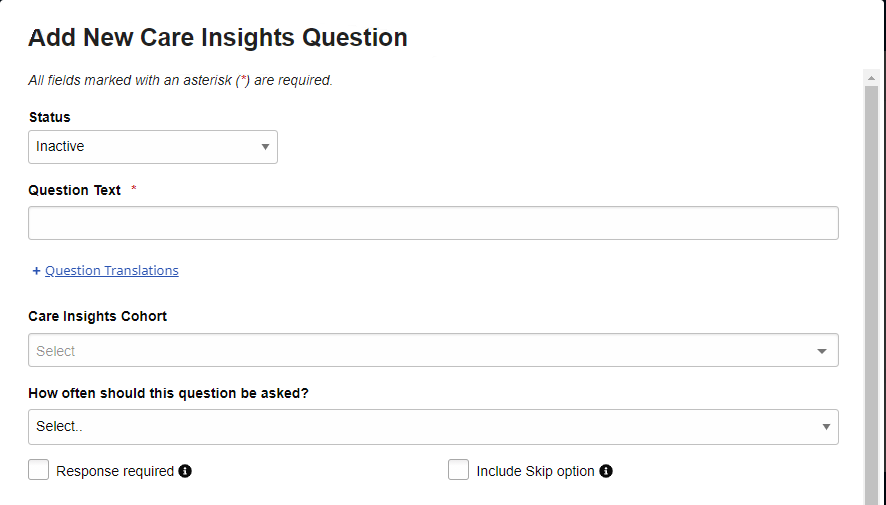
On the Add New Care Insights Question page, complete the following information.
-
Status - Select Active or Inactive. Inactive questions do not appear.
-
Question Text - Enter the question text, for example: Has the Member received a Covid-19 vaccination?
-
+ Question Translations - Click to expand the page to show text entry fields for alternate languages. Type the question’s translation into one or more alternate languages. The question is displayed to the Caregiver in the language selected by the Caregiver for the HHAeXchange+ Mobile (Unified).
-
Care Insights Cohort - Select one or more Cohorts to assign the question to. Caregivers will see the question at clock-out for active Members belonging to any Cohort selected.
-
How often should this question be asked - Select By Visit, Weekly, Monthly, or Yearly. Then choose the number of Visits, weeks, months, or years (for example, a question might be asked every two weeks).
-
Response required - Select to prevent a Caregiver from completing a clock-out if there is no response to a question.
-
Include Skip option - Select to allow a Caregiver to skip a mandatory question they do not have enough information to answer.
-
Require reason for skipping - Select to require a Caregiver to add additional notes that describe the reason for skipping a question.
-
Require additional info - For Yes and No answers, select to require additional details and notes when responding.
-
Trigger an alert - For Yes and No answers, generate an alert in the Care Insights Alerts tab.
-
Alert Priority - For Yes and No answers, select the priority of any alert to be generated. Alerts can be Informational, Moderate, High, or Critical.
-
Alert Text or Description - For Yes and No answers, enter the description to be shown in the Alerts tab, if configured. For example, a Yes answer might read: The Member has received a Covid-19 vaccination while a No answer might read: The Member has not received a Covid-19 vaccination.
See the image for an example of the Add New Care Insights Question page.
-
-
Click Save to finish adding a new question.
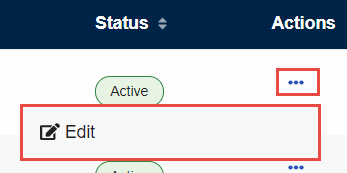
To edit a Care Insights question, click the menu in the Actions column and select Edit. In the Edit Care Insights Question window that appears, make any necessary changes and click Save to finalize.
See the image below for an example of the Edit option in the Actions menu.