Eligibility Check Setup
This feature is activated by HHAeXchange System Administration. Contact HHAeXchange Support Team for details, setup, and guidance.
The Eligibility Check feature under Admin > Contract Setup > Search Contract > Eligibility allows an Agency to determine if a Patient is eligible to receive services before visits can be scheduled. The Eligibility Check may be set to run automatically every X number of days or at the user’s discretion. You can set up Eligibility Checks to run in a batch or as an ad-hoc for a Patient.
Follow the steps below to set up the Eligibility Checks function,
-
Go to Admin > Contract Setup > Search Contract.
-
Locate the Contract and click the Contract Name link.
-
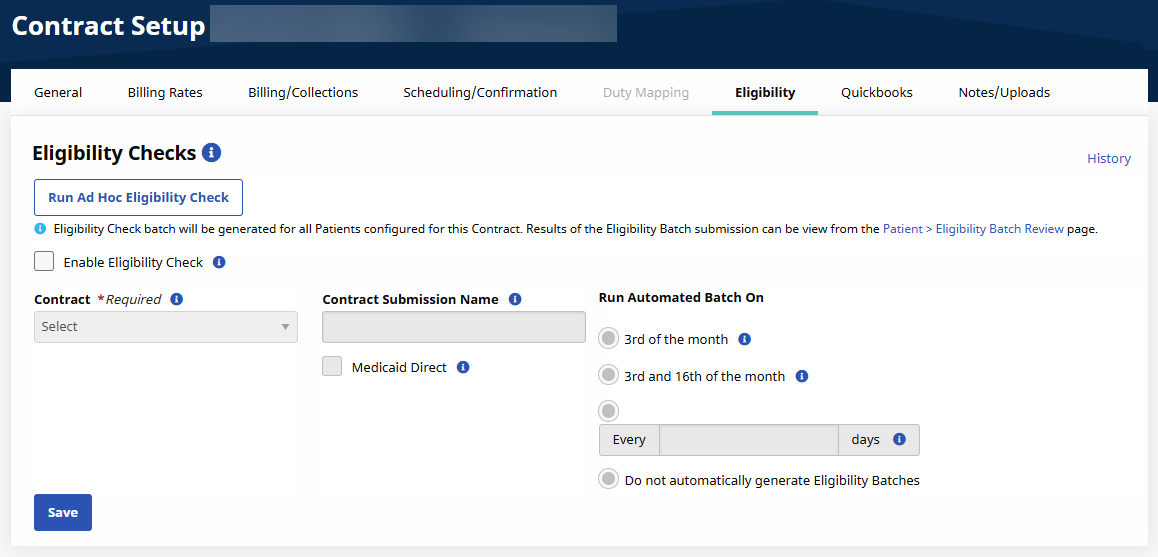
Select the Eligibility tab.
-
Complete the fields described in the following table.
Field Description Enable Eligibility Check
Select checkbox to track the status of Referrals and Patients to ensure they are covered for services.
Select this checkbox to enable edits for all other fields.
Contract
Select the Payer source to be used when performing Eligibility Checks for this Contract’s Patients.
Contract Submission Name
When submitting Eligibility Checks for this Contract, the entry in this field is used instead of the Contract Name as it is configured on the Contract Profile. This field is required.
Enter all associated Contract names that correspond to the primary contract here. Multiple contracts can be entered in this field.
Medicaid Direct
Select this checkbox if the Contract provides service to Patients who are directly covered by Medicaid. When selected, the Eligibility Check process correctly identifies which Patients are covered by Medicaid.
Run Automated Batch On
Use the radio buttons to schedule when to run an Automated Eligibility Check for the Patients assigned to the Contract.
Run Ad Hoc Eligibility Check
Click the Run Ad Hoc Eligibility Check button to generate an Eligibility Check batch for all Patient’s configured for this Contract.
Go to Patient > Eligibility Batch Review page to view the results of the Eligibility Batch submission.
-
Click Save to finalize.