Enable Provider Profile General Page Options
Many HHAeXchange portal features are enabled under Admin > Provider Profile> General. See the table below for more information.
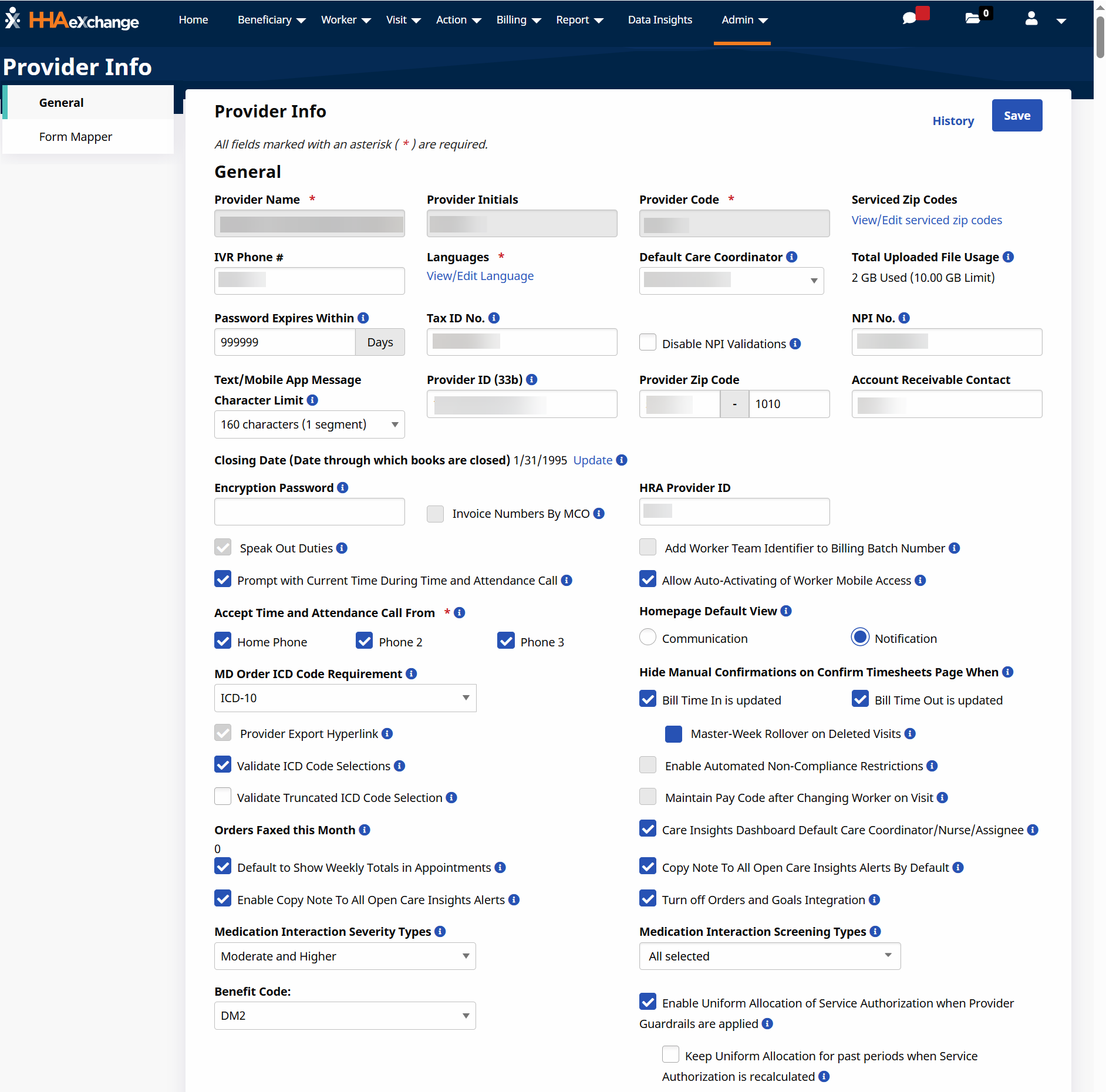
| Enable or Disable Feature | Definition |
|---|---|
| Speak Out Duties | Allows the system to read off the required duties. |
| Prompt with Current Time During Time and Attendance Call | Allows the system to state the current time during clock in and out calls. |
| Accept Time and Attendance Call From | Allows the selection of the phone number allowed for clock in and out calls. |
| MD Order ICD Code Requirement | Select the type of ICD Diagnosis Codes required and applied to Patient MD Orders (e.g., 485 Orders). |
| Provider Export Hyperlink | Allows the Provider Export Hyperlink to be visible in the batch search grid. |
| Validate ICD Code Selections | Validates codes assigned to each Patient satisfy the code validation. |
| Validate Truncated ICD Code Selection | Restricts users from adding ICD Codes with validation Flag 10. |
| Orders Faxed this Month | Providers can fax clinical orders to physicians for review. Displays the count of faxed orders for the current month. |
| Default to Show Weekly Totals in Appointments | Displays the Show Weekly Totals view in the Appointments page. |
| Enable Copy Note To All Open Care Insights Alerts | Allows use of the Copy Details to Open Alerts checkbox in the Care Insights alert note. |
| Medication Interaction Severity Types | Allows information to sync from the eDoc to the orders and goals tab of the Integrated MD Orders. |
| Medication Interaction Screening Types | Allows Provider to turn results for different interaction types on and off. If the interaction type is turned off, corresponding results do not display when a user checks interactions, even if details in their profile would indicate an interaction of that type. |
| Benefit Code | Allows selection of the Benefit Code. |
| Enable Uniform Allocation of Service Authorization when Provider Guardrails are applied | Displays the Uniform Allocation (Hours) option for Patient Service Authorizations with Provider Guardrails enabled to set the Allocated Hours to an equal value for each Guardrail Period. |
| Keep Uniform Allocation for past periods when Service Authorization is recalculated |
Displays when the Enable Uniform Allocation of Service Authorization when Provider Guardrails are applied option is selected. Allows recalculation of the Allocated Hours when triggered. Past periods do not update when triggered. |
| HRA Provider ID | Allows users to enter HRA Provider ID. |
| Add Worker Team Identifier to Billing Batch Number | Allows billing batches generated based on the Worker Team include the first two letters of the selected Worker Team in the Billing Batch Number. |
| Allow Auto-Activating of Worker Mobile Access | Allows a Provider to configure your system to automatically Activate Workers Mobile Access. The switch applies to workers who switched from Active status to Non-Active status and then back to Active status. |
| Homepage Default View | Allows you to select which homepage view displays: Communication or Notification. |
| Hide Manual Confirmations on Confirm Timesheets Page When |
Allows selection of Bill Time In is Updated or Bill Time Out is Updated. Master-Week Rollover on Deleted Visits option becomes available. |
| Enable Automated Non-Compliance Restrictions | Allows the system to automatically generate a Restriction for Non-Compliant on the Worker's Absence/Restriction tab for all dates where the Worker is listed as Non-Compliant based on the Provider's compliance rules. After created, you are unable to schedule that worked for the days listed, regardless of the workers compliance status. They can be scheduled for the day after the restriction is removed. |
| Maintain Pay Code after Changing Worker on Visit | Allows the system to maintain the selected Worker Pay Code on the visit, even after changing the Worker. If the next Worker selected does have the Employment Type configured to match the original Pay code, the Pay Code is unselected and the user is forced to choose the Pay Code manually. If unselected, the system changes the Pay Code automatically based on the Default Pay Code configuration of your Payroll Setup. |
| Care Insights Dashboard Default Care Coordinator/Nurse/Assignee | Allows you to assign a default value for either the Care Coordinator, Nurse, or Assignee field on the Care Insights Dashboard. |
| Copy Note To All Open Care Insights Alerts By Default | Allows the Copy Details to Open Alerts checkbox in the Care Insights alert note is selected by default. |
| Turn off Orders and Goals Integration | Information syncs or does not sync from the eDoc to the orders and goals tab of the integrated MD Order. |
| Medication Interaction Screening Types | Allows Providers to turn results for different interaction types on and off. If an interaction type is turned off, corresponding results do not display when a user checks interactions, even if details in their profile indicates an interaction of that type. |