EVV Validation in Office Profile
In the state of Texas, each program provider and financial management services agency (FMSA) maintains a Provider Profile of information that identifies the program provider or FMSA for EVV transactions and other processes. Some of this information is only needed when specified by state requirements for EVV required services.
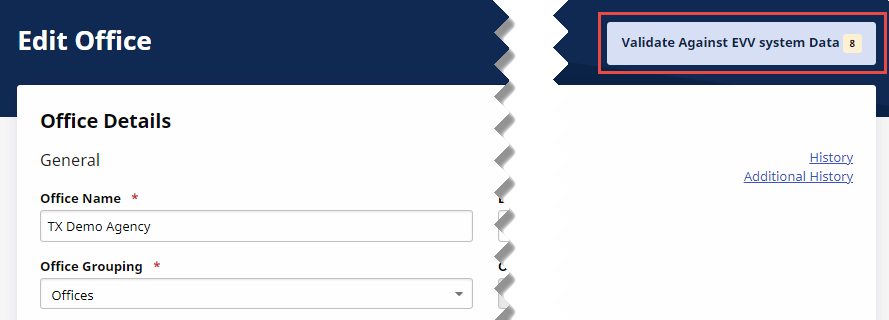
To manage information to meet state requirements, click Validate Against EVV system Data at right of the Edit Office page under Admin > Office Setup > Search Office > find and select the office.
On the Validate Against EVV System Data page, select to either keep the Current data (in the left column) or select to keep the EVV System data (in the right column), retrieved from the EVV Master Data System.
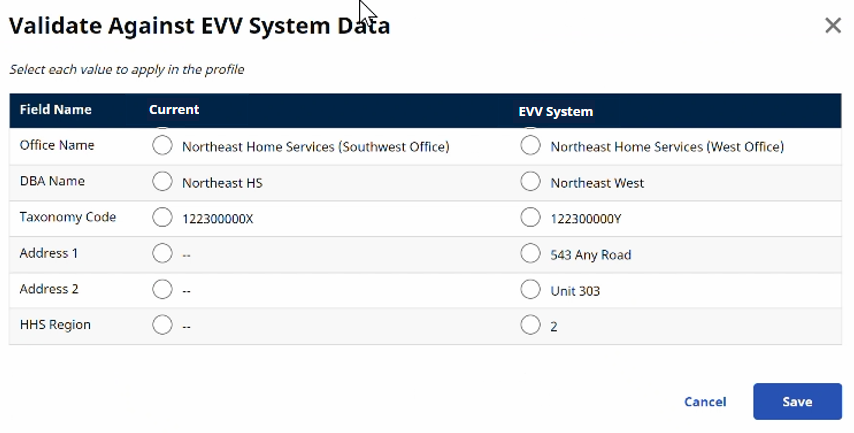
Manually enter and edit all fields with the Current radio button selected on the Edit Office page. All fields with the EVV System radio button selected become unavailable to edit because the information is pulled from the master EVV database.