How can a system user reset their HHAeXchange login password?
Users can reset their own password directly from the HHAeXchange client login page by following the steps below.
-
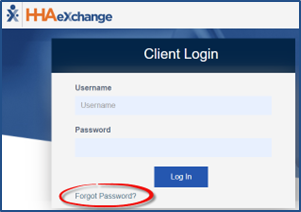
From the login screen, click Forgot Password to start a password reset.
-
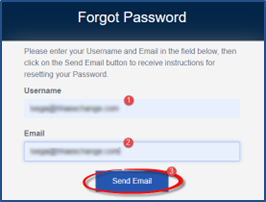
Enter your Username and Email address. Click Send Email.
-
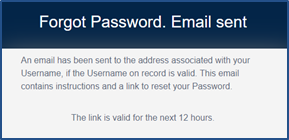
The system issues an alert announcing that an email has been sent to the user. This email contains instructions and a link for the user to reset their password. This link is valid for 12 hours from the time sent.
-
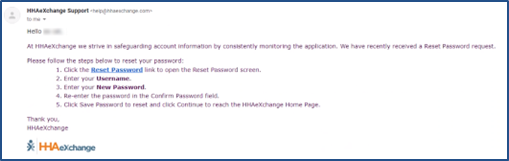
When the system user receives the email, instruct them to click the Reset Password link and follow the prompts.
-
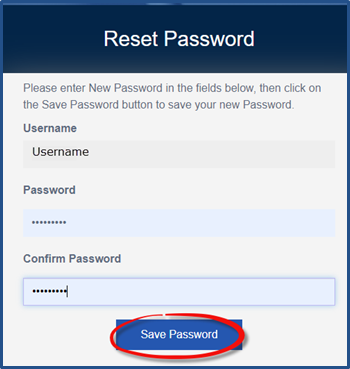
On the Reset Password page, the Username field is auto filled and cannot be edited.
-
Enter the new password and reenter it in the Confirm Password field.
-
Click Save Password to continue.
-
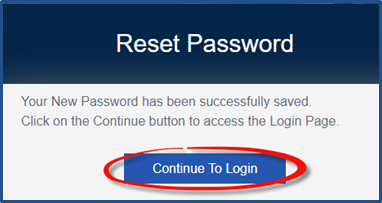
The system alerts the user that their password has been reset successfully. From here, the user can click the Continue to Login button to go to the login page.
Password requirements
Password requirements are only enforced when a password is changed. Existing passwords are not affected. For full details on resetting a password for a system user, refer to the Password Reset by Agency Administrator topic.
New passwords:
-
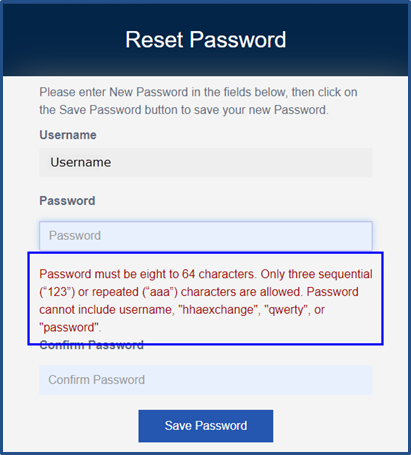
Must be at least eight characters long.
-
Cannot have more than three repeated characters
-
Valid: 123, ABC, aaa, 111, 333
-
Invalid: 1234, ABCD, aaaa, 1111, 3333
-
-
Cannot contain the following words or characters:
-
Username/hhaexchange/qwerty/password.
-