Case Broadcasting via Mobile App
The Mobile App Case Broadcasting feature allows Coordinators to set broadcasts of a single visit (Single shift) or a Master Week (Permanent shift) to their Agency’s Caregivers. Caregivers see these Broadcasts on their Mobile App where they can view and press the checkmark icon (express interest) or the X icon (uninterested) to open work shifts.
-
When interested in an open shift, the request is logged in the Enterprise app and sent to the Broadcast Dashboard for further assignment by the Coordinator.
-
When uninterested in an open shift, the open shift no longer displays on the Caregiver’s Mobile App or on the Enterprise app.
Coordinators sort through past Broadcasts and Caregiver requests, and either revoke or rebroadcast a past broadcast; or assigns or rejects the Caregiver’s requests.
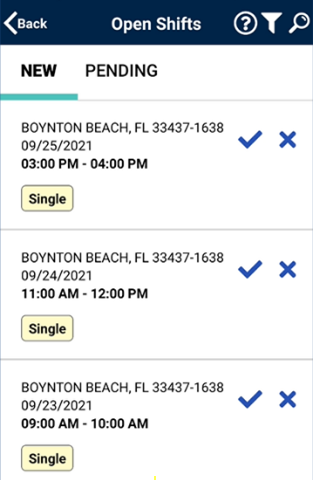
The Caregiver must be logged in to the Mobile App to review Case Broadcasts in the Open Shifts screen.