Create and Manage Caregiver Chat Topics
Topics or categories are created and managed via the Reference Table Management functionality under Admin > Reference Table Management.
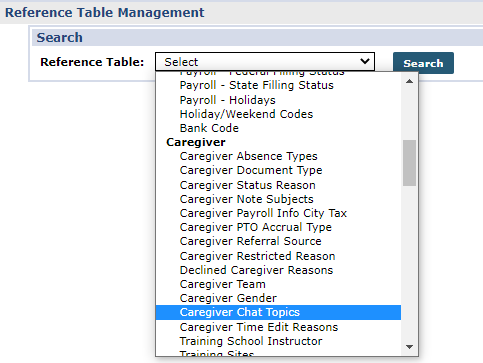
On the Reference Table Management page, select Caregiver Chat Topics from the Reference Table field and click Search.
Providers can choose to add a custom Topic or select from a set of preconfigured Topics on the Caregiver Chat Topics Reference Table. Click the Add button to add a Topic or Click the Topic link to edit an existing one custom or pre-configured.
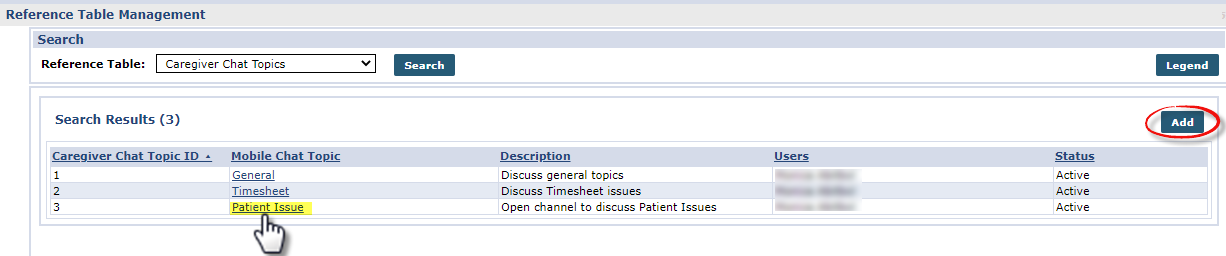
Pre-configured Topics include General, Timesheet, Patient Issue, Scheduling, Mobile App Issue, and EVV.
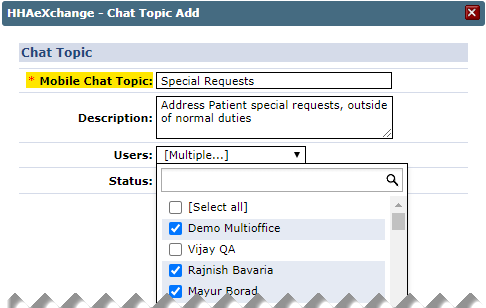
On the Chat Topic Add window, enter a topic in the Mobile Chat Topic field .
Enter a Description and assign specific Users by selecting Agency users from the multi-select dropdown field.
Click Save.
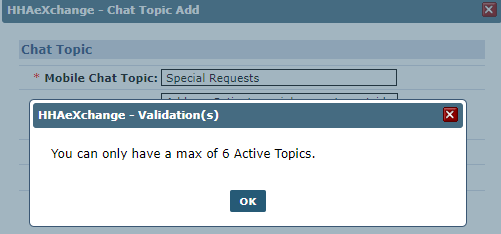
The system allows up to 6 active Topics at a time.
Attempting to save an additional active Topic generates a validation alert.
In this case, deactivate an existing active Topic and make the new one active.
In addition, the system does not allow duplicate Topics.
A validation alert is issued if a Topic already exists in the system.

Topics are displayed on the Caregiver Chat page based on assignment on the Caregiver Chat Topics Reference Table. All active mobile-enabled Caregivers see all active Topics on the Mobile App.