Fax MD Orders and Interim Orders
MD Orders and Interim Orders can be faxed directly from the system. To access a Patient’s MD Orders and Interim Orders, go to the Patient MD Order page under Patient > Patient Search > MD Orders.

This feature is activated by HHAeXchange System Administration. Contact HHAeXchange Support Team for details, setup, and guidance.
This category covers the MD Orders and Interim Orders fax functionality in the HHAeXchange system.
For comprehensive guidance and instructions on how to create and manager MD Orders and Interim Orders, refer to the Clinical Section.
In accordance with HIPAA Regulations, a fax cover sheet is added to the Fax MD Order and Interim Order fax transmissions intended to safeguard sensitive information such as Protected Health Information (PHI). The following images illustrate samples of the cover sheets for MD Order and Interim Order, respectively.
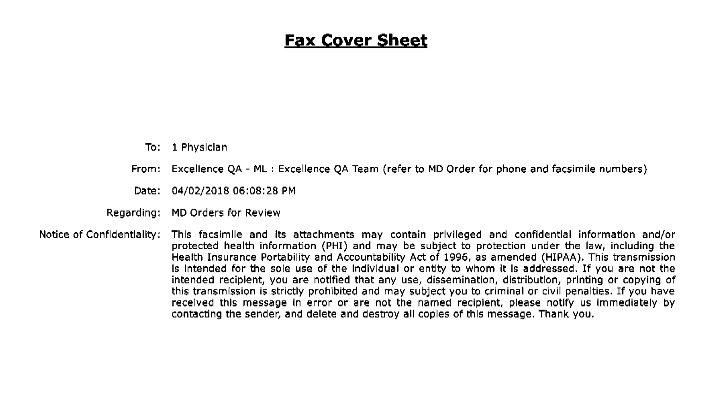
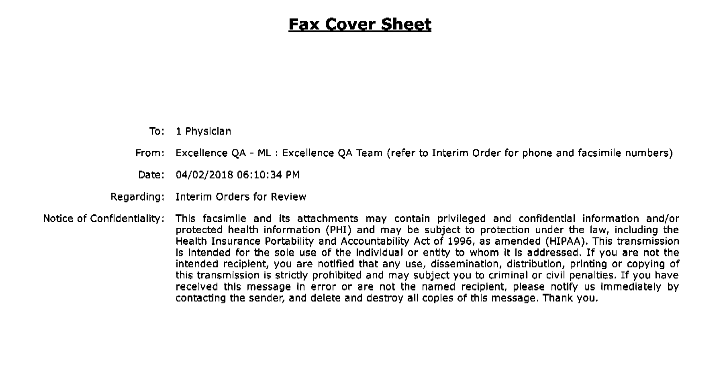
In the case of multiple orders, if the To and From fields are the same, then one cover sheet suffices; however, if these fields differ then two separate cover sheets are issued.
The MD Orders and Interim OrdersStatus must have a Complete status for the Print or Fax options to be available. Items with an In Progress status can neither be printed nor faxed.
Once an MD Order is Complete, the Fax and Print options become available. The various icon colors indicate whether the fax functionality is available. To fax an MD Order, click the Fax icon to the right of the Print button. A black-colored icon indicates that the order is available to fax.
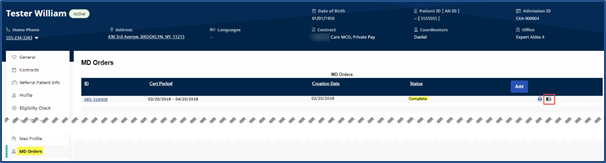
Click the Legend button to access the descriptions of the Status colors.
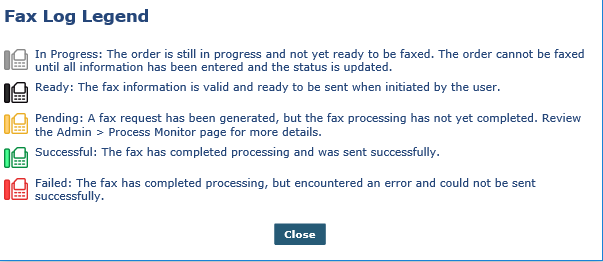
Once faxed, the icon appears in orange and the Status changes to Sent. Hover over the icon to view fax details such as Date Sent, User (Sender), and the Fax Status.

Faxes can only be sent to an assigned Physician with an associated fax number on record.