Patient Forms Feature
Forms can be loaded for a patient via the Document Management page or through a Patient Note.
Refer to the following sections for instructions.

-
Search and locate the patient under Patient > Search Patient.
-
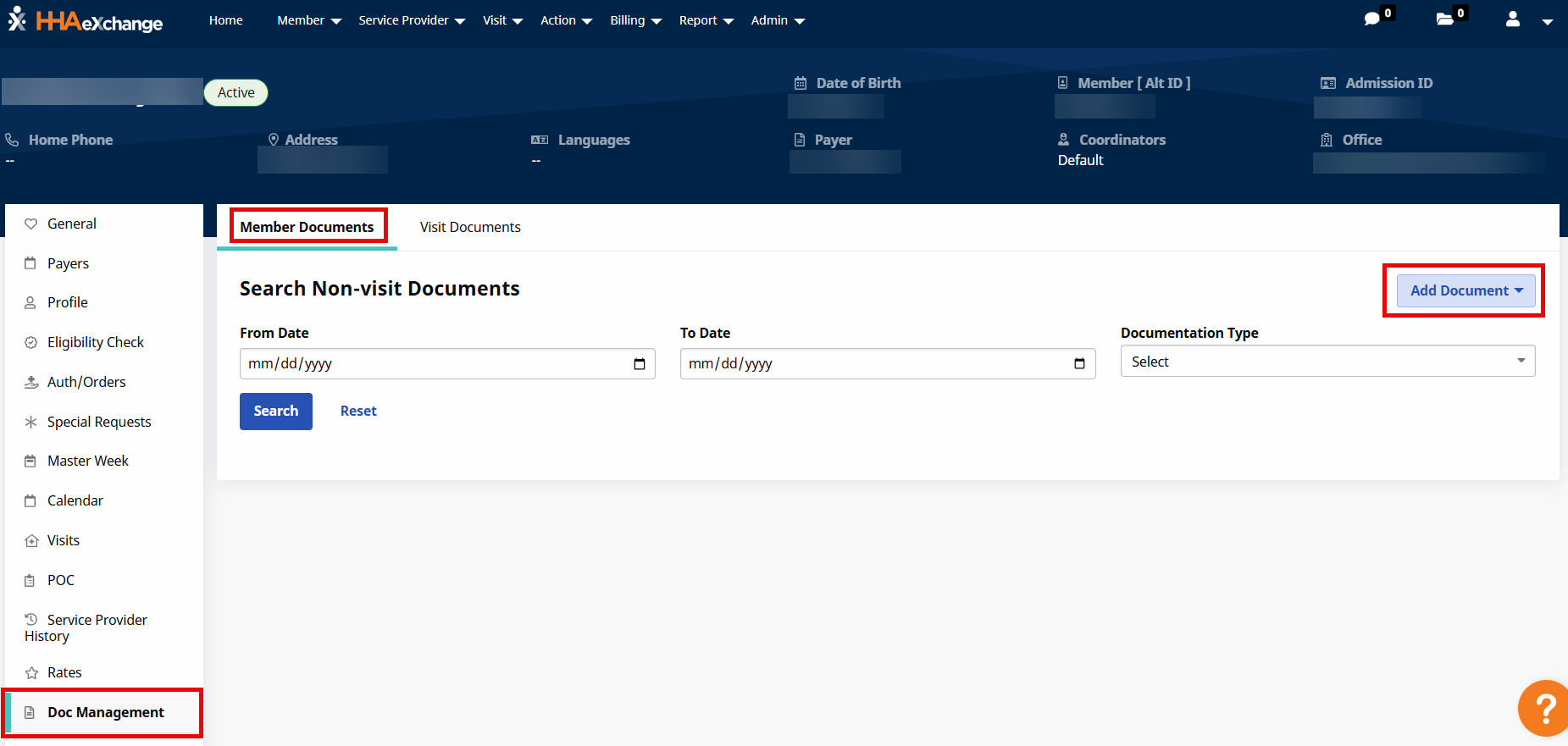
Select the Doc Management page for the patient.
-
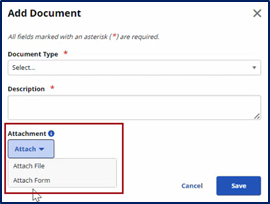
On the Patient Documents tab, click the Add Document button to open the Add Document window. From the Attachment field, select Attach Form.
-
The Attach Form window opens with a list of forms available for the patient. This list includes forms loaded from the HHAeXchange Forms tool and any existing forms loaded from another source. Select the applicable form from the menu to open the form in fillable PDF format.
Basic information (such as patient name, address, Medicaid ID, etc.) is auto-populated into the form, derived from the data in the system. Some forms, where tasks and schedules are applied, use the entered date to populate certain fields.
Auto-populated fields can be edited, if needed.
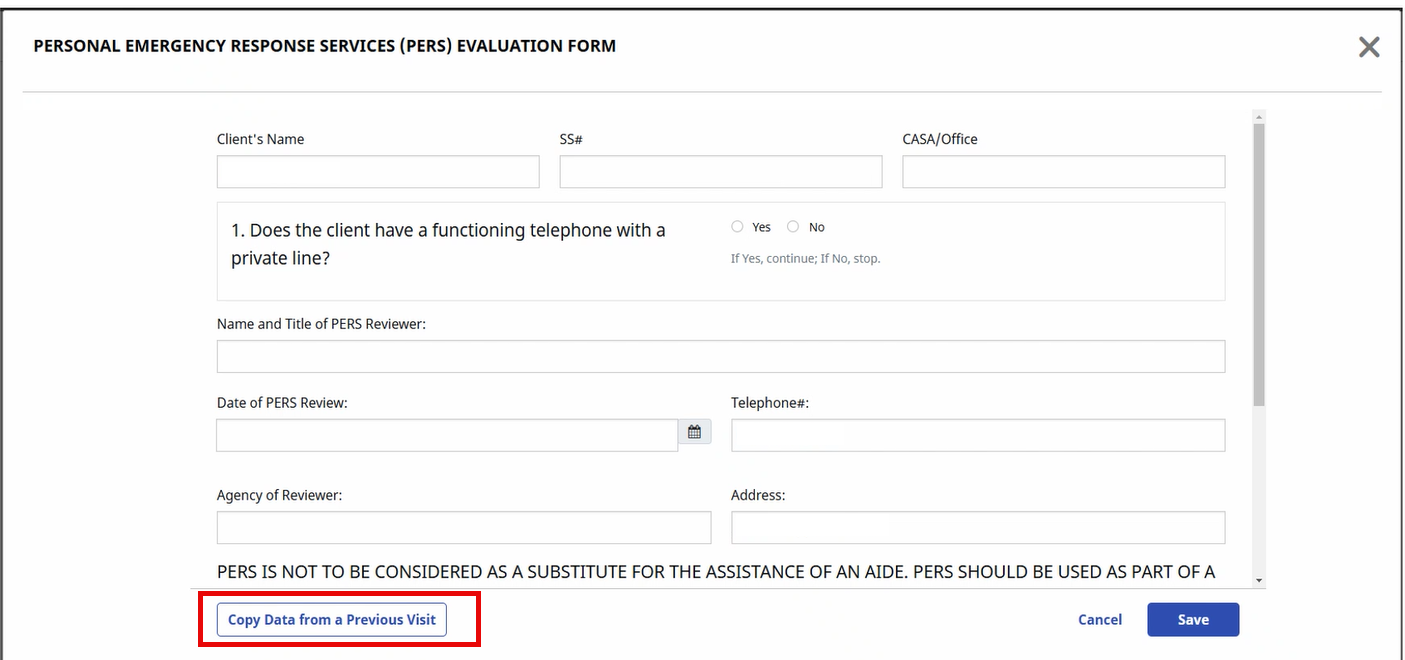
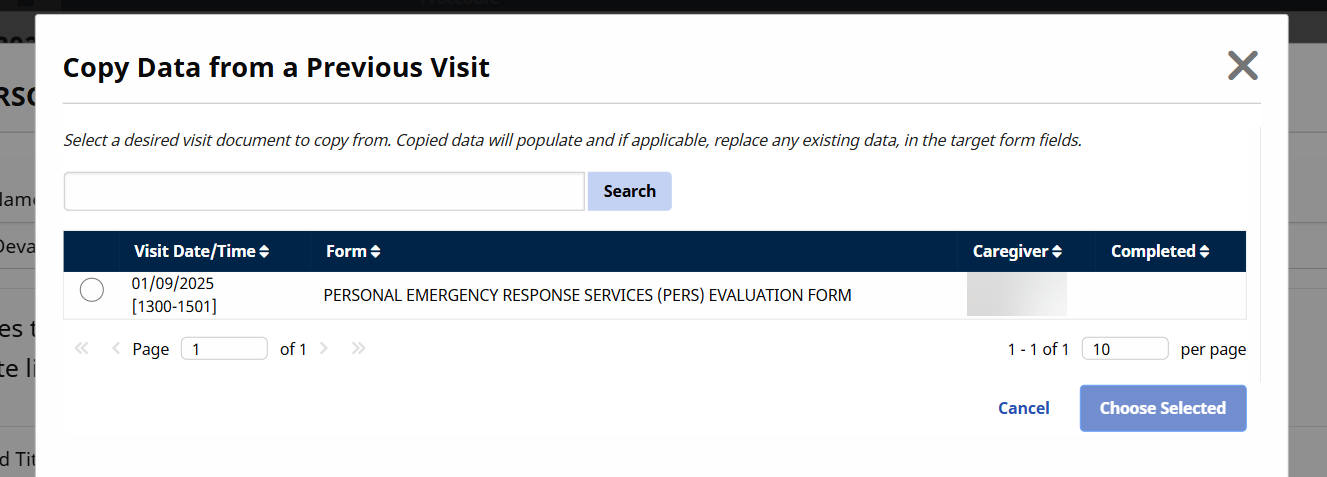
Use the Copy Data from a Previous Visit button to select data from another visit to populate on the opened form. On the window that opens, select the visit from the list and then select the Choose Selected button. The correct fields populate.
-
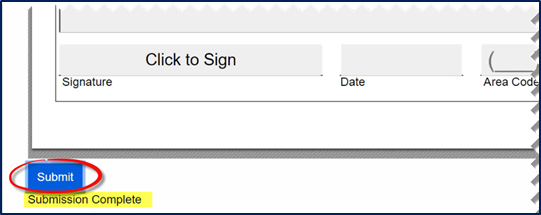
To save a completed form, click the Submit button at the bottom-left of the form. Once submitted, a Submission Complete shows that the form has been successfully entered. Click the Close button (at the bottom-right, not shown) to exit the form.
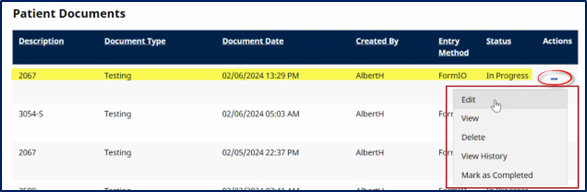
The form displays on the patient’s Document Management page.
Click the Ellipsis… under the Actions column to view, edit, and change the form status.
Available actions vary according to the Status of the form. An In Progress status allows for editing while a form marked Completed can only be viewed (read-only).
To print a form, select the View or Edit option from the Actions menu to open the form. Click the Print button at the bottom-left of the form to print.
-
Search and locate the patient under Patient > Search Patient.
-
Select the General page for the patient.
-
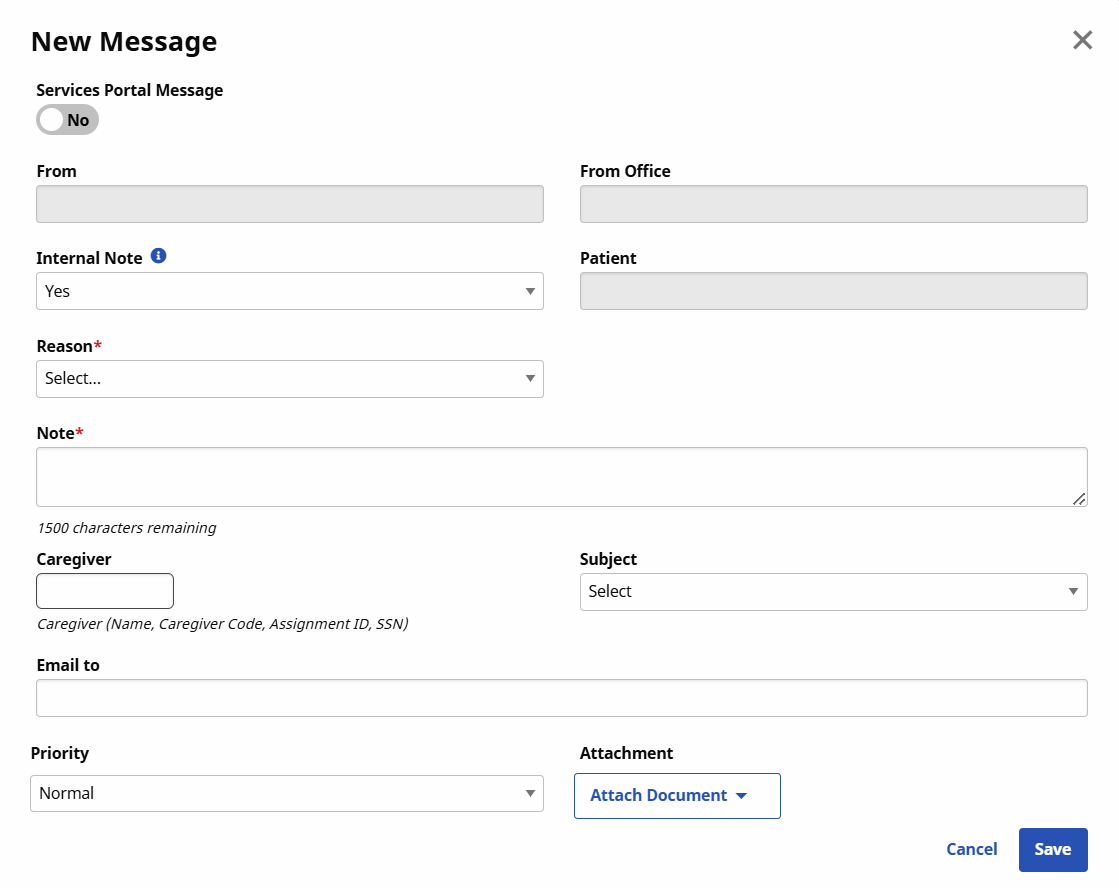
Scroll to the Notes section and click the New Message button to open the New Message window.
-
On the New Message window, select the Reason and enter a Note, required by the system. Select the Subject and click the Attach Form option under the Attachment field.
-
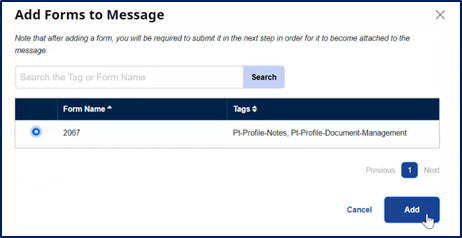
The Add Forms to Message window opens. Click the radio button to select the form and click the Add button.
-
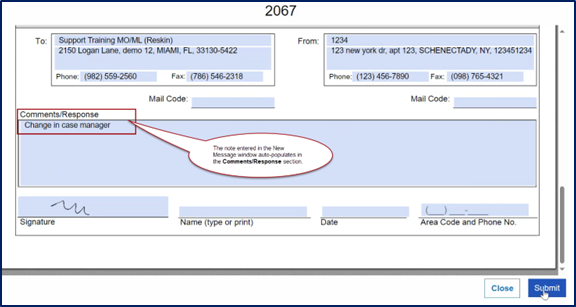
The form opens with auto-filled fields to include the added Note which appears in the Comments/Response window. From here, make further edits if needed. To finalize, Click Click to Sign in the Signature field (and sign on the pop-up window) and click Submit.
-
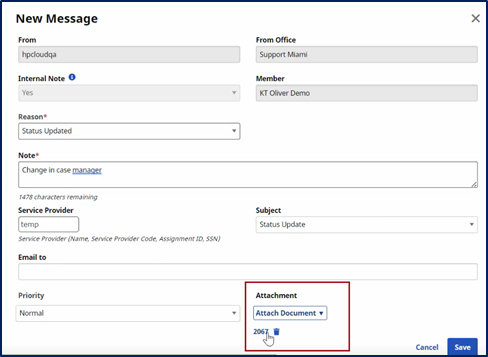
The form window closes routing back to the New Message window, where the added form is seen under the Attachment field. An additional attachment can also be included. To include an attachment, select the Attach Document option and follow the prompts. When complete, click the Save button to finalize.
-
The entry appears in the patient’s notes section providing high-level details, as shown below. The document and attachment are synced to the Document Management page, where a user can manage and update status.

The following forms have been scanned, imported, and available to agencies:
|
Form Number / Name |
State(s) |
Description / Use |
|---|---|---|
|
2067 |
Texas |
Communication tool between provider and case manager; used to report updates, issues, changes in condition, or requests affecting the care plan. |
| 3052 | Texas | Practitioner’s Statement of Medical Need; certifies medical necessity for personal assistance services. |
| 3054/3054-S | Texas | Service Delivery Record form, used by Caregivers to document services and hours worked for recipients of home and community support services. 3054-S is the Spanish version. |
| 3599 | Texas | Habilitation Service Provider Orientation/Supervisory Visits form, used when orienting a habilitation or PAS/HAB service provider by telephone or in person, or when providing an annual supervisory visit. |
| Attendant Orientation / Supervisory Visit Forms | Texas | Documentation of attendant/caregiver orientation, competency checks, and supervisory visits to ensure service quality. |
| M27 | New York | Physician’s Order for Personal Care/Consumer Directed Personal Assistance Services (PCS/CDPAP); certifies medical necessity for homecare based on medical assessment. |
| M27R | New York | Physician’s Reassessment for Personal Care/Consumer Directed Personal Assistance Services; used for periodic recertification of medical necessity and updates to the care plan. |
| M27T | New York | Authorization to Release Medical/Treatment Information, allows HRA to obtain medical records from healthcare providers to determine eligibility for benefits or services. |
| PAS Individual Evaluation / Service Plan | Texas | Evaluates functional needs and establishes the service plan for Personal Assistance Services programs. |
| PERS Documentation (Personal Emergency Response Service) | Nationwide | Documents eligibility, installation, monitoring, and continued use of emergency alert devices for at-risk individuals. |
| PHC Individual Evaluation / Service Plan | Texas | Functional assessment and service plan for the Primary Home Care program, determining authorized PAS services. |
The table below provides the field mapping across all forms. The first column is the form field, the second column is a field description, and the third column is the path where the information comes from in the system to pre-fill the forms.
|
Field |
Field Description |
Path/Navigation |
|---|---|---|
|
Individual Name |
Patient's name in their profile |
Patient > Profile > Name |
|
Individual Number |
Patient’s Medicaid ID |
Patient > Profile > Admission ID |
|
Individual Address |
Patient's primary address |
Patient > Address (primary) |
|
Attendant A, B, C |
Name and code of caregivers in patient's history |
Patient > Caregiver History > Caregiver Name + caregiver code |
|
Tasks |
Most recently created plan of care for the patient |
Patient > Plan of Care (most recently created plan) |
|
Agency Name |
Name of the agency in its profile |
Agency Profile > Agency Name |
|
Vendor No. |
Provider contract number in authorization settings |
Authorizations > Edit Authorization > Provider Contract Number |
|
Attendant Schedule (A, B, C) |
Visits scheduled corresponding to selected caregivers |
Patient > Masterweek (visits corresponding with the caregivers selected above) |
|
Total HRS |
Sum of daily or weekly totals |
Sum daily/weekly totals |
|
From > Agency Name |
Name of the agency in its administrative profile in response |
Admin > Agency Profile > Agency Name in response |
|
From > Agency Address |
Address of the agency in its office setup in response |
Admin > Office Setup > Address in response |
|
From > Phone |
Phone number of the agency in its office setup in response |
Admin > Office Setup > Phone in response |
|
From > Fax |
Fax number of the agency in its office setup in response |
Admin > Office Setup > Fax in response |
|
Case Name |
Name of the patient in their profile |
Patient > Patient Name |
|
Case No. |
Alternate patient ID based on selected contract |
Patient > Contracts > Alt Patient ID |
|
Category 2 |
Additional contract category in patient's profile |
Patient > Contract |
|
Address (Street, City, State, Zip Code) |
Default address of the patient |
Patient > Address (Default to primary) |
|
Area Code and Telephone No. |
Phone number of the agency in its office setup in response |
Admin > Office Setup > Phone in response |
|
Supervisor |
Name and code of caregivers in patient's history |
Patient > Caregiver History > Caregiver Name + caregiver code |
|
Contract No. |
Provider contract number in authorization settings |
Authorizations > Edit Authorization > Provider Contract Number |
|
Employee Name/No |
Name and code of caregivers in patient's history |
Patient > Caregiver History > Caregiver Name + caregiver code |
|
County |
County in the patient's address (defaulting to current address) |
Patient > Profile > Address > County |
|
Task(s) Assigned |
Most recently created plan of care for the patient |
Patient > Plan of Care (Use most recently created plan) |
|
Scheduled or Authorized Hours > In |
Start time in the master week for the patient including daily variable hours |
Patient > Master Week |
|
Scheduled or Authorized Hours > Out |
End time in the master week for the patient including daily variable hours |
Patient > Master Week |
|
Scheduled or Authorized Hours > Total |
Total hours scheduled in all overlapping master weeks |
Patient > Master Week |
|
Total Authorized Hours Per Week |
Sum of the total hours above |
Sum of the above totals |
|
Record of Time > In |
Visit EVV start time in the patient's calendar |
Patient Calendar > Visit Start Time |
|
Record of Time > Out |
Visit EVV end time in the patient's calendar |
Patient Calendar > Visit End Time |
|
Record of Time > Total Daily Time |
Total daily time recorded in the patient's calendar |
Visit Start Time minute Visit End Time above |
|
Monthly Total of Hours |
Sum of the above totals |
Sum of the above totals |
|
Habilitation Provider Schedules > Schedule 1 > Type of Service |
Schedule in the master week based on service code |
Patient > Masterweek |
|
Habilitation Provider Schedules > Schedule 1 > Schedule |
Schedule in the master week based on service code |
Patient > Masterweek |
|
Habilitation Provider Schedules > Schedule 1 > Weekly hours |
Schedule in the master week based on service code |
Patient > Masterweek |
|
Habilitation Provider Schedules > Schedule 2 > Type of Service |
Schedule in the master week based on service code |
Patient > Masterweek |
|
Habilitation Provider Schedules > Schedule 2 > Schedule |
Schedule in the master week based on service code |
Patient > Masterweek |
|
Habilitation Provider Schedules > Schedule 2 > Weekly hours |
Schedule in the master week based on service code |
Patient > Masterweek |
|
Response > To > Agency Name |
Name of the agency in its administrative profile |
Admin > Agency Profile > Agency Name |
|
Response > To > Agency Address |
Address of the agency in its office setup |
Admin > Office Setup > Address |
|
Response > To > Phone |
Phone number of the agency in its office setup |
Admin > Office Setup > Phone |
|
Response > To > Fax |
Fax number of the agency in its office setup |
Admin > Office Setup > Fax |
|
Caregiver Name |
Name of the Caregiver if Caregiver Profile matches username |
Caregiver Profile |
|
Patient Gender |
Gender of Patient |
Patient Profile > Profile |
|
Patient SSN |
Patient Social Security Number |
Patient Profile > Profile |
|
Patient DOB |
Patient Date of Birth |
Patient Profile > Profile |
|
Patient Start of Care Date |
Start of care date for Patient |
Patient Profile > General > Service Request Start Date |
|
Patient Emergency Contact Details |
Emergency contact name, relationship, primary phone |
Patient Profile > Profile > Emergency Contact |
| Medication Profile | Patient Medications | Patient Profile > Med Profile |
| Diagnosis | Patient Diagnosis Codes | Patient Profile > Clinical Info > Diagnosis |