MD Order Tracking Added to Referral

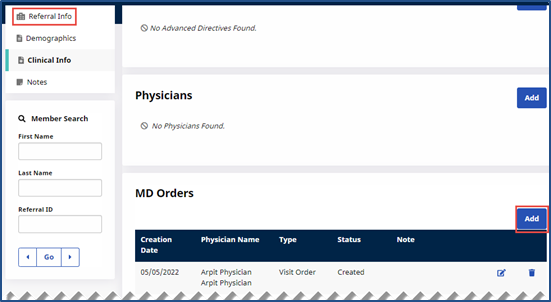
MD Orders can be tracked at the referral stage. This MD Order information is carried over when a Referral is converted into a Patient. The MD Order grid is available under Referral Profile > Clinical Info with add, edit and delete functionality.
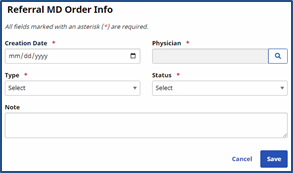
When adding or editing an MD Order, from either the Referral or Patient page, the MD Order Info Type and Status field values are populated in Reference Tables, as explained in the following section. The Note field is expanded in size and character limit to accommodate more text.
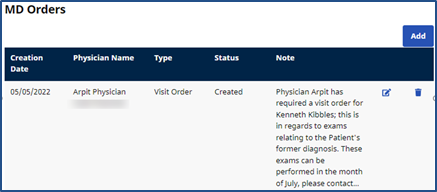
On the MD Order Info window, only two lines of a Note displays with a Show More ellipse. Click the ellipse to open the window displaying the full text message.
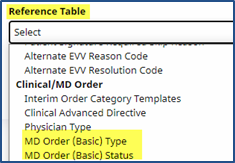
MD Order options for MD Order (Basic) Type and MD Order (Basic) Status are added via the Reference Table Management function under Admin > Reference Table Management under the Clinical/MD Order category.
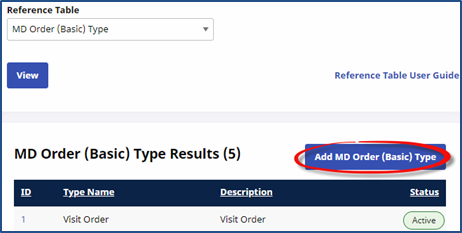
All current MD Order Types are standard and available for all Providers. Although these standard Types are un-editable, Providers can add customized types. Click the Add MD Order (Basic) Type button to add a new MD Order (Basic) Type.
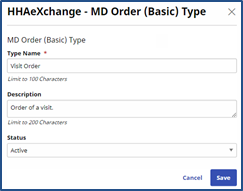
Complete the MD Order (Basic) Type fields when the window opens. Click the Save button to finalize.
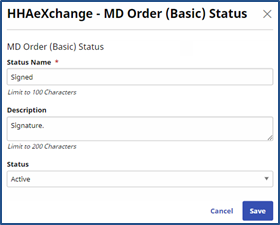
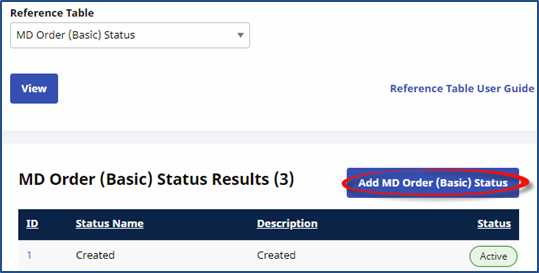
All current MD Order Status options are standard and available for all Providers. Although these standard options are un-editable, Providers can add customized options. Click the Add MD Order (Basic) Status button to add a new MD Order (Basic) Status.
Complete the MD Order (Basic) Status fields when the window opens. Click the Save button to finalize.