Navigation Panel
The Navigation Panel allows users to navigate between the different sections or modules of the HHAeXchange system.

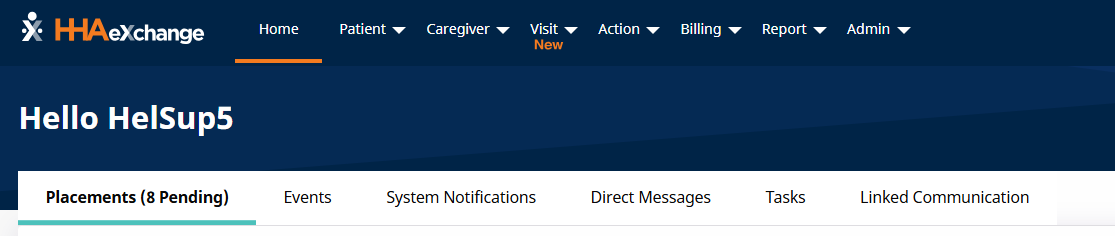
The full navigation panel contains eight modules that can be accessed based on user permissions. Providers can assign access to users for specific modules. For example, a Collections employee handling invoicing Visits may not need access to the Admin modules, so the permission to access Admin functions can be deactivated for that user.
The Home page tabs provide internal communications tools collectively used to handle HHAeXchange communications between internal employees and with all active Caregivers.
-
The Placements tab communicates pending Patient cases to Providers from authorizing Payer(s) as new Placements; agencies can review Patient cases before accepting or rejecting the Patient.
-
The Events tab notifies Providers of Authorizations and Notifications.
-
The System Notifications tab is a communications hub used to handle HHAeXchange communications between internal employees and with all active Caregivers.
-
The Direct Messages tab allows Providers to create and review internal messages as well as send messages to Caregivers externally.
-
The Tasks tab allows Provider users to create and send tasks (to themselves or others) with due date and priority definitions on the system.
-
The Linked Communications tab is used primarily by Providers who service Linked Contract Patients.
The following table offers a high-level summary of the actions available through each module.
|
Module |
Description |
|---|---|
|
Patient |
The Patient module allows users to manage Patients and schedule visits. |
|
Caregiver |
The Caregiver module allows users to create and manage Caregivers and assign them to visits. |
|
Visit |
The Visit module allows users to search for scheduled visits and manage visits. |
|
Action |
The Action module allows users to search for Availability, Pending Placements, Payroll, Payer Communications, and many other features. |
|
Billing |
The Billing module allows users to handle all aspects of the billing process. |
|
Report |
The Report module allows Providers to run reports based on specified filters and compile specific information into documents that may be saved outside of the software. |
|
Admin |
The Admin module allows users to manage key components of the system, including Role Permissions. |