Alabama: Configure EVV Aggregation
Alabama Medicaid has certified HHAeXchange to submit Electronic Visit Verification (EVV) data on behalf of Providers who render Personal Care Services (PCS) and/or Home Health Care Services (HHCS). Providers are subject to Alabama Medicaid EVV guidelines and must ensure visits are recorded in the aggregator.

Providers must complete the steps outlined below to configure HHAeXchange for EVV Aggregation. Failure to comply may result in no data sent to the aggregator.
-
Inform the state aggregator of the decision to use AltEVV.
Complete the AL EVV Attestation form. For more information, please refer to Alabama Medicaid Provider Enrollment and Forms. Refer to the AltEVV/3rd Party Vendor Selection and Information table below for Vendor Information to be added to the form.
AltEVV/3rd Party Vendor Selection and Information Vendor Information:
Vendor:
HHAeXchange
EVV Vendor Contact Name:
HHAeXchange EVV Aggregation Support
EVV Vendor Contact Email:
EASTeam@hhaexchange.com
EVV Vendor Contact Phone Number:
855-400-4429
EVV Product Name:
HHAeXchange
-
Complete the following steps in the HHAeXchange system:
Go to Admin > Contract Setup > New Contract to create a contract.
Skip this step if the contract already exists in HHAeXchange.
-
Providers are identified by their 10-digit Rendering National Provider ID (NPI) in the State aggregator. Additionally, certain programs require 10-digit Billing National Provider ID (NPI).
-
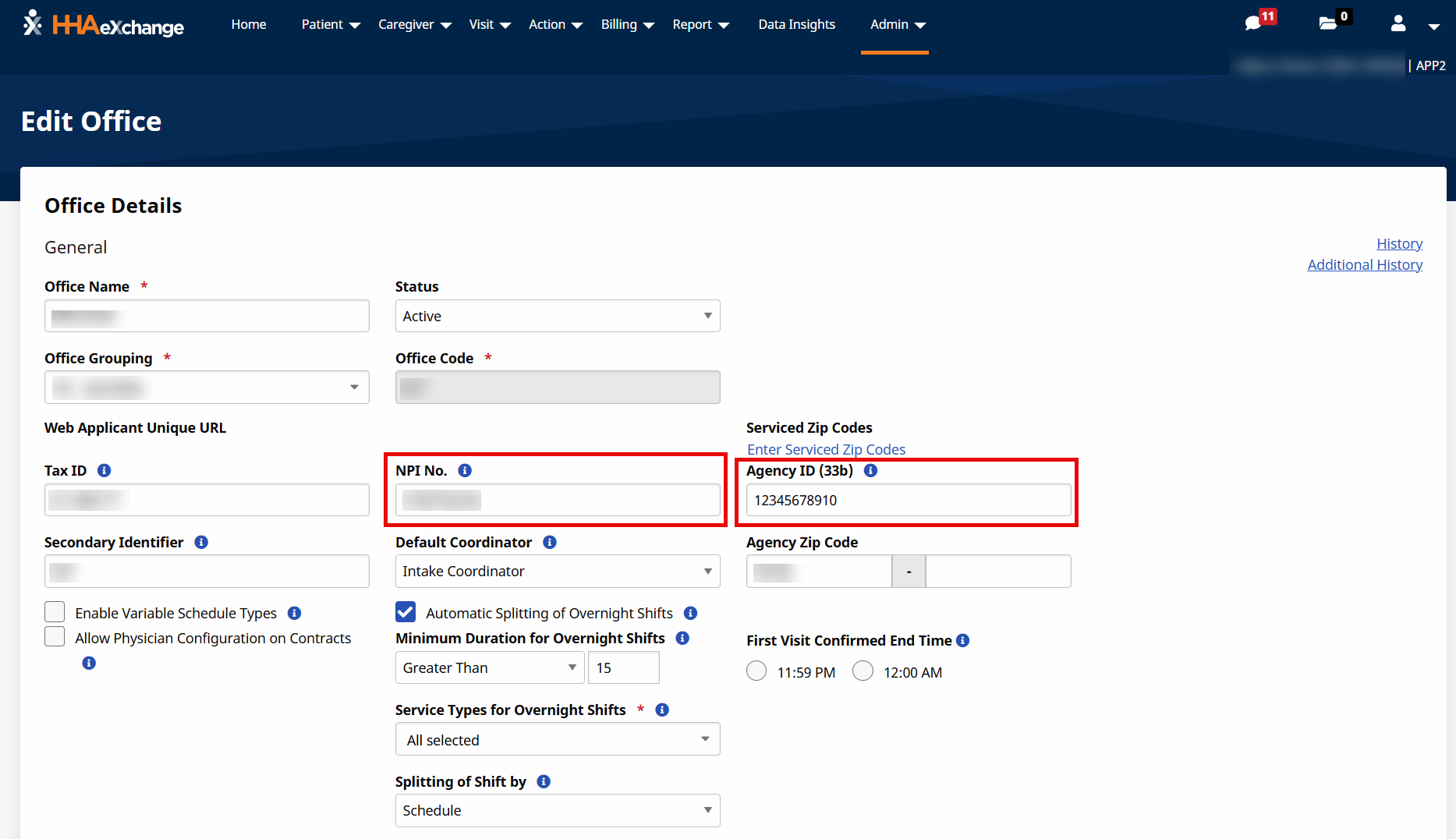
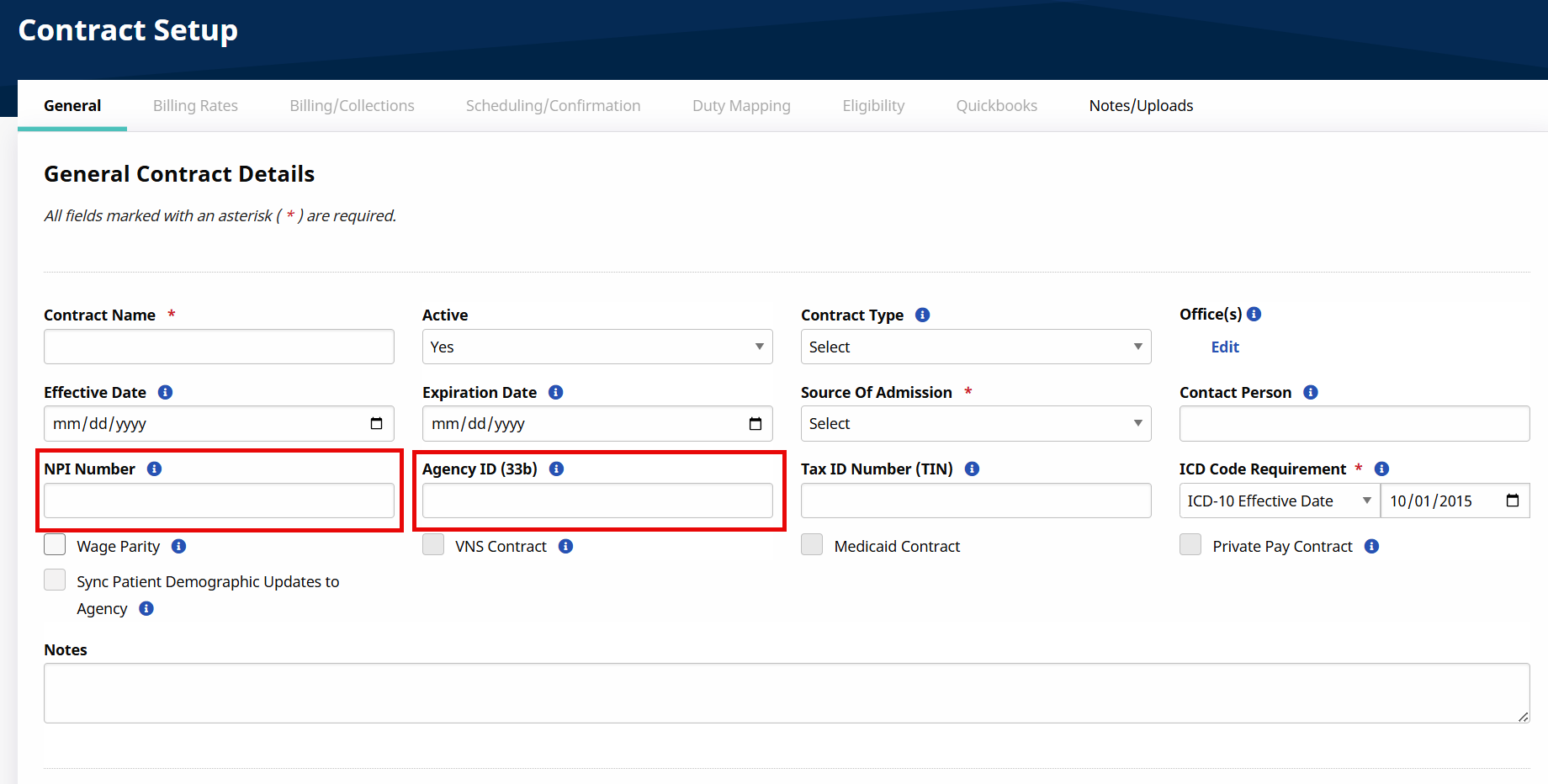
Enter the appropriate NPI in the office and contract NPI Number fields. If needed, the Rendering & Billing MPI can be added to the office and contract AgencyID (33b) fields.
-
Refer to the following steps on how to add the Provider Identifiers to a contract or office:
-
Rendering National Provider ID (NPI)(Agency Information) is configured at the office level. See Set Up or Edit a New Office > General for more information.
-
Billing Provider ID (NPI) (Alabama Medicaid) and Medicaid Provider ID (MPI) is configured at the contract level. Navigate to Admin > Contract Setup > New/Search Contract (see General Tab for Admin Contract Setup for more information).
-
Contract Type Configuration Waiver Program (Contract) Billing NPI (NPI Number field) Billing Medicaid ID (Agency ID (33b) field) ACT
1932590163
169638
E&D
1326111337
008500520
-
-
Select the appropriate contract type: Alabama_EVV.
Refer to the General tab for Admin Contract Setup topic for steps on how to add the Contract Type to a Contract.
If a Contract Type is not found in the HHAeXchange, go to Admin > Reference Table Management > Contract Type. Refer to the Reference Table Management topic for steps on how to add a Contract Type.
-
Next, go to Admin > Reference Table Management > Contract Service Code to enter a valid service code in the HCPCS Code field. Repeat this step for each contract. Refer to the Contract Service Code Configuration table or Contract Service Code Configuration section below for a full list of valid/in-scope Service Codes. Refer to the Reference Table Management topic for steps on how to add a contract service code and HCPCS code.
If a HCPCS Code is associated to an incorrect Contract Type, then the EVV visit data associated to the HCPCS Code is not sent to the aggregator. Only the confirmed visits associated to the below valid/in-scope Service Codes and the correct Contract Type are sent to the aggregator.
-
Review all Member Profiles and ensure the Member details are entered correctly. Members must be identified by first name, last name, and Medicaid ID. Member Medicaid IDs must be entered in the Member’s Profile > Medicaid Number field. Medicaid ID must be a 12-digit numeric value starting with a 530 value.
Member names can consist of alpha letters, hypens, periods, and apostrophes. All other special characters cause the record to reject.
-
Review all Caregiver profiles to ensure that the Caregiver details are entered correctly. Caregivers must be identified by first name, last name, full XX-digits of the Social Security number (SSN). Providers can enter the full 9-digit SSN or the last X-digits using the following format: 000-00-XXXX.
Caregiver names can consist of alpha letters, hypens, periods, and apostrophes. All other special characters cause the record to reject.
-
Once all of the above steps are complete, please create a case via Client Support Portal > Data & Integration > EVV Aggregation Support to setup the AL EVV Aggregation Interface. If a case already exists, please update the case advising that all steps have been completed.
When confirmation is received, please proceed to the State Aggregation Report section for steps on how to review exported EVV data.