Accrued Minutes Visits
Missouri EVV programs require Providers to follow specific visit documentation and billing rules related to Medicaid compliance. These rules apply to Accrued Minutes Visits (AMV). Accrued minutes are leftover visit minutes that do not reach a full 15‑minute billing increment. These minutes can be combined within the same calendar month to create a payable AMV. The HHAeXchange portal currently does not automate accrued minute accumulation and certain validation rules. Providers must complete these processes manually.
HHAeXchange is actively working toward an automated solution that will support Missouri Accrued Minutes Visit (AMV) processing in the future. This enhancement is intended to reduce manual effort and help standardize how accrued minutes are calculated and submitted.
The following steps are required to create an AMV.

See the information in this guide for a detailed list of instructions.
Accrued Minutes Rules
Review the following key rules for creating an AMV:
-
The 15-Minute Billing Rule: Only 15‑minute increments (i.e. 15, 30, 45, 60) are payable. All visits round down.
-
Monthly Carry‑Forward Only: Unused minutes carry forward within the same calendar month only. Minutes under 15 are discarded at month‑end.
-
Modifiers Must Match: Accrued minutes can only be combined when the procedure code and modifier are the same.
Create an Accrued Minutes Visit
Keep the following in mind before creating an AMV:
-
HHAeXchange does not calculate accrued minutes automatically.
-
HHAeXchange does not enforce modifier separation or one AMV per day rules.
-
Providers must validate all AMV rules before submission.
To create an Accrued Minutes Visit:
-
Run the Accrued Minutes Report for each Provider office:
-
Go to Reports > Billing > Accrued Minutes Report in the HHAeXchange portal.
-
Set the Visit Date Range to the full calendar month.
-
Filter to Missouri contracts only and include EVV in-scope services.
-
Export the report to Excel. This report displays confirmed duration, billed duration, and accrued minutes (confirmed minus billed minutes), and grouping (Patient + contract + service code).
This report identifies only “accrued minutes” — NOT full accrual logic.
-
-
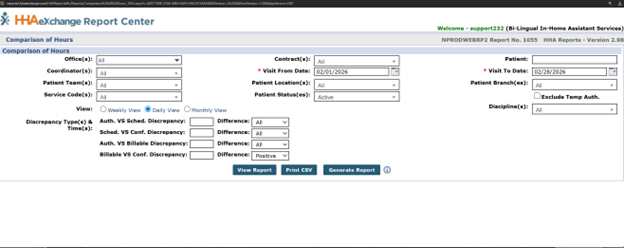
Next, run the Comparison of Hours Report for each Provider office:
-
Go to Reports > Billing > Comparison of Hours Report.
-
Set the Visit Date Range to the full calendar month.
-
Next, filter to Missouri contracts only and include EVV in scope services.
-
Set View to Daily View.
-
Set Billable vs. Confirmed Discrepancy to Positive.
-
Export the report to Excel. This report displays confirmed time/hours, billed hours, billable/conf. discrepancy (accrued minutes), and grouping (Patient + Caregiver + contract + service code).
Each report can be run monthly or weekly based on the Provider's preference.
This report identifies only “accrued minutes” — NOT full accrual logic.
-
-
Calculate Eligible Accrued Minutes manually.
-
Using Excel, Providers must determine AMV eligibility. For each Client + service code + modifier, calculate:
-
Total accrued minutes
-
Whether the total is 15 minutes or greater
-
Payable AMV minutes (floor: total accrued minutes ÷ 15) × 15)
-
Any remaining minutes may carry forward within the same month only.
HHAX Support/IMP/CS does not perform these calculations and can only guide the Provider.
-
-
-
Next, confirm modifier separation. Missouri requires accrued minutes to be grouped by procedure code and modifier. Do not combine minutes across different modifiers (for example: HA, HI, HX, U1, U2, HQ). Only minutes with the same code and modifier may be combined into a single AMV.
-
Create the AMV in HHAeXchange.
-
Choose the correct procedure code + all modifiers.
-
Enter start/end time that equals the approved AMV minutes (e.g., 30 minutes → 10:00–10:30 AM.)
-
Choose the same Caregiver as the original visit that the minutes were accrued from.
-
Select Visit Edit Reason Code 280 for Accrued Minutes Visit.
-
Select the appropriate Pay Code. Choose Non-Payable if Caregivers are not paid for accrued minutes.
-
Add a visit memo, if required by contract and service code. A compliant memo should be entered that provides context and details about the services performed and should be between 28 and 1240 characters.
It is recommended to document the source dates of accrued minutes for audit support. See the Provider bulletin for more details.
-
Tasks are required ("Accrued Minutes Visits").
The requirements below vary by Missouri contract. Review carefully to ensure your Accrued Minutes Visits meet contract‑specific submission rules before billing.
Contract-Specific Requirements Contract Reminders MODSS‑DSDS -
Tasks are required.
-
A memo is not required.
-
EVV duty compliance is enforced.
-
Reason Code 280 must be used.
MODSS‑DDD -
A meaningful memo is required (28–1240 characters), including services provided, issues or incidents, and change from typical support.
-
A missing memo results in the visit not being submitted.
MODSS-DDD Memo Examples
1. T1019 HA, T1019 HI, T1019 HQ+HA, T1019 HQ+HI, T1019 HQ+HX, T1019 HQ+U1
2. T1019 HX (PFH Individual), T1019 U1 (CSW Individual), etc.
3. T1019 SC+HA/HI/HX – Medical, Agency/Contractor
4. T1019 SC+SE+HA/HI/HX/U1 – Medical, Self-Directed
5. T1019 U2 + HA/HI/HX/U1 – MOCDD/COMP/PFH/CSW, Individual Self-Directed
-
-
-
Submit the Accrued Minutes Visit. Before submitting, confirm the following rules are met:
-
Only one AMV per day per client per service code
-
AMVs must be submitted within the same calendar month the minutes were accrued
-
Visit duration must be divisible by 15 minutes
-
Complete ongoing monitoring. Providers should:
• Review accrued minutes weekly (optional)
• Complete a final review at month end (required)
• Retain supporting documentation for audits
Common Submission Mistakes
The items below highlight the most common issues that delay or prevent Accrued Minutes Visits from being submitted successfully. Reviewing these upfront can help avoid rework, rejected visits, and month‑end compliance issues.
-
Carrying minutes into a new month
-
Combining different modifiers
-
Submitting more than one AMV per day for the same service
-
Assuming the HHAeXchange portal automatically calculates accrued minutes
For detailed configuration steps, service code mappings, and EVV aggregation setup, see Missouri: Configure EVV Aggregation.