Missouri: Configure EVV Aggregation
The Missouri Department of Social Services (MODSS) has certified HHAeXchange to submit Electronic Visit Verification (EVV) data on behalf of providers who render Personal Care Services (PCS) and/or Home Health Care Services (HHCS). Providers are subject to MODSS EVV guidelines and must ensure visits are recorded in the aggregator.
Missouri is now enforcing hard edits, which means visits must be in Verified status in the Missouri Electronic Aggregator Solution (EAS) portal before claims can be billed successfully. If visits are not verified at the state level, even if they appear complete in HHAeXchange, claims may be denied and payments delayed. Review the Quick Guide and short video to learn what to check and how to prevent billing issues before submitting claims.

Providers must complete the steps outlined below to configure HHAeXchange for EVV Aggregation. Failure to comply may result in no data sent to the aggregator.
-
Inform the state aggregator of the decision to use AltEVV.
-
Complete the Missouri DSS EAS (EVV Aggregator Solution) Provider Online EVV Vendor Registration. Complete one form per MPI. Use the following information to complete the form:
AltEVV Vendor Selection and Information
Vendor Information: Vendor: HHAeXchange EVV Vendor Contact Name: HHAeXchange EVV Aggregation Support EVV Vendor Contact Email: EASTeam@hhaexchange.com EVV Vendor Contact Phone Number: 855-400-4429 EVV Product Name: HHAeXchange
-
-
Next, go to Admin > Contract Setup > New Contract to create a contract.
Skip this step if the contract already exists in the system.
-
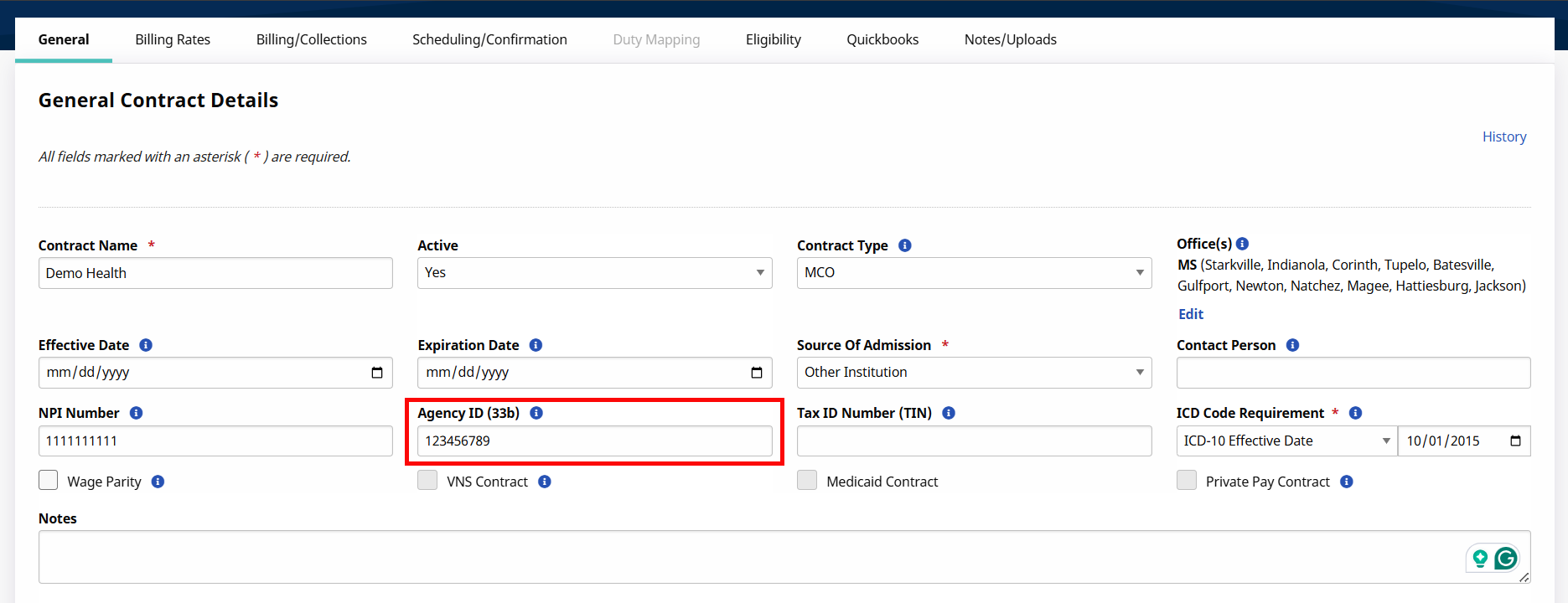
Providers are identified by their 9-digit Medicaid Provider ID (MPI) in the State aggregator. Enter the appropriate MPI for each contract in the Agency ID (33b) field.
-
Select the appropriate Contract Type value:
Contract Type Configuration Contract Type Payer Program/Waiver Name MODSS-DSDS Division of Senior and Disability Services (DSDS). MODSS-BHSH Bureau of HIV, STD, & Hepatitis (BHSH). MODSS-SHCN Special Health Care Needs (SHCN). MODSS-DDD Division of Developmental Disabilities (DDD). MOHSH-MOHSH Home State Health - Centene (MOHSH) . MOBCBS-MOBCBS Healthy Blue – BCBS (MOBCBS). MOUHC-MOUHC United Healthcare – UHC (MOUHC). MOBCBS-BCBSHH Healthy Children and Youth – HHCS (SHCNHH). MODSS-DSSHH Department of Social Services HHCS (DSSHH). MODSS-SHCNHH Home State Health – Centene HHCS (HSHHH). MOHSH-HSHHH Healthy Blue – BCBS HHCS (BCBSHH). MOUHC-UHCHH United Healthcare – UHC HHCS (UHCHH). -
If a Contract Type is not found, go to Admin > Reference Table Management > Contract Type.
Refer to the Reference Table Management topic for steps on how to add a Contract Type.
-
-
Go to Admin > Reference Table Management > Contract Service Code to enter a valid Service Code in the HCPCS field.
Repeat this step for each contract.
Refer to the Reference Table Management topic for steps on how to add a Contract Service Code
Contract Service Code Configuration Contract Type Applicable Export Codes and Modifiers MODSS-DSDS S5120
S5130
S5150
S5150:TF
T1019:U2
T1019
T1019:U6
T1019:TF
MODSS-BHSH T1019
T1019:U4
T1019:TF
MODSS-SHCN S5125:U5
T1019:HB
T1019:EP
T1019:TF:EP
T1019
T1019:TF
MODSS-DDD T1019:HA
T1019:HI
T1019:HQ:HA
T1019:HQ:HI
T1019:HQ:HX
T1019:HQ:U1
T1019:HX
T1019:SC:HA
T1019:SC:HI
T1019:SC:HX
T1019:SC:SE:HA
T1019:SC:SE:HI
T1019:SC:SE:HX
T1019:SC:SE:U1
T1019:SC:U1
T1019:U1
T1019:U2:HA
T1019:U2:HI
T1019:U2:HX
T1019:U2:U1
MOHSH-MOHSH T1019 MOBCBS-MOBCBS T1019 MOUHC-MOUHC T1019 MOBCBS-BCBSHH 92521:EP
92522:EP
92523:EP
92524:EP
97161:EP
97162:EP
97163:EP
97164:EP
97165:EP
97166:EP
97167:EP
99501
G0151
G0151:96
G0151:EP
G0157
G0157:96
G0157:EP
G0157:SC
G0151:SC
G0152
G0152:96
G0152:EP
G0152:SC
G0153
G0153:96
G0153:EP
G0153:SC
G0156
G0156:EP
G0160:SC
G0161
G0161:96
G0161:EP
G0158
G0158:96
G0158:EP
G0158:SC
G0159
G0159:96
G0159:EP
G0159:SC
G0160
G0160:96
G0160:EP
G0161:SC
G0162
G0162:EP
G0299
G0299:EP
G0300
G0300:EP
T1001:EP
MODSS-DSSHH 92521:EP
92522:EP
92523:EP
92524:EP
97161:EP
97162:EP
97163:EP
97164:EP
97165:EP
97166:EP
97167:EP
99501
G0151
G0151:96
G0151:EP
G0157
G0157:96
G0157:EP
G0157:SC
G0151:SC
G0152
G0152:96
G0152:EP
G0152:SC
G0153
G0153:96
G0153:EP
G0153:SC
G0156
G0156:EP
G0160:SC
G0161
G0161:96
G0161:EP
G0158
G0158:96
G0158:EP
G0158:SC
G0159
G0159:96
G0159:EP
G0159:SC
G0160
G0160:96
G0160:EP
G0161:SC
G0162
G0162:EP
G0299
G0299:EP
G0300
G0300:EP
T1001:EP
MODSS-SHCNHH G0156:EP
G0162:EP
G0299:EP
G0300:EP
MOHSH-HSHHH 92521:EP
92522:EP
92523:EP
92524:EP
97161:EP
97162:EP
97163:EP
97164:EP
97165:EP
97166:EP
97167:EP
99501
G0151
G0151:96
G0151:EP
G0157
G0157:96
G0157:EP
G0157:SC
G0151:SC
G0152
G0152:96
G0152:EP
G0152:SC
G0153
G0153:96
G0153:EP
G0153:SC
G0156
G0156:EP
G0160:SC
G0161
G0161:96
G0161:EP
G0158
G0158:96
G0158:EP
G0158:SC
G0159
G0159:96
G0159:EP
G0159:SC
G0160
G0160:96
G0160:EP
G0161:SC
G0162
G0162:EP
G0299
G0299:EP
G0300
G0300:EP
T1001:EP
MOUHC-UHCHH 92521:EP
92522:EP
92523:EP
92524:EP
97161:EP
97162:EP
97163:EP
97164:EP
97165:EP
97166:EP
97167:EP
99501
G0151
G0151:96
G0151:EP
G0157
G0157:96
G0157:EP
G0157:SC
G0151:SC
G0152
G0152:96
G0152:EP
G0152:SC
G0153
G0153:96
G0153:EP
G0153:SC
G0156
G0156:EP
G0160:SC
G0161
G0161:96
G0161:EP
G0158
G0158:96
G0158:EP
G0158:SC
G0159
G0159:96
G0159:EP
G0159:SC
G0160
G0160:96
G0160:EP
G0161:SC
G0162
G0162:EP
G0299
G0299:EP
G0300
G0300:EP
T1001:EP
If an HCPCS code is associated to an incorrect Contract Type, then the EVV visit data associated to the HCPCS code is not sent to the aggregator. Only the confirmed visits associated to the above In-Scope Service Codes and the correct Contract Type are aggregated.
-
Go to Admin > Reference Table Management > Visit Edit Reason to configure the valid Reason Codes.
Reason Code Description Note Required? 100 Member No Show
Yes 110 Member Unavailable Yes 120 Member Refused Verification Yes 130 Member Refused Service Yes 140 Member Incapable, Designee Unavailable No 150 Caregiver Failed to Call In - Verified Services Were Delivered No 160 Caregiver Failed to Call Out - Verified Services Were Delivered No 170 Caregiver Failed to Call In and Out - Verified Services Were Delivered No 180 Caregiver Called Using an Alternate Phone Yes 190 Caregiver Change No 200 Mobile App Issue/Inoperable No 210 Telephony Issue/Inoperable No 220 FVV Issue/Inoperable No 230 Service Outside the Home Yes 240 Unsafe Environment Yes 250 Does Not Contain Task or Memo Information Yes 260 DD Budget Authorization Approved Late No 270 DD Correction for System Alignment No 280 Accrued Minutes Visit No -
Go to Admin > Duty List Setup to view all HHAeXchange Duty Codes.
Refer to the Duty List Setup topic on how to manage Plan of Care (POC) Duties.
Configure valid duties within the organization's active Duty List, entering the listed Aggregator Task Names to duty list. Sandata Aggregator Task List.
Note: The SandataTaskCodes provided are the only Duty/Task codes approved by the Missouri Department of Social Services (MODSS) that can be sent to the State Aggregator. The completed workbook must be provided to HHAeXchange to configure the mapping, regardless if the same Duty/Task codes are entered in the HHAeXchangeAdmin > Duty List Setup. Failure to provide this document results in visits as Incomplete status in the State Aggregator’s Portal. -
Review all Member Profiles to ensure the Member details are entered correctly.
Members must be identified by First Name, Last Name, and Departmental Client Number (DCN) Member DCNs must be entered in the Member Profile > Medicaid ID field. DCN must be an 8-digit numeric value, including leading zeros.
-
Review all Caregiver profiles to ensure that the Caregiver details are entered correctly.
Caregivers must be identified by First Name, Last Name, and Family Care Safety Registry (FCSR) Number. Caregiver FCSR Numbers must be entered in the Caregiver Profile > HHA/PCA Registry Number field. FCSR Numbers are 8-digits long, including leading zeros.
Member and Caregiver names can consist of alpha letters, hyphens, periods, and apostrophes. All other special characters cause the record to reject.
-
Open a support case to set up the Missouri EVV aggregation interface. If you already have an existing support case open, let your agent know through the existing case.
Once confirmation is received, proceed to the Missouri State Aggregation Report topic to review exported EVV data.