COVID-19 Agency Dashboard
An Agency Administrator or Owner must first Opt In before the Caregivers for that agency begin to receive daily survey links. Caregivers (in all Disciplines) must be active and have at least one visit for the day to receive the survey. Contact the HHAeXchange Support Team for details, setup, and guidance.
This topic provides an explanation of the COVID-19 Agency Dashboard under Caregiver > COVID-19 Survey which tracks survey responses to the COVID-19 Caregiver Screening Tool. Upon opt-in, all system users have the COVID-19 Survey permission selected. To changeCaregiver > Search Caregiver > Compliance permissions for this feature, see the User Management topic.

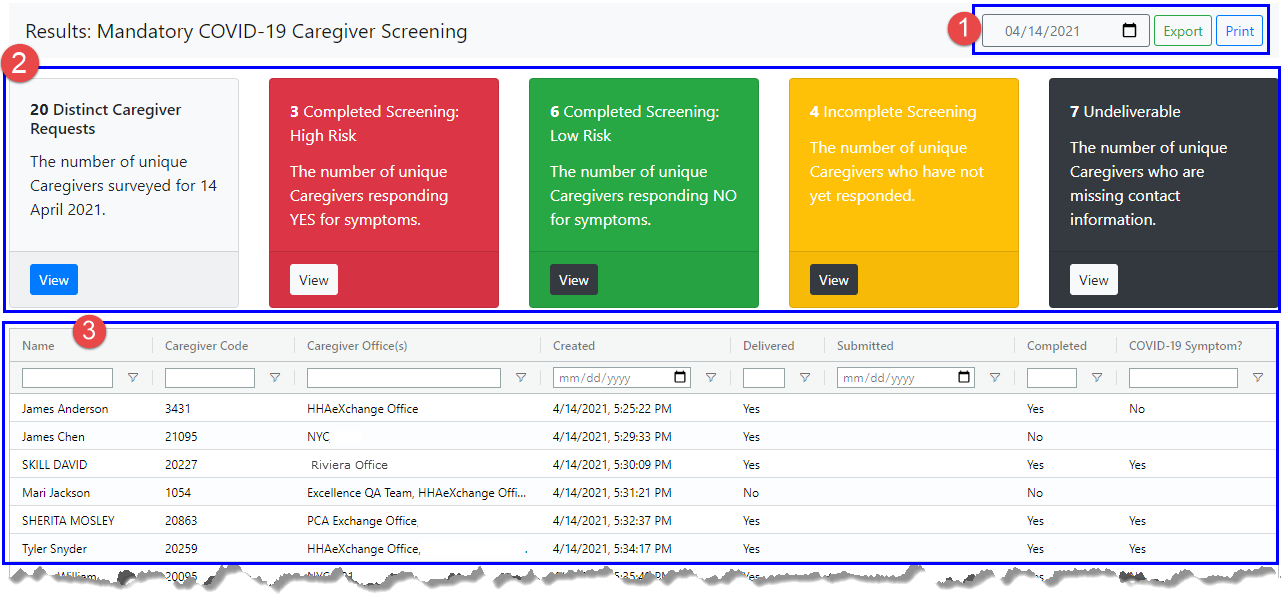
The Agency Dashboard is made up of three sections as seen in the following image and described in the table below.
|
|
Section |
Description |
||||||||||||
|---|---|---|---|---|---|---|---|---|---|---|---|---|---|---|
|
1 |
Date Search |
Search for COVID-19 response results by a specific date (defaults to the current date). Click the Export button to generate an Excel spreadsheet file for the selected date. Click the Print button to print the results for the selected date. |
||||||||||||
|
2 |
Tiles |
The color coded tiles provide a visual aid for activity and responses (described below). Totals in tiles change as responses are received.
|
||||||||||||
|
3 |
Results by Caregivers |
All Caregivers to whom a survey is sent on a selected date. Each row provides details such as the Caregiver Name, the Caregiver Code, Caregiver Office(s), and responses. |