Pending Cases Page
The Pending Cases Page in the Non-Homecare Portal shows service authorizations sent by a Payer that require your review. Each pending case includes an expiration time and must be accepted or declined before the cutoff.
To view a pending case, click the Eye icon next to the case.

When you open a pending case, the case details are displayed. If required, select a Service Location Code from the dropdown menu. The Service Location Code identifies the office location where the Member receives services and affects how billing information is sent to the Payer. This field is configured by System Administration and is only selectable if required by the Payer.
New pending cases appear in the portal within seconds of being issued by the Payer. A pending case is automatically removed if:
-
It is not accepted before the expiration time, or
-
It is canceled by the Payer
To respond to a pending case:
-
Click Accept to accept the case.
-
Click Decline to decline the case.
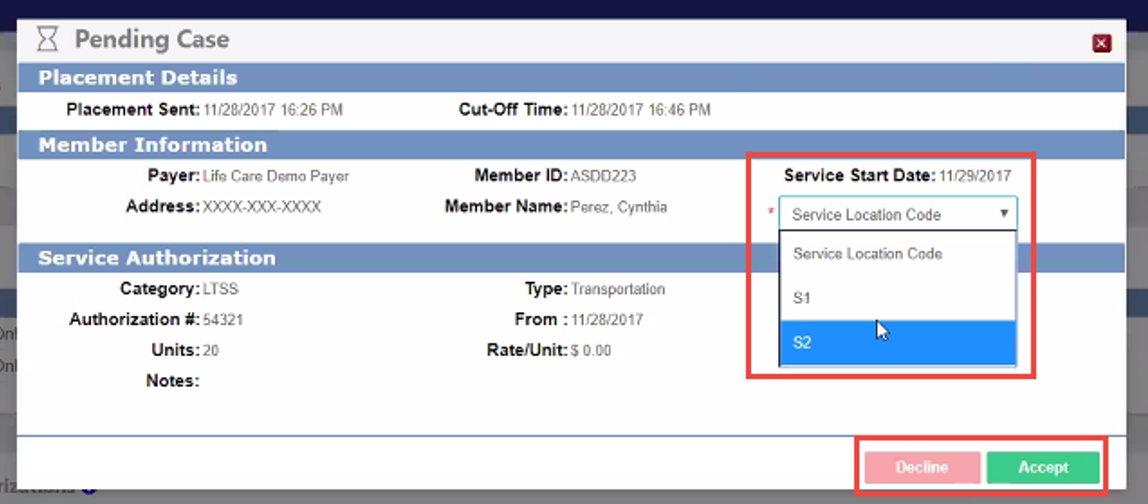
If you accept the case, it moves from Pending Cases to Recent Authorizations. See the Authorizations help topic for more information.
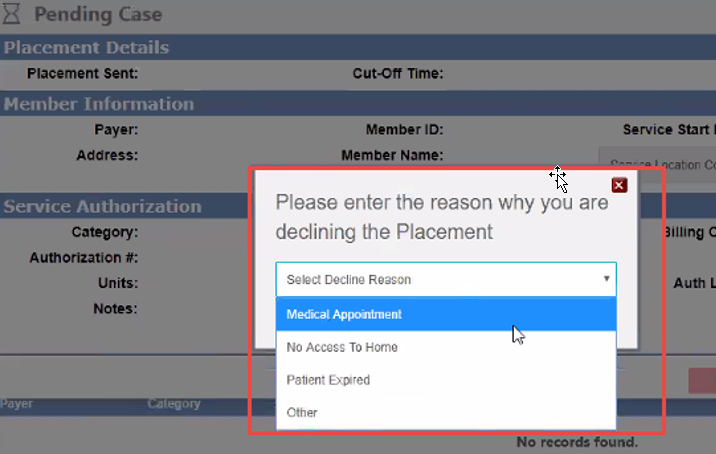
If you decline the case, select a Decline Reason in the pop-up window. The Payer is notified, and the case is returned to them to assign to another Provider.