View Shift History in Services Portal
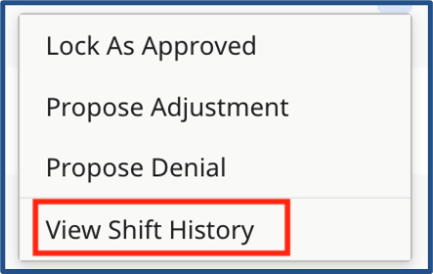
To view the history of a shift, click Ellipsis… in the Actions column for the shift, and select View Shift History.
The Shift History page displays information including shift details, status changes, and notes. When you are finished reviewing history, click Close.
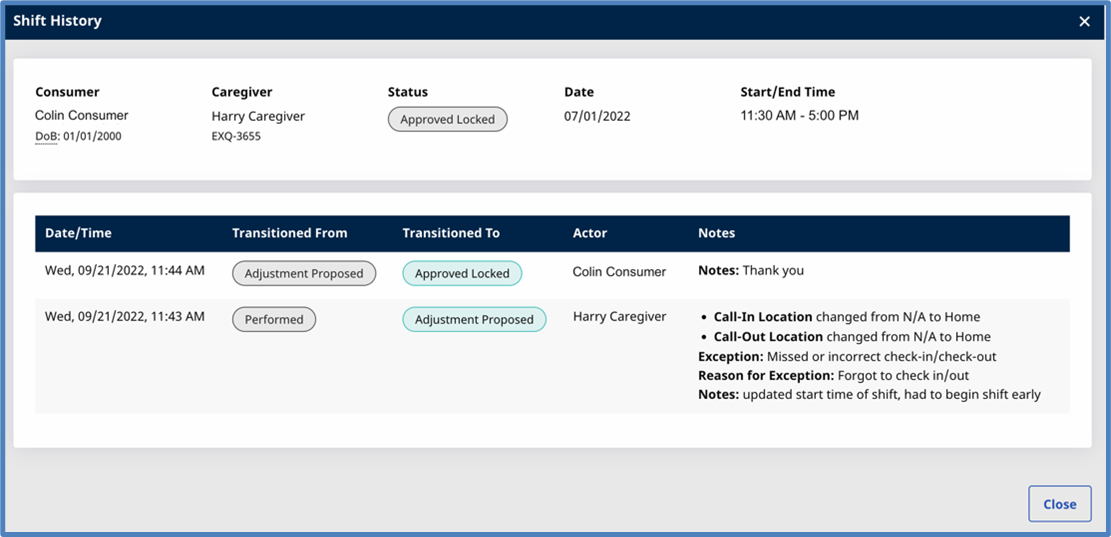
| Field |
Description |
|---|---|
|
Consumer |
Name of the Consumer who received services. |
|
Caregiver |
Name of the Caregiver who provided services. |
|
Status |
Status of the shift. See Shift Status in Search Shifts for details. |
|
Start/End Time |
Start and end time of the shift. |
|
Date/Time |
Date and time that the action occurred. |
|
Transitioned From |
Status of the shift before the action occurred. |
|
Transitioned To |
Status of the shift after the action occurred. |
|
Actor |
Person who performed the action. |
|
Notes |
Information about the shift, including changes, reasons for changes, and notes left by the person who made the changes or performed the action. |