Search Shifts

When Search Shift instructions differ for Consumers, Caregivers, or Representatives, the difference is explained at the start of the instruction.
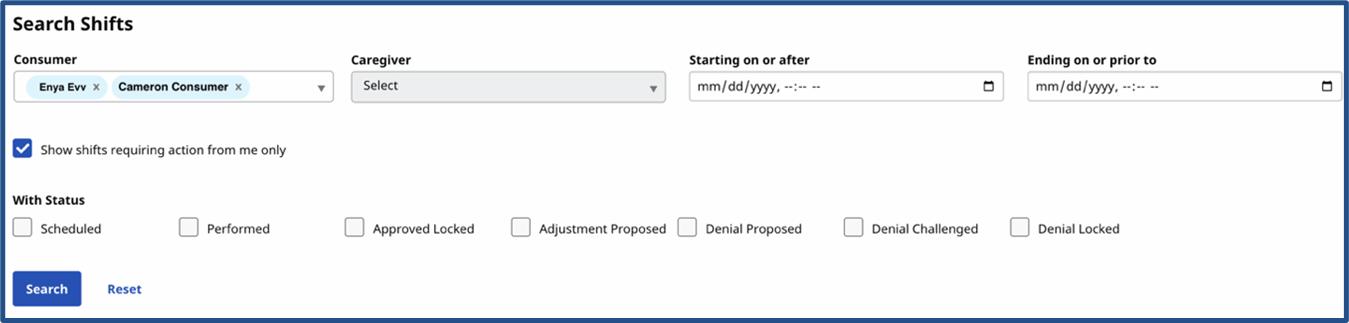
The Search Shifts option within the Services Portal allows you to search for a specific shift or to sort through a list of shifts assigned by selecting one or more filter options. Available filters depend on your role in the system.
Consumers (CDS Employers) cannot select from the Consumer list because Consumers can only see their own shifts. Consumers can select from the Caregiver list. The system preselects all Caregivers who work for the Consumer. All other fields are available to search and sort.
Caregivers (CDS Employees) can select from the Consumer list. The system preselects all Consumers with whom the Caregiver works. Caregivers cannot select from the Caregiver list, as they can only see their own shifts. All other fields are available to search and sort.
Representatives may or may not be able to select from the Consumer or Caregiver lists. Selecting anything from these lists depends on how many Consumers with whom the Representative is connected and how many Caregivers are connected to those Consumers. All other fields are available to search and sort.
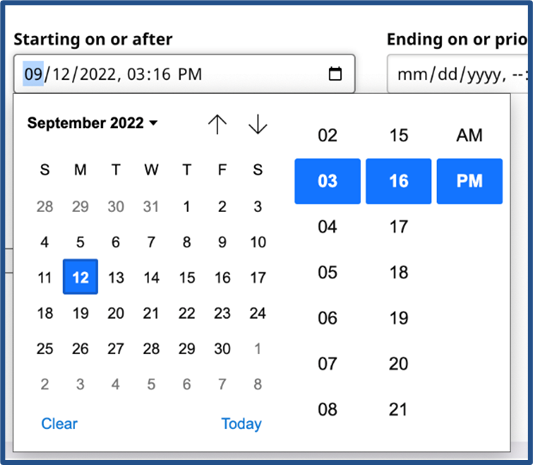
When you click the Starting on or after or Ending on or prior to fields, a menu is displayed with the date on the left and the time on the right. Use one or both fields to filter the shifts to a date range. At the bottom of the calendar, click Clear to remove the currently selected date from the field. Click Today to set the selection to the current date and time.
On the Search Shifts page, select the Show shifts requiring action from me only checkbox (under the search filters) to view only the shifts that need an action (approval, review, or denial) from you.

The With Status checkboxes allow the user to filter the list of shifts to those with one or more statuses. By default, all shifts of all statuses are displayed. Check one or more Status types to limit the shift display to only those statuses. More details and instructions on Status in are provided in Approve a Shift, Adjust a Shift, and Deny a Shift.

Shift Status values are defined in the following table.
| Status |
Description |
|---|---|
|
Scheduled |
Shift planned to happen in the future but has not been recorded using EVV. |
|
Performed |
Shift recorded using EVV and waiting for approval from the Consumer. |
|
Approved Locked |
Consumer (or Representative where authorized) approved the shift. Because the shift is locked, it can no longer be changed by the Consumer, Caregiver, or Representative. |
|
Adjustment Proposed |
One party (either the Consumer, Caregiver, or Representative) has made a change to some part of the shift. The shift now must be reviewed and approved by the other party.
|
|
Denial Proposed |
One party (either the Consumer, Caregiver, or Representative) has asked that the shift be denied. The shift must be reviewed, and the denial accepted by the other party.
|
|
Denial Locked |
Shift denied by one party, and the other party agreed to the denial. Because the shift is locked, it can no longer be changed by the Consumer, Caregiver, or Representative. |
Click Search at the bottom of the form to apply the filters or click Reset to clear any selected filters. Click Search to restore the full list.