Billing Dashboards

Billing Dashboards (Dashboards menu) display information about invoices submitted by Providers. Billing Dashboards organize information according to Providers based on Member Census.
For an explanation of how to navigate these dashboards and use common dashboard components, see Navigate Dashboards.
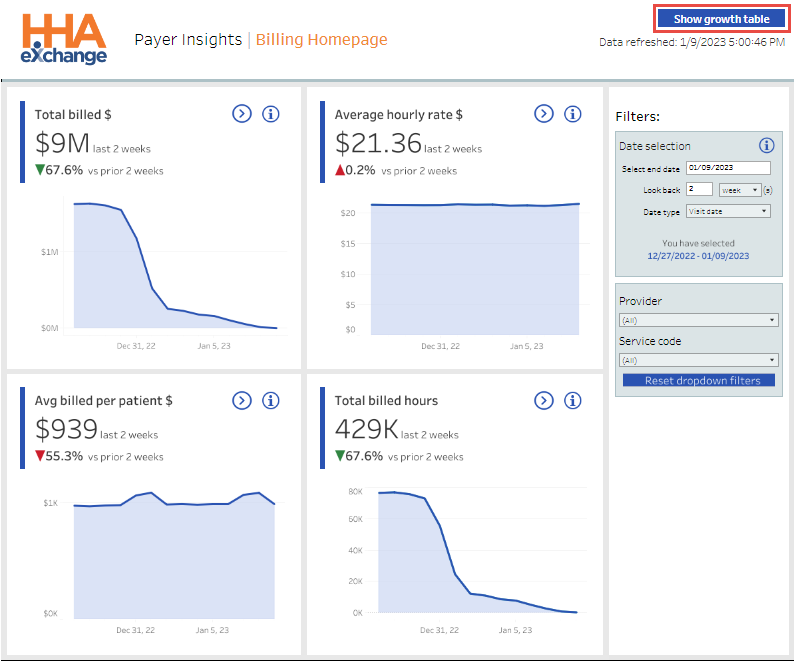
Cards on the Billing Homepage include:
Use the Filters at right to customize the data displayed on all cards.
 Click the Navigate icon on any card to open its related dashboard. For example, click the Navigate icon on the Total Billed $ card to open the Total Billed Amount Dashboard.
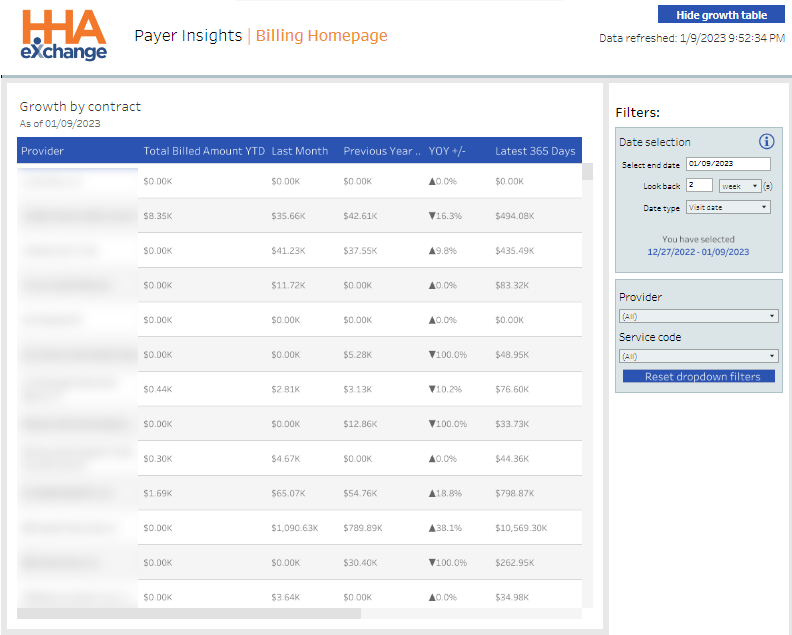
Click Show Growth Table (upper right) to review and analyze Billed Amounts by Provider Contract over the past month and year. Results can be filtered by Date, by Provider, and by Service Code.
The Average Billed Amount per Patient Dashboard includes cards and widgets related to Billed Amounts for all Patients (Members) at all Providers.
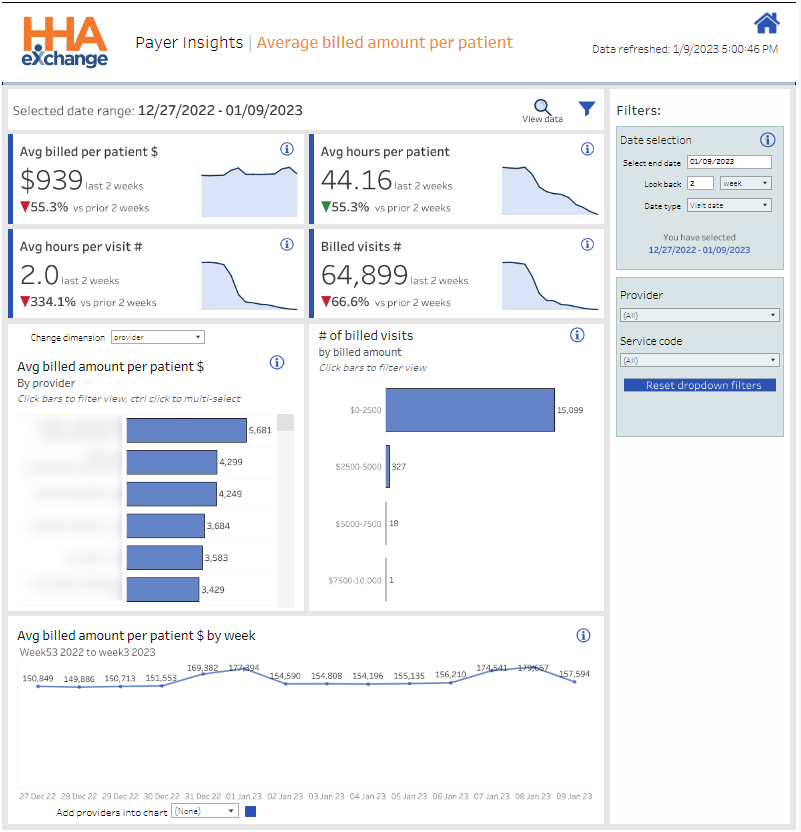
Use the Filters at the right of the dashboard to customize the data displayed on all widgets.
 Click the View Data icon (left of Filters) to view the dashboard’s source data. Source Data can be filtered, printed, and exported from the View Data page.
Average Billed Amount per Patient cards are described in the following table.
|
Card |
Description |
|---|---|
|
Avg Billed per Patient $ |
Average Amount billed per Patient (Member) for all Providers in the last two weeks. Also, a comparison to the previous two weeks. |
|
Avg Hours per Patient |
Average Hours billed per Patient (Member) for all Providers in the last two weeks. Also, a comparison to the previous two weeks. |
|
Avg Hours per Visit # |
Average Hours billed per Visit for all Providers in the last two weeks. Also, a comparison to the previous two weeks. |
| Billed Visits # | Total number of Billed Visits for all Providers in the last two weeks. Also, a comparison to the previous two weeks. |
Average Billed Amount per Patient widgets are described in the following table.
|
Widget |
Description |
|---|---|
|
Avg Billed Amount per Patient $ by Provider |
Compares the Average Billed Amount per Patient (Member) for all Providers. Click one or more bars to focus on specific Providers. Select from Change Dimension to refocus the widget to compare data by Provider, by Service Code, or by EVV Type. |
|
Number of Billed Visits by Billed Amount |
Compares the Number of Billed Visits by Billed Amount for all Providers. |
|
Avg Billed Amount per Patient $ by Week |
Compares the Average Billed Amount per Patient (Member) by week for all Providers. Select specific Providers to analyze using the Add Providers into Chart list. |
The Average Hourly Rate Dashboard includes cards and widgets related to Hourly Rates for all Providers.
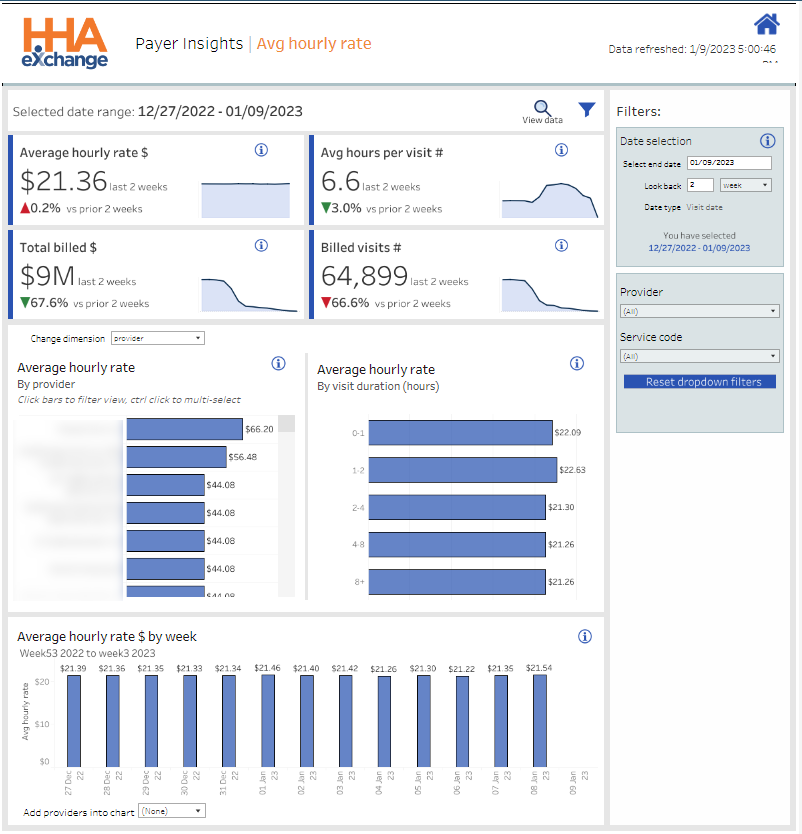
Use the Filters at the right of the dashboard to customize the data displayed on all widgets.
Click the View Data icon (left of Filters) to view the dashboard’s source data. Source Data can be filtered, printed, and exported from the View Data page.
Average Hourly Rate cards are described in the following table.
|
Card |
Description |
|---|---|
|
Average Hourly Rate $ |
Total Billed Amount divided by Total Billed Hours for all Providers in the last two weeks. Also, a comparison to the previous two weeks. |
|
Average Hours per Visit # |
Total Billed Hours divided by Total Number of Visits for all Providers in the last two weeks. Also, a comparison to the previous two weeks. |
|
Total Billed $ |
Total Billed Amount for all Providers in the last two weeks. Also, a comparison to the previous two weeks. |
| Billed Visits # | Total number of Billed Visits for all Providers in the last two weeks. Also, a comparison to the previous two weeks. |
Average Hourly Rate widgets are described in the following table.
|
Widget |
Description |
|---|---|
|
Average Hourly Rate by Provider |
Compares the Average Hourly Rate for all Providers. Click one or more bars to focus on specific Providers. Select from Change Dimension to refocus the widget to compare data by Provider, by Service Code, or by EVV Type. |
|
Average Hourly Rate by Visit Duration (Hours) |
Compares the Average Hourly Rate by length of Visit for all Providers. |
|
Average Hourly Rate $ by Week |
Compares the Average Hourly Rate by Week for all Providers. Select specific Providers to analyze using the Add Providers into Chart list. |
The Total Billed Amount Dashboard includes cards and widgets related to Billed Amounts for all Providers.
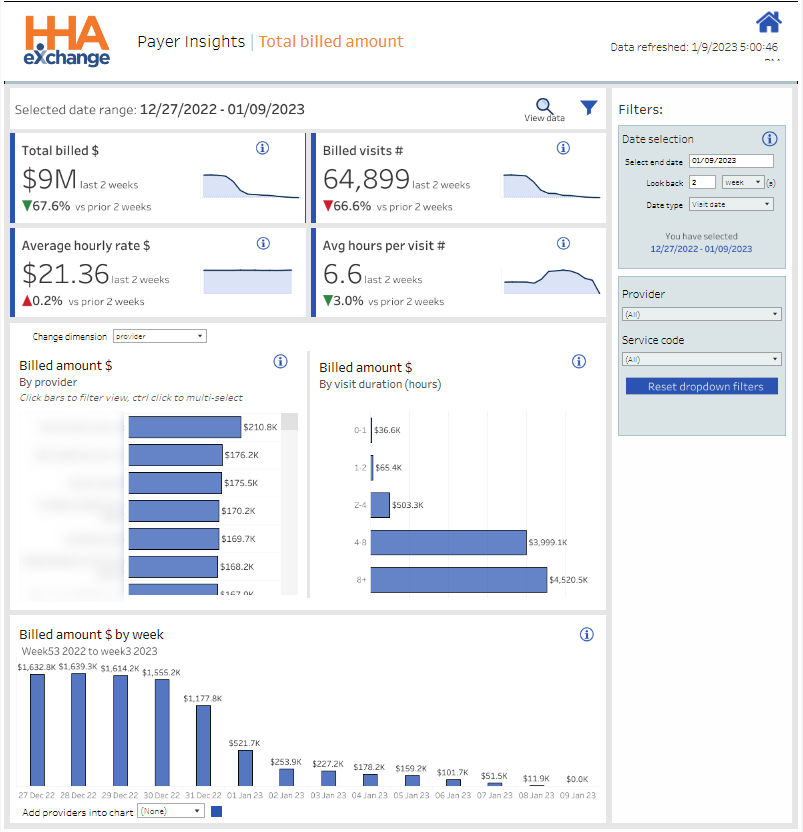
Use the Filters at the right of the dashboard to customize the data displayed on all widgets.
Click the View Data icon (left of Filters) to view the dashboard’s source data. Source Data can be filtered, printed, and exported from the View Data page.
Total Billed Amount cards are described in the following table.
|
Card |
Description |
|---|---|
|
Total Billed $ |
Total amount billed for all Providers in the last two weeks. Also, a comparison to the previous two weeks. |
|
Billed Visits # |
Total number of Billed Visits for all Providers in the last two weeks. Also, a comparison to the previous two weeks. |
|
Average Hourly Rate $ |
Total Billed Amount divided by Total Billed Hours for all Providers in the last two weeks. Also, a comparison to the previous two weeks. |
| Average Hours Per Visit # |
Total Billed Hours divided by Total Number of Visits for all Providers in the last two weeks. Also, a comparison to the previous two weeks. |
Total Billed Amount widgets are described in the following table.
|
Widget |
Description |
|---|---|
|
Billed Amount $ by Provider |
Compares the Total Billed Amount for all Providers. Click one or more bars to focus on specific Providers. Select from Change Dimension to refocus the widget to compare data by Provider, by Service Code, or by EVV Type. |
|
Billed Amount $ by Visit Duration (Hours) |
Compares the Total Billed Amount by length of Visit for all Providers. |
|
Billed Amount $ by Week |
Compares the Total Billed Amount by Week for all Providers. Select specific Providers to analyze using the Add Providers into Chart list. |
The Total Billed Visits Dashboard includes cards and widgets related to Billed Visits for all Providers.
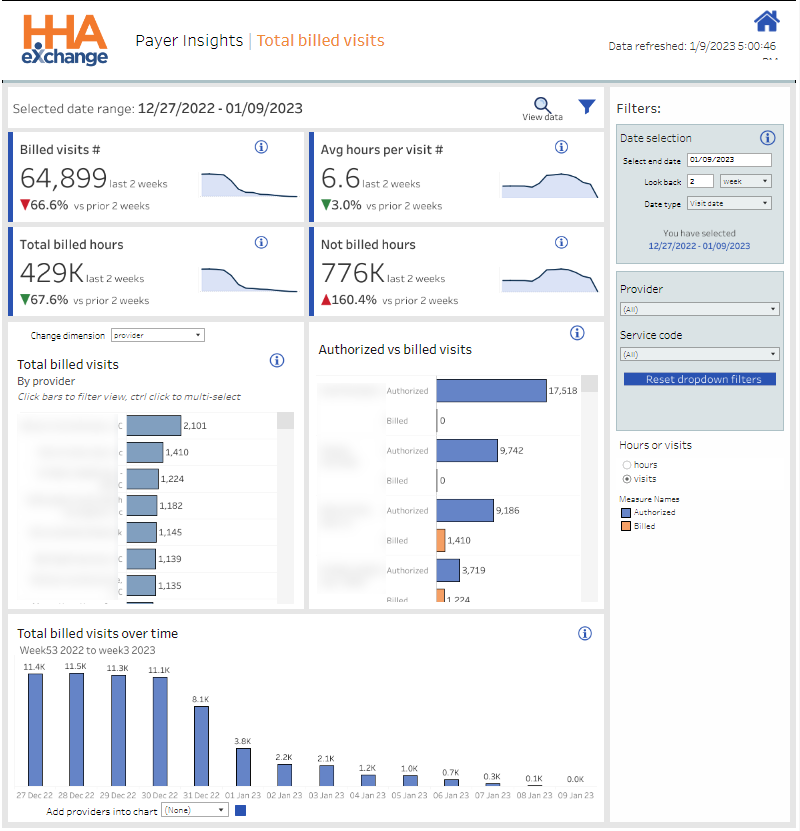
Use the Filters at the right of the dashboard to customize the data displayed on all widgets.
Click the View Data icon (left of Filters) to view the dashboard’s source data. Source Data can be filtered, printed, and exported from the View Data page.
Total Billed Visits cards are described in the following table.
|
Card |
Description |
|---|---|
|
Billed Visits # |
Total number of Billed Visits for all Providers in the last two weeks. Also, a comparison to the previous two weeks. |
|
Avg Hours per Visit # |
Average Hours billed per Visit for all Providers in the last two weeks. Also, a comparison to the previous two weeks. |
|
Total Billed Hours |
Total number of Billed Hours for all Providers in the last two weeks. Also, a comparison to the previous two weeks. |
| Not Billed Hours |
Total number of Unbilled Hours for all Providers in the last two weeks. Also, a comparison to the previous two weeks. |
Total Billed Visits widgets are described in the following table.
|
Widget |
Description |
|---|---|
|
Total Billed Visits by Provider |
Compares the Total Number of Billed Visits for all Providers. Click one or more bars to focus on specific Providers. Select from Change Dimension to refocus the widget to compare data by Provider, by Service Code, or by EVV Type. |
|
Authorized vs. Billed Visits |
Compares the number of Authorized Visits to the number of Billed Visits for all Providers. |
|
Total Billed Visits Over Time |
Compares the Total Billed Visits over time for all Providers. Select specific Providers to analyze using the Add Providers into Chart list. |