Illinois: Configure EVV Aggregation
The Illinois Division of Rehabilitation Services (IL DRS) has certified HHAeXchange to submit Electronic Visit Verification (EVV) data on behalf of providers who render Personal Care Services (PCS) and/or Home Health Care Services (HHCS). Providers are subject to Illinois Division of Rehabilitation Services (IL DRS) EVV guidelines and must ensure visits are recorded in the aggregator.
Providers must complete the steps outlined below to configure HHAeXchange for EVV Aggregation. Failure to comply may result in no data sent to the aggregator.

Fill out the missing Agency Information below and send via Email to ILAltEVV@sandata.com.
| AltEVV/3rd Party Vendor Selection and Information | |
|---|---|
| Agency Information: | |
|
Agency Name: |
|
|
Medicaid ID Number: |
|
|
NPI Number: |
|
|
Current STX #: ‘N/A’ if a new Sandata Account [only for Sandata] |
|
|
Contact Name: |
|
|
Contact Phone Number: |
|
|
Contact Email: |
|
|
Vendor Information: |
|
|
Vendor: |
HHAeXchange |
|
EVV Vendor Contact Name: |
HHAeXchange EVV Aggregation Support |
|
EVV Vendor Contact Email: |
EASTeam@hhaexchange.com |
|
EVV Vendor Contact Phone Number: |
855-400-4429 |
|
EVV Product Name: |
HHAeXchange |
Complete the following steps in the HHAeXchange system:
-
Go to Admin > Contract Setup > New Contract to create a contract.
Skip this step if the contract already exists in the system.
-
Complete all fields. Select the appropriate Contract Type and enter the appropriate TIN for each Contract1 or Office2 in the Tax ID No fields.
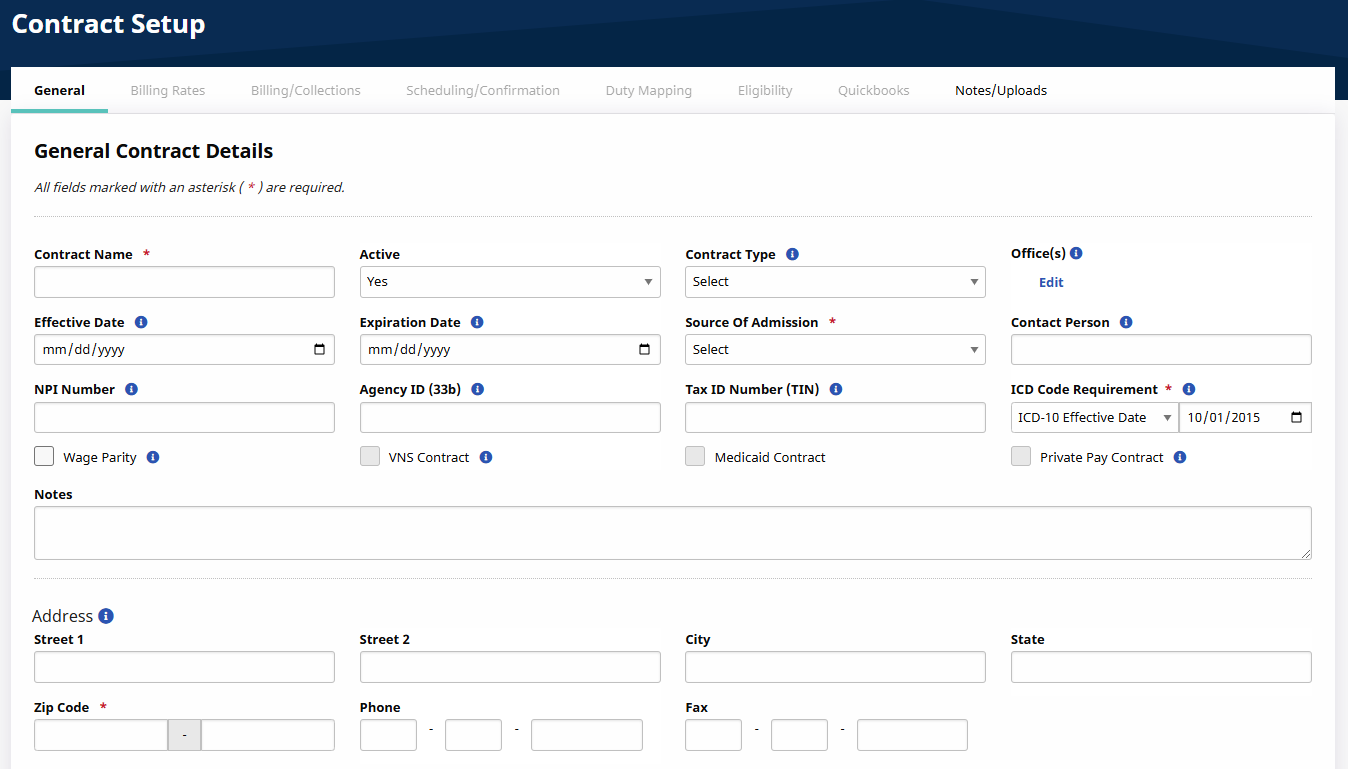
Providers are identified by their 9-digit Federal TaxID Number (TIN) in the State aggregator. Providers can be configured at the Contract or Office level.
Refer to the following topics for steps on how to add the Contract Type and Provider Identifiers to a Contract or Office:
-
If your agency is using a unique Provider Identifier per payer/contract, then complete the Contract Config steps: General Tab for Admin Contract Setup.
-
If your agency is using a unique Provider Identifier per office, and all respective contracts in that office uses the same Provider Identifier, then complete the Office Config steps: Set Up or Edit a New Office.
-
Use the Contract Type Configuration ILDHS-HSPA for the Contract Payers and Programs.
If a Contract Type is not found in the HHAeXchange system, go to Admin > Reference Table Management > Contract Service Code. Refer to the Reference Table Management topic for steps on how to add a Contract Type.
-
-
Go to Admin > Reference Table Management > Contract Service Code to enter a valid Service Code in the HCPCS Code field. Repeat this step for each contract.
-
Refer to the Contract Service Code Configuration table below for a full list of valid/in-scope Service Codes.
-
Refer to the Reference Table Management topic for steps on how to add a Contract Service Code and HCPCS Code.
If a HCPCS Code is associated to an incorrect Contract Type, then the EVV visit data associated to the HCPCS Code is not sent to the aggregator. Only the confirmed visits associated to the below valid/in-scope Service Codes and the correct Contract Type are sent to the aggregator.
Service Code Configuration Contract Type-Program Name Type of Service Applicable HCPCS Code and Modifiers ILDHS-HSPA
Homemaker
S5130
RN/LPN - Agency (multiple clients)
T1002:TT
LPN - Agency
T1003
RN - Agency
T1002
CNA - Agency
T1004
RN - Agency (visits < 2hrs)
G0299
LPN - Agency (visits < 2hrs)
G0300
-
-
Go to Admin > Reference Table Management > Visit Edit Reason to configure the valid Reason codes.
A default value of Other is exported with the visit when the Reason Code differs from the table above. Excessive use of the Other in the Reason field can result in potential compliance issues and/or audit.
Reason Description Note Required? Wrong Phone Number - Agency Verified
No
Invalid ID - Agency Verified
No
Phone Unavailable - Agency Verified
No
Agency Worker Failed to Call In/Out - Customer Verified Agency Worker Worked Hours as Entered as Daily Pay Hours
No
Agency Worker did not work as per Customer Request
No
Fill-in for Regular Agency Worker
No
Additional Hours at Customer Request
No
Customer Does Not Have a Home Phone
No
Companion Case
No
Customer Refused Agency Worker Use of Phone
No
Services Provided Outside of the Home
No
FVV Requested
No
No Home Phone - Does Not Qualify for FVV
No
PhoneLines Not Working - Agency Worker Not Able to Call
No
Less Hours Worked Than Scheduled at Customer's Request
No
Other
Yes
-
Review all Member Profiles and ensure the Member details are entered correctly. Members must be identified by First Name, Last Name, Medicaid ID1, and Case #.
-
Member Medicaid IDs must be entered in the Member’s Profile > Medicaid Number field. The Medicaid ID must be a 9-character alphanumeric value.
-
Member Case #s must be entered in the Patient > Contracts > Alt Patient ID field. Case #s must be a 8 digit numeric value, including leading zeros.
Member names can consist of alpha letters, hyphens, periods, and apostrophes. All other special characters cause the record to reject.
-
-
Review all Caregiver profiles to ensure that the Caregiver details are entered correctly.
Caregivers must be identified by First Name, Last Name, Full 9-digits of the Social Security Number (SSN).
Caregiver names can consist of alpha letters, hyphens, periods, and apostrophes. All other special characters cause the record to reject.
-
Once all of the above steps are complete, create a case via Client Support Portal > Data & Integration > EVV Aggregation Support to setup the IL EVV Aggregation Interface. If a case already exists, update the case advising that all steps have been completed.
When confirmation is received, proceed to the IL State Aggregation Report topic for steps on how to review exported EVV data.
This report contains all transactions sent to the aggregator. The transactions provide record status for each Caregiver, Patient, and Visit record.
HHAeXchange sends EVV data when a visit is confirmed. The visit must have a confirmed Clock In and confirmed Clock Out time to be sent to the aggregator. Information sent consists of newly confirmed visits and all updates made to confirmed visits. Data is sent daily during the overnight process.
It is recommended to bill in correspondence with the state’s system after a Success response is received for the visit on the State Aggregation Report.
-
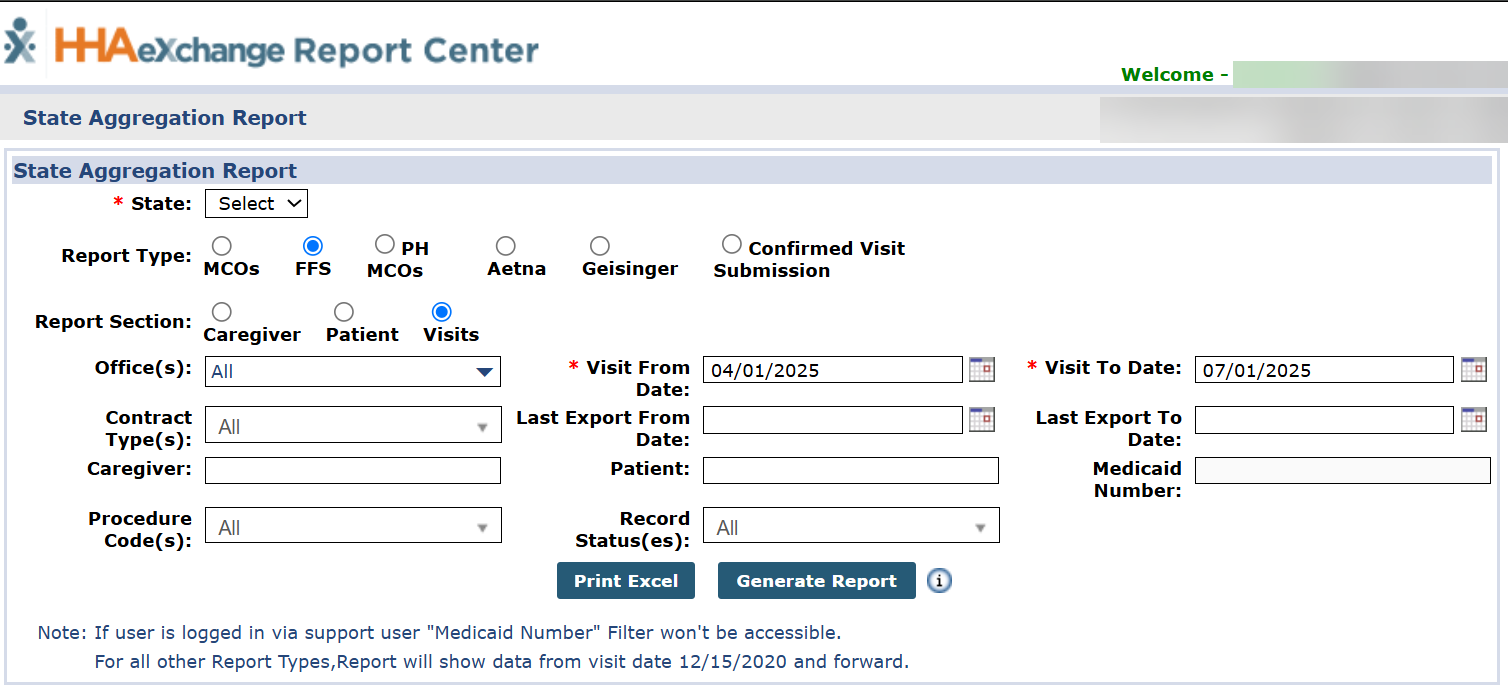
Go to Report > Exception Reports > State Aggregation Report, the State Aggregation Report window opens.
-
Complete the required fields, and then select Generate Report:
-
State: select IL
-
Report Type: select FFS
-
Report Section: Select Caregiver, Patient, or Visits
-
Visit From Date
-
Visit To Date
-
Record Status(es): Select All to view all statuses. Field defaults to Failed for each report.
-
-
Providers must run the Caregiver, Patient, and Visits reports to review and address all rejections associated to the EVV aggregation.
Refer to the Common Failed Responses for a list of common failed responses found in the State Aggregation Report.
The tables below contain the most common failed responses found in the IL EVV Aggregator interface, and the recommended actions to take to successfully address responses in the HHAeXchange system.
| Record Status Response | Description / Recommended Resolution |
|---|---|
|
Success |
The record successfully imported into the Aggregator. No further action is required. |
|
Pending |
The record is pending in the Aggregator. Record updates with a Success or Failed status when the Aggregator completes processing the record. No further action is required. |
|
Failed |
The record failed to import into the Aggregator. Action required. |
Items to consider in this process:
-
A single record can contain more than one failed response. Each failed response is separated by a pipe delimiter (|).
-
The Owner column indicates which entity is responsible for resolving the failed response.
-
Records in a Pending status can take between 24-48 hours to process in the Aggregator Portal. When the Aggregator finishes processing the record, HHAeXchange updates the record status to a Success or Failed response. If a Pending status persists after 48 hours, contact HHAeXchange via HHAeXchange Support Team, select Category: Data & Integration, Sub-Category: EVV Aggregation Support (EAS) and include a copy of the State Aggregation Report.
Refer to the Client Support Portal topic for instructions on how to create and submit a request.
| Response | Owner | Description / Recommended Resolution |
|---|---|---|
|
ERROR: The EmployeeFirstName format is incorrect. |
Provider |
Caregiver First Name has invalid characters. The Aggregator only allows the following characters in the Caregiver Name: alpha letters, hyphens, periods, apostrophe. All other special characters are rejected. Remove all unallowed values. |
|
ERROR: The EmployeeLastName format is incorrect. |
Provider |
Caregiver Last Name has invalid characters. The Aggregator only allows the following characters in the Caregiver Name: alpha letters, hyphens, periods, apostrophe. All other special characters are rejected. Remove all unallowed values. |
|
ERROR: The EmployeeEmail expected format is not correct. |
Provider |
Caregiver email has invalid characters. Review and update the email ID. |
|
Account not active |
Aggregator |
Provider Portal in the Aggregator system is suspended. Steps to resolve: If Provider failed to revalidate, the Provider account is suspended in the Aggregator. Provider must revalidate with the State. If Provider validation is active, then contact HHAeXchange via HHAeXchange Support Team, select Category: Data & Integration, Sub-Category: EVV Aggregation Support (EAS). HHAeXchange contacts the Aggregator to resolve. |
|
ERROR: The EmployeeSSN cannot be NULL. |
HHAeXchange |
HHAeXchange export issue. Contact HHAeXchange via HHAeXchange Support Team, select Category: Data & Integration, Sub-Category: EVV Aggregation Support (EAS) to resolve. |
| Response | Owner | Description / Recommended Resolution |
|---|---|---|
|
ERROR: The EmployeeIdentifier cannot be null. The record is being rejected. |
Provider |
Visit cannot be confirmed with a TEMP Caregiver. Update the visit with valid Caregiver Profile. |
|
Worker not found |
Provider |
Caregiver record is not found in the Aggregator Portal. Check the Caregiver rejections and correct any issues with the Caregiver Profile. |
|
Client not found |
Provider |
Member record is not found in the Aggregator Portal. Check the Member rejections and correct any issues with the Member Profile. |
|
ERROR: The CallDateTime cannot be null. The record is being rejected. |
HHAeXchange |
HHAeXchange export issue. Contact HHAeXchange via HHAeXchange Support Team, select Category: Data & Integration, Sub-Category: EVV Aggregation Support (EAS) to resolve. |
|
ERROR: The ChangeReasonMemo cannot be null for some values of ReasonCode. The record is being rejected. |
HHAeXchange |
HHAeXchange export issue. Contact HHAeXchange via HHAeXchange Support Team, select Category: Data & Integration, Sub-Category: EVV Aggregation Support (EAS) to resolve. |
|
ERROR: The Call In cannot be greater than the Call Out. The record is being rejected. |
HHAeXchange |
HHAeXchange export issue. Contact HHAeXchange via HHAeXchange Support Team, select Category: Data & Integration, Sub-Category: EVV Aggregation Support (EAS) to resolve. |
|
ERROR: The OriginatingPhoneNumber value is incorrect. The length should be between 0 and 10. |
Provider |
HHAeXchange export issue. Contact HHAeXchange via HHAeXchange Support Team, select Category: Data & Integration, Sub-Category: EVV Aggregation Support (EAS) to resolve. |
|
ERROR: Visit Date out of range |
Aggregator |
Configuration issue in the Aggregator Provider Portal. Contact HHAeXchange via HHAeXchange Support Team, select Category: Data & Integration, Sub-Category: EVV Aggregation Support (EAS) to resolve. |
|
ERROR: visit_date field is empty, it is a required field |
HHAeXchange |
HHAeXchange export issue. Contact HHAeXchange via HHAeXchange Support Team, select Category: Data & Integration, Sub-Category: EVV Aggregation Support (EAS) to resolve. |
|
ERROR: The VisitOtherID cannot be duplicated in list. |
HHAeXchange |
HHAeXchange export issue. Contact HHAeXchange via HHAeXchange Support Team, select Category: Data & Integration, Sub-Category: EVV Aggregation Support (EAS) to resolve. |
|
ERROR: If CallType = Telephony (IVR), TelephonyPIN and OriginatingPhoneNumber are required. |
Provider |
HHAeXchange export issue. Contact HHAeXchange via HHAeXchange Support Team, select Category: Data & Integration, Sub-Category: EVV Aggregation Support (EAS) to resolve. |
|
ERROR: The ProcedureCode format is incorrect. |
Provider |
Enter or update the valid HCPCS Code under Admin > Reference Table Management > Contract Service Code > HCPCS Code. Refer to the latest Addendum for the HCPCS Codes. |
|
ERROR: The ProcedureCode length is invalid. |
Provider |
Enter or update the valid HCPCS Code under Admin > Reference Table Management > Contract Service Code > HCPCS Code. Refer to the latest Addendum for the HCPCS Codes. |
|
Error during retrieving service service_id entered |
Provider Aggregator |
Make sure to have correct HCPCS Code under Admin > Reference Table Management > Contract Service Code > HCPCS Code. Refer to the latest Addendum for the HCPCS Codes. If HCPCS Code is correct, then it may be a configuration issue in the Aggregator Provider Portal. Contact HHAeXchange via HHAeXchange Support Team, select Category: Data & Integration, Sub-Category: EVV Aggregation Support (EAS) to resolve. |
|
ERROR: Total visit time cannot exceed 25 hours. |
Provider |
Visit cannot exceed 25 hours. Update the confirmed visit times. It is recommended for overnight shifts to be split into two shifts. |
|
Pay/Bill Hours exceed maximum hours allowed |
Provider |
Visit cannot exceed 25 hours. Update the confirmed visit times. It is recommended for overnight shifts to be split into two shifts. |
|
ERROR: The ClientIdentifierOnCall value is incorrect. |
Provider |
Member Medicaid ID must be 8-digits long. Review Member’s Medicaid ID in the Member Profile and update the correct ID. |
|
A visit row exists in stx.visits table (by account/visit_id) and no changes are specified in current import of account/visit_id |
Aggregator |
Technical interface error from the Aggregator. HHAeXchange automatically resends this record. |
|
Records uploaded failed, please check errors/warning and try again. |
Aggregator |
Technical interface error from the Aggregator. HHAeXchange automatically resends this record. |
| Response | Owner | Description / Recommended Resolution |
|---|---|---|
|
ERROR: Client Not Found. Clients must have been previously received from Payer to be updated via Alt-EVV. |
Provider Aggregator |
Member Medicaid ID is not found in the Aggregator. Steps to resolve: Confirm Member's 8-digit Medicaid ID in Member Profile. Confirm Member’s Date of Birth in Member Profile. If Member’s Medicaid ID and DOB are correct and the Aggregator is erroneously rejecting the record, then contact HHAeXchange via HHAeXchange Support Team, select Category: Data & Integration, Sub-Category: EVV Aggregation Support (EAS). HHAeXchange contacts the Aggregator to resolve. |
|
ERROR: The ClientMedicaidID value is incorrect. |
Provider |
Member Medicaid ID must be 8-digits long. Review Member’s Medicaid ID in the Member Profile > Medicaid ID. |
|
ERROR: The ClientLastName format is incorrect. |
Provider |
Member last name is missing or incorrect length. Review and update the Member Name. |
|
ERROR: The ClientAddressLine1 value is incorrect. The length should be between 1 and 30. |
Provider |
Member address is missing or incorrect length. Review and update the Member Address. |
|
ERROR: The ClientAddressLine1 format is incorrect. |
Provider |
Member address has invalid special characters. Review and update the Member Address. |
|
ERROR: The ClientPhone format is incorrect. |
Provider |
Member phone number must be 10-digits long. Review and update the Member Phone Number. |
|
ERROR: The EffectiveStartDate format is incorrect. |
Aggregator |
Configuration issue in the Aggregator Provider Portal. Contact HHAeXchange via HHAeXchange Support Team, select Category: Data & Integration, Sub-Category: EVV Aggregation Support (EAS). HHAeXchange contacts the Aggregator to resolve. |