Arizona: Configure EVV Aggregation
The Arizona Health Care Cost Containment System (AHCCCS) has certified HHAeXchange to submit Electronic Visit Verification (EVV) data on behalf of Providers who render Personal Care Services (PCS) and Home Health Care Services (HHCS) that are required to use an EVV system to verify visits for each claim submitted. For more information, refer to the AHCCCS website.
Providers must complete the following steps to configure HHAeXchange for EVV Aggregation. Failure to comply may result in data not being sent to the aggregator. To configure EVV Aggregation,
-
Register for an AHCCCS Online account by completing the AHCCCS Online Portal Registration Form. Refer to the AHCCCS Online Learn More webpage for more information.
-
Next, go to Admin > Contract Setup > New Contract in the HHAeXchange portal to create a contract.
Skip this step if the contract already exists in the system.
-
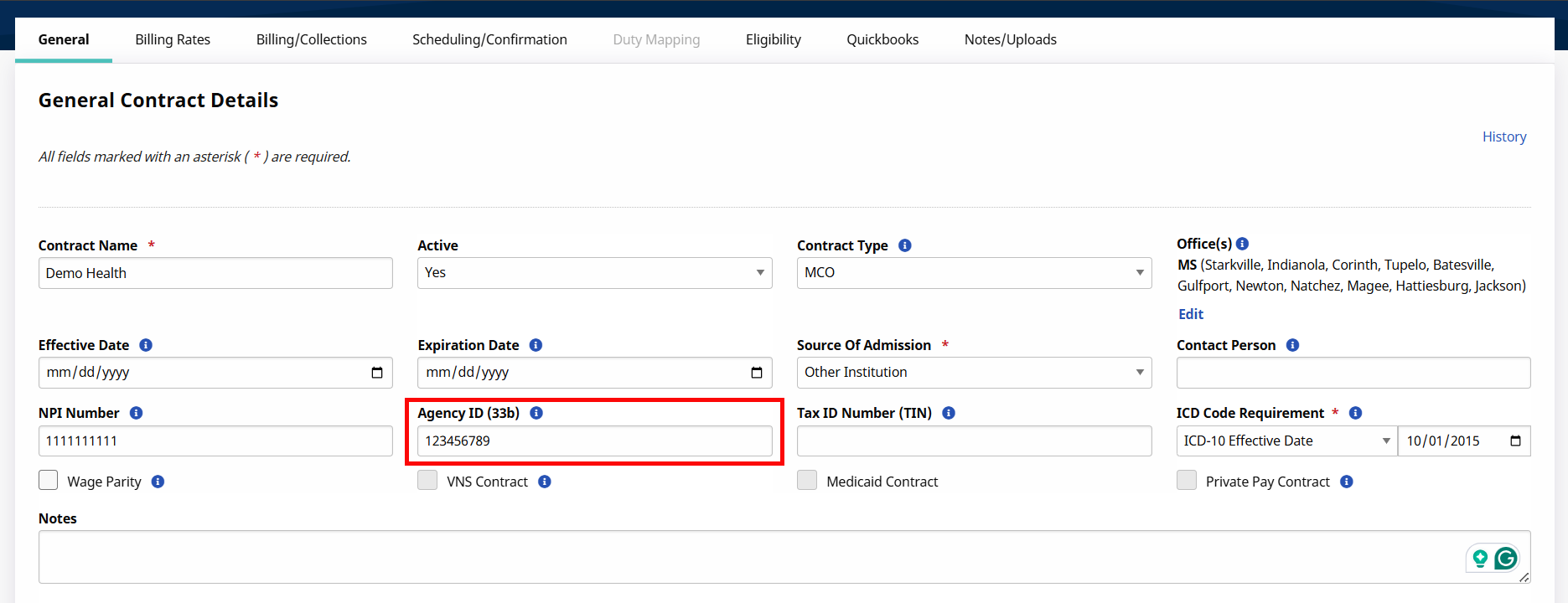
Providers are identified by their 6-digit Medicaid Provider ID (MPI) in the State aggregator. Complete the required fields and enter the appropriate MPI for each contract in the Agency ID (33b) field.
-
Select the appropriate Contract Type value:
-
AZCCCS-AHCCCS
-
AZDDD-AHCCCS
-
AZACH-AHCCCS
-
AZBUFC-AHCCCS
-
AZCHP-AHCCCS
-
AZMCC-AHCCCS
-
AZMYC-AHCCCS
-
AZSHC-AHCCCS
-
AZUCP-AHCCCS
-
AZCDMP-AHCCCS
If a Contract Type is not found, go to Admin > Reference Table Management > Contract Type to add a contract type. Refer to the Reference Table Management topic for steps on adding a Contract Type.
-
-
-
Go to Admin > Reference Table Management > Contract Service Code to enter the valid Service Code in the HCPCS Code field. Repeat this step for each applicable contract.
Refer to the Reference Table Management topic on how to add/edit Contract Service Codes.
Contract Service Code Configuration Contract Type Applicable Export Codes and Modifiers AZCCCS-AHCCCS
AZDDD-AHCCCS
AZACH-AHCCCS
AZBUFC-AHCCCS
AZCHP-AHCCCS
AZMCC-AHCCCS
AZMYC-AHCCCS
AZSHC-AHCCCS
AZUCP-AHCCCS
AZCDMP-AHCCCS
G0151
G0152
G0153
G0299
G0299:UN
G0299:UP
G0300
G0300:UN
G0300:UP
S5125:U7:U4
S5125:U7:U5
S5125:U7:U3
S5125
S5125:UN
S5125:UP
S5125:U2
S5125:U3
S5125:U4
S5125:U5
S5125:U6
S5125:U7
S5130
S5130:U7
S5135
S5150
S5150:HQ
S5150:UN
S5150:UP
S5150:UQ
S5150:US
S5150:U3
S5150:U4
S5150:U5
S5150:U7
S5151:U7
S5151
S5151:UN
S5151:UP
S5151:UQ
S5151:UR
S5151:US
S5151:U3
S5151:U4
S5151:U
S5181
S9123
S9123:UN
S9123:UP
S9123:UF
S9123:UG
S9124
S9124:UN
S9124:UP
S9128
S9129
S9131
T1019:U7
T1019
T1021
T2017:U7
T2017
T2017:UP
T2017:U
If an HCPCS code is associated to an incorrect Contract Type, then the EVV visit data associated to the HCPCS code is not sent to the aggregator. Only the confirmed visits associated to the In-Scope Service Codes and the correct Contract Type are aggregated.
-
Go to Admin > Reference Table Management > Visit Edit Reason to configure the valid Reason Codes.
Refer to the Reference Table Management topic on how to add Reason Codes.
Reason Code
Description
1 Caregiver Error. 2 Member/Designee Unavailable to Verify. 3 Mobile Device Issue. 4 Telephony Issue. 5 Member/Designee Refused Verification. 6 Unsafe Environment. 7 Member Refused Service. 8 Member No Show. 9 Other. 10 Caregiver No Show. 11 Clinical Need. 12 Live In/Onsite Caregiver. 13 Member Preference. A default value of Other is exported with the visit when the Reason Code differs from the table above.
-
Go to Admin > Reference Table Management > Visit Edit Action Taken and Admin > Reference Table Management > Missed Visits Action Taken to configure the valid Resolution Codes.
Refer to the Reference Table Management topic on how to add/edit Resolution Codes.
Resolution Code Description 2 Reschedule within 2 Hours. 3 Reschedule within 28 Hours. 4 Reschedule within 48 Hours. 5 Next Scheduled Visit . 6 Non-Paid Caregiver. 7 Non-EVV Service Provided. 8 Contacted Case Manager and/or Reconvened Treatment/Planning Team. DAF Designee Attestation on File. TSF Timesheet with Signature on File. None None. -
Review all Member Profiles to ensure the Member details are entered correctly.
Members must be identified by First Name, Last Name, and Medicaid ID. Member Medicaid IDs must be 9 characters starting with an uppercase A.
All Members must have a Contingency Plan set up as part of their Authorization. For more information, see Authorizations > Arizona Contingency Plan Entry.
If a Member has a live-in Caregiver, make sure their relationship is entered correctly. For more information, see Residing Caregiver Section.
-
Review all Caregiver profiles to ensure that the Caregiver details are entered correctly.
Caregivers must be identified by First Name, Last Name, and Full 9-digit Social Security number (SSN).
Member and Caregiver names can consist of alpha letters, hyphens, periods, and apostrophes. All other special characters cause the record to reject.
-
Open a support case to set up the Arizona EVV aggregation interface. If you already have an existing support case open, let your agent know through the existing case.
Supporting Resources
I received a No EVV Denial on my remittance advice (Arizona Providers).